
Looking for accurate and structured pasture information for mapping or spatial analysis? Download Pasture Data easily using GIS Data by MAPOG, a platform built to deliver ready-to-use GIS datasets in multiple formats. It supports formats such as Shapefile, KML, MID, GeoJSON, and 15+ other GIS formats, ensuring smooth compatibility with most GIS software and workflows.
Pasture data represents land areas used for grazing livestock and plays a key role in agriculture planning, land-use analysis, and environmental studies. With GIS Data by MAPOG, pasture datasets are organized, standardized, and prepared for direct use in professional GIS projects.
Understanding the Process
GIS Data by MAPOG simplifies how pasture datasets are discovered, visualized, and downloaded. Instead of manual data collection, users can search predefined layers, apply filters, analyze spatial distribution, and export data in their preferred GIS format. As a result, the process becomes faster, more accurate, and suitable for both large-scale and localized studies.
Download Pasture Data of any countries
Important Notes
- All datasets are provided in GCS datum EPSG:4326 WGS84 Coordinate Reference System.
- User login is required to access and download data in the selected formats.
How to Download Pasture Data Using GIS Data by MAPOG
Step 1: Search for Pasture Data
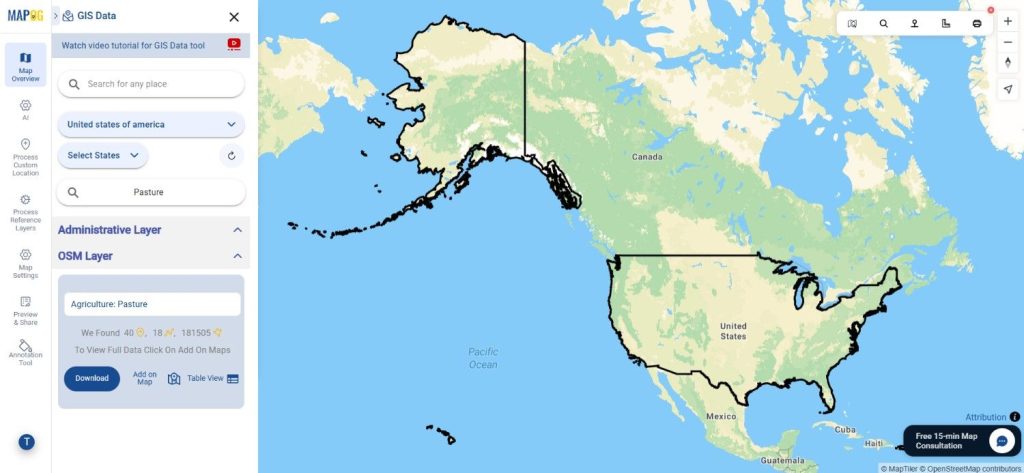
Begin by opening the GIS Data by MAPOG interface and using the layer search option. Enter “Pasture Data” to view available layers. Dataset attributes can be reviewed to understand whether the data is provided as points, polygons, or boundaries.
Step 2: Apply Data Filters
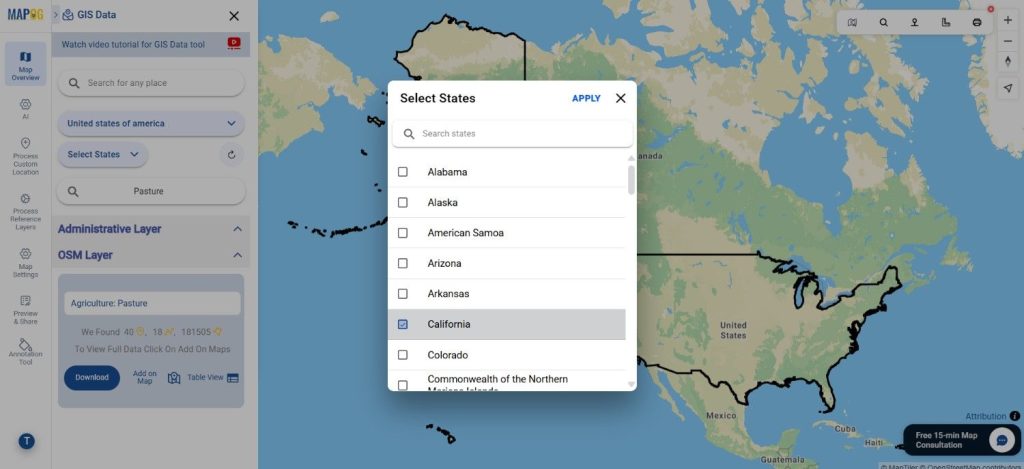
To refine results, use the Filter Data option. This allows datasets to be narrowed down to specific states and districts, helping users focus only on the most relevant pasture areas for analysis or mapping.
Step 3: Visualize Using “Add on Map”
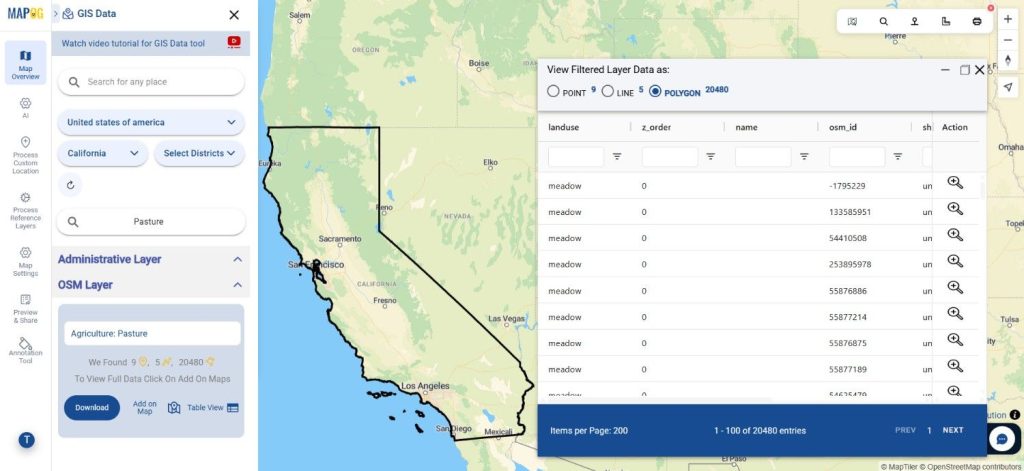
With the “Add on Map” option, selected pasture layers can be added directly to the map analysis interface. This step helps visualize distribution patterns, coverage areas, and spatial relationships before finalizing the download.
Step 4: Download Pasture Data
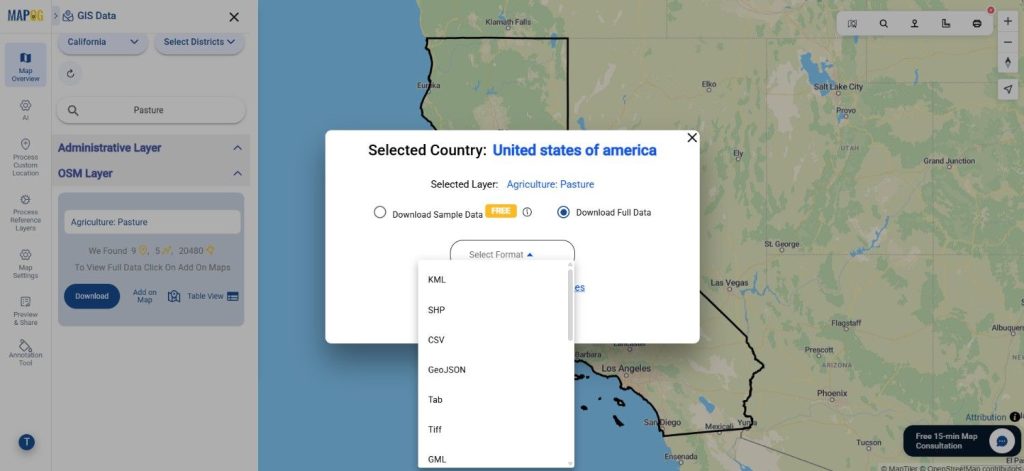
Once the dataset is reviewed, proceed to Download Pasture Data by selecting either a sample or full dataset. Choose the required format—Shapefile, KML, MID, or any of the 15+ supported GIS formats—accept the terms, and complete the download.
Conclusion
With GIS Data by MAPOG, Download Pasture Data becomes a smooth and efficient process. The platform combines advanced search tools, filtering options, map-based visualization, and multiple export formats to support diverse GIS needs. Whether used for agricultural planning, land-use studies, or spatial analysis, this approach ensures reliable data access with minimal effort.
With MAPOG’s versatile toolkit, you can effortlessly upload vector and upload Excel or CSV data, incorporate existing layers, perform Split polygon by line, use the converter for various formats, calculate isochrones, and utilize the Export Tool.
For any questions or further assistance, feel free to reach out to us at support@mapog.com. We’re here to help you make the most of your GIS data.
Download Shapefile for the following:
- World Countries Shapefile
- Australia
- Argentina
- Austria
- Belgium
- Brazil
- Canada
- Denmark
- Fiji
- Finland
- Germany
- Greece
- India
- Indonesia
- Ireland
- Italy
- Japan
- Kenya
- Lebanon
- Madagascar
- Malaysia
- Mexico
- Mongolia
- Netherlands
- New Zealand
- Nigeria
- Papua New Guinea
- Philippines
- Poland
- Russia
- Singapore
- South Africa
- South Korea
- Spain
- Switzerland
- Tunisia
- United Kingdom Shapefile
- United States of America
- Vietnam
- Croatia
- Chile
- Norway
- Maldives
- Bhutan
- Colombia
- Libya
- Comoros
- Hungary
- Laos
- Estonia
- Iraq
- Portugal
- Azerbaijan
- Macedonia
- Romania
- Peru
- Marshall Islands
- Slovenia
- Nauru
- Guatemala
- El Salvador
- Afghanistan
- Cyprus
- Syria
- Slovakia
- Luxembourg
- Jordan
- Armenia
- Haiti And Dominican Republic
- Malta
- Djibouti
- East Timor
- Micronesia
- Morocco
- Liberia
- Kosovo
- Isle Of Man
- Paraguay
- Tokelau
- Palau
- Ile De Clipperton
- Mauritius
- Equatorial Guinea
- Tonga
- Myanmar
- Thailand
- New Caledonia
- Niger
- Nicaragua
- Pakistan
- Nepal
- Seychelles
- Democratic Republic of the Congo
- China
- Kenya
- Kyrgyzstan
- Bosnia Herzegovina
- Burkina Faso
- Canary Island
- Togo
- Israel And Palestine
- Algeria
- Suriname
- Angola
- Cape Verde
- Liechtenstein
- Taiwan
- Turkmenistan
- Tuvalu
- Ivory Coast
- Moldova
- Somalia
- Belize
- Swaziland
- Solomon Islands
- North Korea
- Sao Tome And Principe
- Guyana
- Serbia
- Senegal And Gambia
- Faroe Islands
- Guernsey Jersey
- Monaco
- Tajikistan
- Pitcairn
Disclaimer : The GIS data provided for download in this article was initially sourced from OpenStreetMap (OSM) and further modified to enhance its usability. Please note that the original data is licensed under the Open Database License (ODbL) by the OpenStreetMap contributors. While modifications have been made to improve the data, any use, redistribution, or modification of this data must comply with the ODbL license terms. For more information on the ODbL, please visit OpenStreetMap’s License Page.
Here are some blogs you might be interested in:
- Download Airport data in Shapefile, KML , MIf +15 GIS format – Filter and download
- Download Bank Data in Shapefile, KML, GeoJSON, and More – Filter and Download
- Download Railway data in Shapefile, KML, GeojSON +15 GIS format
- Download Farmland Data in Shapefile, KML, GeoJSON, and More – Filter and Download
- Download Pharmacy Data in Shapefile, KML, GeoJSON, and More – Filter and Download
- Download ATM Data in Shapefile, KML, MID +15 GIS Formats Using GIS Data by MAPOG
- Download Road Data in Shapefile, KML, GeoJSON, and 15+ GIS Form