Download Australia Statistical Areas Level 4 Data in Shapefile, KML, MID +15 GIS Formats

Need accurate regional boundary datasets for mapping and spatial analysis? Download Australia statistical areas level 4 Data easily with GIS Data by MAPOG. The platform provides access to structured geographic datasets in multiple GIS formats such as Shapefile, KML, MID, GeoJSON, CSV, DXF, and many more. Australia Statistical Areas Level 4 datasets are widely used for demographic studies, urban planning, regional analysis, and government reporting because they represent large socio-economic regions with organized statistical boundaries.

Understanding Australia Statistical Areas Level 4 Data

Australia Statistical Areas Level 4 are broad geographic regions created for statistical and administrative analysis. These datasets help users understand regional population distribution, economic activities, infrastructure planning, and service management across large areas. With GIS Data by MAPOG, the data can be visualized, filtered, analyzed, and exported in different GIS-compatible formats for professional workflows.

How to Download Australia Statistical Areas Level 4 Data

GIS Data by MAPOG simplifies the entire process by offering access to hundreds of GIS layers and multiple export formats from a single interface. The platform supports formats including SHP, KML, MID, GeoJSON, SQL, GPX, TOPOJSON, CSV, MIF, and more, making the datasets compatible with most GIS software applications.

Download Australia Statistical Areas Level 4 Data

Note:
  • All datasets are provided in GCS datum EPSG:4326 WGS84 CRS (Coordinate Reference System).
  • Users must log in to access and download datasets in their preferred GIS formats.

Step-by-Step Guide to Download Australia Statistical Areas Level 4

Step 1: Search for the Dataset

Begin by selecting GIS Data tool. Choose “Australia” in select country panel. Then, you can get the Statistical Areas Level 4 in other layer or use the search layer option to find “Statistical Areas Level 4.” Users can inspect layer attributes to understand whether the dataset contains polygon boundaries or other geographic elements before downloading.

Download Australia Statistical Areas Level 4 Data
Step 2: Filter the Data

The Filter Data option helps users narrow down large datasets more effectively. Data can be filtered based on state, district, or regional divisions for more accurate analysis. If broader datasets are available, users can further refine the information to reach highly specific geographic areas.

Download Australia Statistical Areas Level 4 Data
Step 3: Add Data on the Map

Using the “Add on Map” feature, selected layers can be directly visualized within the GIS analysis interface. This helps users analyze spatial patterns, compare nearby regions, and perform deeper geographic studies using interactive mapping tools.

Download Australia Statistical Areas Level 4 Data
Step 4: Download the Dataset

After reviewing the dataset, click on the “Download Data” option. Users may choose either sample data or the complete dataset based on project requirements. Select the required output format such as Shapefile, KML, MID, GeoJSON, or any of the additional supported GIS formats, then proceed with the download.

Download Australia Statistical Areas Level 4 Data

Final Thoughts

With GIS Data by MAPOG, Download Australia statistical areas level 4 datasets quickly and efficiently for mapping, planning, and analytical projects. The platform combines flexible export options, AI-powered search, filtering tools, and interactive visualization features to simplify GIS workflows. Whether the requirement involves research, statistical reporting, infrastructure planning, or spatial analysis, Australia statistical areas level 4 Data can be accessed and managed smoothly through MAPOG’s GIS ecosystem.

Download More Useful Data from Australia:

Download Shapefile for the following:

  1. World Countries Shapefile
  2. Australia
  3. Argentina
  4. Austria
  5. Belgium
  6. Brazil
  7. Canada
  8. Denmark
  9. Fiji
  10. Finland
  11. Germany
  12. Greece
  13. India
  14. Indonesia
  15. Ireland
  16. Italy
  17. Japan
  18. Kenya
  19. Lebanon
  20. Madagascar
  21. Malaysia
  22. Mexico
  23. Mongolia
  24. Netherlands
  25. New Zealand
  26. Nigeria
  27. Papua New Guinea
  28. Philippines
  29. Poland
  30. Russia
  31. Singapore
  32. South Africa
  33. South Korea
  34. Spain
  35. Switzerland
  36. Tunisia
  37. United Kingdom Shapefile
  38. United States of America
  39. Vietnam
  40. Croatia
  41. Chile
  42. Norway
  43. Maldives
  44. Bhutan
  45. Colombia
  46. Libya
  47. Comoros
  48. Hungary
  49. Laos
  50. Estonia
  51. Iraq
  52. Portugal
  53. Azerbaijan
  54. Macedonia
  55. Romania
  56. Peru
  57. Marshall Islands
  58. Slovenia
  59. Nauru
  60. Guatemala
  61. El Salvador
  62. Afghanistan
  63. Cyprus
  64. Syria
  65. Slovakia
  66. Luxembourg
  67. Jordan
  68. Armenia
  69. Haiti And Dominican Republic
  70. Malta
  71. Djibouti
  72. East Timor
  73. Micronesia
  74. Morocco
  75. Liberia
  76. Kosovo
  77. Isle Of Man
  78. Paraguay
  79. Tokelau
  80. Palau
  81. Ile De Clipperton
  82. Mauritius
  83. Equatorial Guinea
  84. Tonga
  85. Myanmar
  86. Thailand
  87. New Caledonia
  88. Niger
  89. Nicaragua
  90. Pakistan
  91. Nepal
  92. Seychelles
  93. Democratic Republic of the Congo
  94. China
  95. Kenya
  96. Kyrgyzstan
  97. Bosnia Herzegovina
  98. Burkina Faso
  99. Canary Island
  100. Togo
  101. Israel And Palestine
  102. Algeria
  103. Suriname
  104. Angola
  105. Cape Verde
  106. Liechtenstein
  107. Taiwan
  108. Turkmenistan
  109. Tuvalu
  110. Ivory Coast
  111. Moldova
  112. Somalia
  113. Belize
  114. Swaziland
  115. Solomon Islands
  116. North Korea
  117. Sao Tome And Principe
  118. Guyana
  119. Serbia
  120. Senegal And Gambia
  121. Faroe Islands
  122. Guernsey Jersey
  123. Monaco
  124. Tajikistan
  125. Pitcairn

Disclaimer : The GIS data provided for download in this article was initially sourced from OpenStreetMap (OSM) and further modified to enhance its usability. Please note that the original data is licensed under the Open Database License (ODbL) by the OpenStreetMap contributors. While modifications have been made to improve the data, any use, redistribution, or modification of this data must comply with the ODbL license terms. For more information on the ODbL, please visit OpenStreetMap’s License Page.

Here are some blogs you might be interested in:

Download Australia Statistical Areas Level 3 Data in Shapefile, KML, MID +15 GIS Formats and more

Need accurate regional boundary datasets for mapping and analysis? With GIS Data by MAPOG, users can easily Download Australia statistical areas level 3 datasets in multiple GIS formats such as Shapefile, KML, MID, GeoJSON, CSV, and many more. The platform provides structured and GIS-ready datasets that are useful for demographic studies, urban planning, regional analysis, and administrative mapping projects.

Australia statistical areas level 3 Data represents medium-sized regional divisions designed for statistical and analytical purposes. These boundaries are commonly used to study population distribution, economic activity, infrastructure development, and regional trends. Since the data is available in multiple GIS-compatible formats, it can be smoothly integrated into different mapping and spatial analysis software.

How GIS Data by MAPOG Works

GIS Data by MAPOG simplifies geographic data access through an intuitive interface where users can search, filter, visualize, and download datasets efficiently. The platform supports more than 15 GIS formats including SHP, KML, MID, GeoJSON, DXF, SQL, GPX, TOPOJSON, and MIF, making it suitable for both beginners and GIS professionals.

Users can explore thousands of administrative and thematic layers, while the built-in tools help refine and visualize data before downloading. As a result, spatial data management becomes faster and more organized.

Download Australia Statistical Areas Level 3 Data

Note:
  • All datasets are provided in GCS datum EPSG:4326 WGS84 Coordinate Reference System (CRS).
  • Users must log in to download data in their preferred GIS format.

Steps to Download Australia Statistical Areas Level 3 Data

Step 1: Search for the Dataset

Begin by selecting GIS Data tool. Choose “Australia” in select country panel. Then, you can get the Statistical Areas Level 3 in other layer or use the search layer option to find “Statistical Areas Level 3 Data.” After locating the layer, review the attributes and geometry type to understand whether the dataset contains polygon boundaries or additional statistical details.

Download Australia Statistical Areas Level 3 Data
Step 2: Apply Filters for Better Results

The Filter Data option allows datasets to be narrowed down further using administrative divisions such as state and district regions. This feature becomes especially useful when working with large-scale national datasets because users can focus only on the required geographic area.

Download Australia Statistical Areas Level 3 Data
Step 3: Add Data to the Map Interface

Using the “Add on Map” feature, selected layers can be directly added to the GIS analysis interface for visualization and further examination. This helps users analyze boundary structures, regional distributions, and neighboring areas more effectively before downloading the dataset.

Download Australia Statistical Areas Level 3 Data
Step 4: Download the Data

Once the required layer is finalized, click on the “Download Data” option. Users can choose either a sample dataset or the complete version and then select their preferred format such as Shapefile, KML, MID, GeoJSON, or any other supported GIS format. After confirming the terms, the download process begins instantly.

Download Australia Statistical Areas Level 3 Data

Conclusion

With GIS Data by MAPOG, users can efficiently Download Australia statistical areas level 3 datasets for mapping, planning, and spatial analysis workflows. The platform combines powerful search tools, interactive visualization, and flexible export options to simplify GIS data access. Whether the requirement involves demographic studies, regional planning, or administrative mapping, Australia statistical areas level 3 Data can be downloaded quickly in a format suitable for nearly any GIS software environment.

Download More Useful Data from Australia:

Download Shapefile for the following:

  1. World Countries Shapefile
  2. Australia
  3. Argentina
  4. Austria
  5. Belgium
  6. Brazil
  7. Canada
  8. Denmark
  9. Fiji
  10. Finland
  11. Germany
  12. Greece
  13. India
  14. Indonesia
  15. Ireland
  16. Italy
  17. Japan
  18. Kenya
  19. Lebanon
  20. Madagascar
  21. Malaysia
  22. Mexico
  23. Mongolia
  24. Netherlands
  25. New Zealand
  26. Nigeria
  27. Papua New Guinea
  28. Philippines
  29. Poland
  30. Russia
  31. Singapore
  32. South Africa
  33. South Korea
  34. Spain
  35. Switzerland
  36. Tunisia
  37. United Kingdom Shapefile
  38. United States of America
  39. Vietnam
  40. Croatia
  41. Chile
  42. Norway
  43. Maldives
  44. Bhutan
  45. Colombia
  46. Libya
  47. Comoros
  48. Hungary
  49. Laos
  50. Estonia
  51. Iraq
  52. Portugal
  53. Azerbaijan
  54. Macedonia
  55. Romania
  56. Peru
  57. Marshall Islands
  58. Slovenia
  59. Nauru
  60. Guatemala
  61. El Salvador
  62. Afghanistan
  63. Cyprus
  64. Syria
  65. Slovakia
  66. Luxembourg
  67. Jordan
  68. Armenia
  69. Haiti And Dominican Republic
  70. Malta
  71. Djibouti
  72. East Timor
  73. Micronesia
  74. Morocco
  75. Liberia
  76. Kosovo
  77. Isle Of Man
  78. Paraguay
  79. Tokelau
  80. Palau
  81. Ile De Clipperton
  82. Mauritius
  83. Equatorial Guinea
  84. Tonga
  85. Myanmar
  86. Thailand
  87. New Caledonia
  88. Niger
  89. Nicaragua
  90. Pakistan
  91. Nepal
  92. Seychelles
  93. Democratic Republic of the Congo
  94. China
  95. Kenya
  96. Kyrgyzstan
  97. Bosnia Herzegovina
  98. Burkina Faso
  99. Canary Island
  100. Togo
  101. Israel And Palestine
  102. Algeria
  103. Suriname
  104. Angola
  105. Cape Verde
  106. Liechtenstein
  107. Taiwan
  108. Turkmenistan
  109. Tuvalu
  110. Ivory Coast
  111. Moldova
  112. Somalia
  113. Belize
  114. Swaziland
  115. Solomon Islands
  116. North Korea
  117. Sao Tome And Principe
  118. Guyana
  119. Serbia
  120. Senegal And Gambia
  121. Faroe Islands
  122. Guernsey Jersey
  123. Monaco
  124. Tajikistan
  125. Pitcairn

Disclaimer : The GIS data provided for download in this article was initially sourced from OpenStreetMap (OSM) and further modified to enhance its usability. Please note that the original data is licensed under the Open Database License (ODbL) by the OpenStreetMap contributors. While modifications have been made to improve the data, any use, redistribution, or modification of this data must comply with the ODbL license terms. For more information on the ODbL, please visit OpenStreetMap’s License Page.

Here are some blogs you might be interested in:

Download Australia Statistical Areas Level 2 Data in Shapefile, KML, MID & more

Need detailed regional boundary datasets for mapping and spatial analysis? Download Australia statistical areas level 2 Data easily with GIS Data by MAPOG . The platform provides access to structured geographic datasets in multiple GIS formats, including Shapefile, KML, MID, GeoJSON, CSV, and many others. These datasets are highly useful for demographic studies, regional planning, infrastructure development, business analysis, and administrative mapping projects.

Australia Statistical Areas Level 2, commonly known as SA2 regions, represent medium-sized geographic areas designed to reflect communities that interact socially and economically. These boundaries are widely used in GIS projects for statistical analysis, census mapping, urban research, and regional visualization. With GIS Data by MAPOG, users can quickly access and manage Australia statistical areas level 2 Data in a format compatible with major GIS platforms.

Understanding the Download Process

GIS Data by MAPOG simplifies geographic data access through an intuitive interface and smart filtering tools. Users can search layers, preview attributes, visualize datasets on maps, and download files in their preferred GIS format without complicated workflows.

The platform supports more than 900+ GIS layers and multiple export formats such as SHP, KML, MID, GeoJSON, SQL, DXF, MIF, TOPOJSON, GPX, and CSV. As a result, the downloaded datasets can easily be integrated into applications like QGIS, ArcGIS, Google Earth, and other mapping software.

Download Australia Statistical Areas Level 2 Data

Note:
  • All datasets are provided in GCS datum EPSG:4326 WGS84 Coordinate Reference System (CRS).
  • Users must log in to download data in their preferred GIS format.

Step-by-Step Guide to Download the Data

Step 1: Search for the Required Layer

Begin by selecting GIS Data tool. Choose “Australia” in select country panel. Then, you can get the Statistical Areas Level 2 in other layer or use the search layer option to locate “Statistical Areas Level 2” datasets. Users can inspect the layer attributes to understand the available geographic information and boundary structure before downloading.

Download Australia Statistical Areas Level 2 Data
Step 2: Apply Data Filters

The Filter Data option allows datasets to be refined based on regions, states, districts, or other administrative divisions. This makes the search process more targeted and improves efficiency while working with large geographic datasets.

Download Australia Statistical Areas Level 2 Data
Step 3: Add Data on the Map

Using the “Add on Map” feature, selected layers can be directly visualized within the map analysis interface. This helps users examine spatial patterns, compare boundaries, and perform further geographic analysis before exporting the files.

Download Australia Statistical Areas Level 2 Data
Step 4: Download the Dataset

After reviewing the layer, click on “Download Data.” Users can either download sample data or export the complete dataset. Choose the required format such as Shapefile, KML, MID, GeoJSON, or any other supported GIS format, then proceed with the download process.

Download Australia Statistical Areas Level 2 Data

Final Thoughts

GIS Data by MAPOG makes it simple and efficient to Download Australia statistical areas level 2 Data for professional GIS workflows and mapping projects. With support for multiple GIS formats, advanced filtering options, AI-powered search, and interactive map visualization, the platform offers a smooth experience for researchers, planners, analysts, and GIS professionals working with regional statistical boundaries.

Download More Useful Data from Australia:

Download Shapefile for the following:

  1. World Countries Shapefile
  2. Australia
  3. Argentina
  4. Austria
  5. Belgium
  6. Brazil
  7. Canada
  8. Denmark
  9. Fiji
  10. Finland
  11. Germany
  12. Greece
  13. India
  14. Indonesia
  15. Ireland
  16. Italy
  17. Japan
  18. Kenya
  19. Lebanon
  20. Madagascar
  21. Malaysia
  22. Mexico
  23. Mongolia
  24. Netherlands
  25. New Zealand
  26. Nigeria
  27. Papua New Guinea
  28. Philippines
  29. Poland
  30. Russia
  31. Singapore
  32. South Africa
  33. South Korea
  34. Spain
  35. Switzerland
  36. Tunisia
  37. United Kingdom Shapefile
  38. United States of America
  39. Vietnam
  40. Croatia
  41. Chile
  42. Norway
  43. Maldives
  44. Bhutan
  45. Colombia
  46. Libya
  47. Comoros
  48. Hungary
  49. Laos
  50. Estonia
  51. Iraq
  52. Portugal
  53. Azerbaijan
  54. Macedonia
  55. Romania
  56. Peru
  57. Marshall Islands
  58. Slovenia
  59. Nauru
  60. Guatemala
  61. El Salvador
  62. Afghanistan
  63. Cyprus
  64. Syria
  65. Slovakia
  66. Luxembourg
  67. Jordan
  68. Armenia
  69. Haiti And Dominican Republic
  70. Malta
  71. Djibouti
  72. East Timor
  73. Micronesia
  74. Morocco
  75. Liberia
  76. Kosovo
  77. Isle Of Man
  78. Paraguay
  79. Tokelau
  80. Palau
  81. Ile De Clipperton
  82. Mauritius
  83. Equatorial Guinea
  84. Tonga
  85. Myanmar
  86. Thailand
  87. New Caledonia
  88. Niger
  89. Nicaragua
  90. Pakistan
  91. Nepal
  92. Seychelles
  93. Democratic Republic of the Congo
  94. China
  95. Kenya
  96. Kyrgyzstan
  97. Bosnia Herzegovina
  98. Burkina Faso
  99. Canary Island
  100. Togo
  101. Israel And Palestine
  102. Algeria
  103. Suriname
  104. Angola
  105. Cape Verde
  106. Liechtenstein
  107. Taiwan
  108. Turkmenistan
  109. Tuvalu
  110. Ivory Coast
  111. Moldova
  112. Somalia
  113. Belize
  114. Swaziland
  115. Solomon Islands
  116. North Korea
  117. Sao Tome And Principe
  118. Guyana
  119. Serbia
  120. Senegal And Gambia
  121. Faroe Islands
  122. Guernsey Jersey
  123. Monaco
  124. Tajikistan
  125. Pitcairn

Disclaimer : The GIS data provided for download in this article was initially sourced from OpenStreetMap (OSM) and further modified to enhance its usability. Please note that the original data is licensed under the Open Database License (ODbL) by the OpenStreetMap contributors. While modifications have been made to improve the data, any use, redistribution, or modification of this data must comply with the ODbL license terms. For more information on the ODbL, please visit OpenStreetMap’s License Page.

Here are some blogs you might be interested in:

Download Australia Statistical Areas Level 1 Data in Shapefile, KML, MID +15 GIS Formats

Looking to Download Australia statistical areas level 1 Data for mapping, demographic studies, urban planning, or regional analysis? GIS Data by MAPOG makes the entire process simple and efficient by offering structured geographic datasets in multiple GIS-supported formats. Users can easily access formats like Shapefile, KML, MID, GeoJSON, CSV, and many more for seamless integration with different GIS platforms and mapping tools.

Australia Statistical Areas Level 1 datasets represent smaller geographic regions designed for statistical and census-based analysis. These boundaries are widely used for population distribution studies, infrastructure planning, administrative analysis, and location-based research. With GIS Data by MAPOG, users can quickly explore, visualize, and download these datasets without complicated workflows.

Understanding the Process

GIS Data by MAPOG provides access to organized spatial datasets from hundreds of layers across different categories. The platform simplifies geographic data extraction by allowing users to search layers, filter locations, preview datasets, and export them in suitable GIS formats for further analysis.

The platform supports formats such as SHP, KML, MID, GeoJSON, SQL, GPX, DXF, MIF, TOPOJSON, and many others. As a result, the downloaded files can easily be used in GIS applications like QGIS, ArcGIS, Google Earth, and other spatial analysis software.

Download Australia Statistical Areas Level 1 Data

Note:
  • All datasets are available in GCS datum EPSG:4326 WGS84 Coordinate Reference System.
  • Users must log in to access and download the preferred GIS data formats.

Step-by-Step Guide to Download Australia Statistical Areas Level 1 Data

Step 1: Search for the Dataset

Begin by selecting GIS Data tool. Choose “Australia” in select country panel. Then, you can get the Statistical Areas Level 1 in other layer or Use the search layer option to find “Australia Statistical Areas Level 1.” Users can also review the layer attributes to understand whether the dataset contains polygon boundaries or other geographic elements.

Download Australia Statistical Areas Level 1 Data
Step 2: Apply Data Filters

The Filter Data feature allows users to refine datasets more precisely. Data can be filtered using state and district-level selections, helping users narrow down geographic regions for more focused analysis. This makes large datasets easier to manage and highly relevant for localized GIS projects.

Download Australia Statistical Areas Level 1 Data
Step 3: Add Data on Map

Using the “Add on Map” option, users can directly load the selected layer into the GIS map analysis interface. This feature helps visualize statistical boundaries interactively and supports further spatial analysis, comparison, and geographic interpretation before downloading the final dataset.

Download Australia Statistical Areas Level 1 Data
Step 4: Download the Data

After reviewing the dataset, click on the “Download Data” button. Users can either download a sample dataset or the complete version. Select the desired format such as Shapefile, KML, MID, GeoJSON, or any other supported GIS format, accept the terms, and start the download process.

Download Australia Statistical Areas Level 1 Data

Conclusion

GIS Data by MAPOG provides a fast and efficient way to Download Australia statistical areas level 1 Data in multiple GIS-supported formats. The platform combines powerful search tools, filtering options, interactive map visualization, and flexible export capabilities to simplify geographic data access. Whether the data is needed for planning, statistical analysis, research, or GIS mapping, MAPOG offers a reliable solution for managing and downloading spatial datasets with ease.

Download More Useful Data from Australia:

Download Shapefile for the following:

  1. World Countries Shapefile
  2. Australia
  3. Argentina
  4. Austria
  5. Belgium
  6. Brazil
  7. Canada
  8. Denmark
  9. Fiji
  10. Finland
  11. Germany
  12. Greece
  13. India
  14. Indonesia
  15. Ireland
  16. Italy
  17. Japan
  18. Kenya
  19. Lebanon
  20. Madagascar
  21. Malaysia
  22. Mexico
  23. Mongolia
  24. Netherlands
  25. New Zealand
  26. Nigeria
  27. Papua New Guinea
  28. Philippines
  29. Poland
  30. Russia
  31. Singapore
  32. South Africa
  33. South Korea
  34. Spain
  35. Switzerland
  36. Tunisia
  37. United Kingdom Shapefile
  38. United States of America
  39. Vietnam
  40. Croatia
  41. Chile
  42. Norway
  43. Maldives
  44. Bhutan
  45. Colombia
  46. Libya
  47. Comoros
  48. Hungary
  49. Laos
  50. Estonia
  51. Iraq
  52. Portugal
  53. Azerbaijan
  54. Macedonia
  55. Romania
  56. Peru
  57. Marshall Islands
  58. Slovenia
  59. Nauru
  60. Guatemala
  61. El Salvador
  62. Afghanistan
  63. Cyprus
  64. Syria
  65. Slovakia
  66. Luxembourg
  67. Jordan
  68. Armenia
  69. Haiti And Dominican Republic
  70. Malta
  71. Djibouti
  72. East Timor
  73. Micronesia
  74. Morocco
  75. Liberia
  76. Kosovo
  77. Isle Of Man
  78. Paraguay
  79. Tokelau
  80. Palau
  81. Ile De Clipperton
  82. Mauritius
  83. Equatorial Guinea
  84. Tonga
  85. Myanmar
  86. Thailand
  87. New Caledonia
  88. Niger
  89. Nicaragua
  90. Pakistan
  91. Nepal
  92. Seychelles
  93. Democratic Republic of the Congo
  94. China
  95. Kenya
  96. Kyrgyzstan
  97. Bosnia Herzegovina
  98. Burkina Faso
  99. Canary Island
  100. Togo
  101. Israel And Palestine
  102. Algeria
  103. Suriname
  104. Angola
  105. Cape Verde
  106. Liechtenstein
  107. Taiwan
  108. Turkmenistan
  109. Tuvalu
  110. Ivory Coast
  111. Moldova
  112. Somalia
  113. Belize
  114. Swaziland
  115. Solomon Islands
  116. North Korea
  117. Sao Tome And Principe
  118. Guyana
  119. Serbia
  120. Senegal And Gambia
  121. Faroe Islands
  122. Guernsey Jersey
  123. Monaco
  124. Tajikistan
  125. Pitcairn

Disclaimer : The GIS data provided for download in this article was initially sourced from OpenStreetMap (OSM) and further modified to enhance its usability. Please note that the original data is licensed under the Open Database License (ODbL) by the OpenStreetMap contributors. While modifications have been made to improve the data, any use, redistribution, or modification of this data must comply with the ODbL license terms. For more information on the ODbL, please visit OpenStreetMap’s License Page.

Here are some blogs you might be interested in:

Download Australia Postal Code Data in Shapefile, KML, MID and other GIS formats

Need accurate postal boundary and location datasets for mapping or spatial analysis? Download Australia Postal Code Data easily with GIS Data by MAPOG, a powerful platform that provides geographic datasets in multiple GIS-ready formats. From urban planning to logistics management and demographic analysis, MAPOG helps users access structured postal code datasets compatible with leading GIS software.

Postal code data is widely used for delivery optimization, regional analysis, customer segmentation, and administrative planning. With GIS Data by MAPOG, users can obtain postal code layers in formats like Shapefile, KML, MID, GeoJSON, CSV, SQL, DXF, GPX, TOPOJSON, and many more for seamless integration into different mapping environments.

Understanding the Process

GIS Data by MAPOG simplifies spatial data access by organizing datasets into searchable layers and downloadable GIS formats. Users can quickly locate postal code boundaries, analyze them on interactive maps, and export them for further GIS workflows.

The platform supports over 200 countries and 900+ data layers, making the process efficient for researchers, analysts, planners, and GIS professionals. In addition, advanced filtering and AI-assisted search tools help users find highly specific datasets without complex technical steps.

Download Australia Postal Code Data

Note:
  • All datasets are available in GCS datum EPSG:4326 WGS84 CRS (Coordinate Reference System).
  • Login is required before downloading datasets in your preferred format.

Step-by-Step Guide to Download Australia Postal Code Data

Step 1: Search for Postal Code Data

Begin by selecting GIS Data tool. Choose “Australia” in select country panel. Then, you can get the Postal Code in other layer or use the search layer option to find “Postal Code Data” Users can review dataset attributes to understand whether the information is available as polygon boundaries or point-based layers.

Download Australia Postal Code Data
Step 2: Apply Filter Data Option

The Filter Data option allows users to narrow datasets using state and district-level filters for more refined results. If a country-wide dataset is available, users can further drill down into detailed regional postal code information. This improves accuracy and helps in finding location-specific data quickly.

Download Australia Postal Code Data
Step 3: Analyze Using “Add on Map”

With the “Add on Map” feature, selected postal code layers can be directly added to the GIS analysis interface. This helps users visualize boundaries, compare nearby regions, and perform advanced spatial analysis within the interactive map workspace.

Download Australia Postal Code Data
Step 4: Download the Dataset

After reviewing the data, click on “Download Data” and choose either the sample version or the complete dataset. Select the required format such as SHP, KML, MID, GeoJSON, CSV, or other supported GIS formats. Accept the terms and proceed with the download process.

Download Australia Postal Code Data

Final Thoughts

With GIS Data by MAPOG, Download Australia Postal Code Data becomes a smooth and efficient experience for GIS professionals, researchers, planners, and businesses. The platform not only supports multiple GIS formats but also provides smart search, filtering, and visualization tools for better geographic analysis. Whether the data is needed for mapping, delivery planning, or regional studies, Download Australia Postal Code Data effortlessly through MAPOG’s advanced GIS ecosystem.

Download More Useful Data from Australia:

Download Shapefile for the following:

  1. World Countries Shapefile
  2. Australia
  3. Argentina
  4. Austria
  5. Belgium
  6. Brazil
  7. Canada
  8. Denmark
  9. Fiji
  10. Finland
  11. Germany
  12. Greece
  13. India
  14. Indonesia
  15. Ireland
  16. Italy
  17. Japan
  18. Kenya
  19. Lebanon
  20. Madagascar
  21. Malaysia
  22. Mexico
  23. Mongolia
  24. Netherlands
  25. New Zealand
  26. Nigeria
  27. Papua New Guinea
  28. Philippines
  29. Poland
  30. Russia
  31. Singapore
  32. South Africa
  33. South Korea
  34. Spain
  35. Switzerland
  36. Tunisia
  37. United Kingdom Shapefile
  38. United States of America
  39. Vietnam
  40. Croatia
  41. Chile
  42. Norway
  43. Maldives
  44. Bhutan
  45. Colombia
  46. Libya
  47. Comoros
  48. Hungary
  49. Laos
  50. Estonia
  51. Iraq
  52. Portugal
  53. Azerbaijan
  54. Macedonia
  55. Romania
  56. Peru
  57. Marshall Islands
  58. Slovenia
  59. Nauru
  60. Guatemala
  61. El Salvador
  62. Afghanistan
  63. Cyprus
  64. Syria
  65. Slovakia
  66. Luxembourg
  67. Jordan
  68. Armenia
  69. Haiti And Dominican Republic
  70. Malta
  71. Djibouti
  72. East Timor
  73. Micronesia
  74. Morocco
  75. Liberia
  76. Kosovo
  77. Isle Of Man
  78. Paraguay
  79. Tokelau
  80. Palau
  81. Ile De Clipperton
  82. Mauritius
  83. Equatorial Guinea
  84. Tonga
  85. Myanmar
  86. Thailand
  87. New Caledonia
  88. Niger
  89. Nicaragua
  90. Pakistan
  91. Nepal
  92. Seychelles
  93. Democratic Republic of the Congo
  94. China
  95. Kenya
  96. Kyrgyzstan
  97. Bosnia Herzegovina
  98. Burkina Faso
  99. Canary Island
  100. Togo
  101. Israel And Palestine
  102. Algeria
  103. Suriname
  104. Angola
  105. Cape Verde
  106. Liechtenstein
  107. Taiwan
  108. Turkmenistan
  109. Tuvalu
  110. Ivory Coast
  111. Moldova
  112. Somalia
  113. Belize
  114. Swaziland
  115. Solomon Islands
  116. North Korea
  117. Sao Tome And Principe
  118. Guyana
  119. Serbia
  120. Senegal And Gambia
  121. Faroe Islands
  122. Guernsey Jersey
  123. Monaco
  124. Tajikistan
  125. Pitcairn

Disclaimer : The GIS data provided for download in this article was initially sourced from OpenStreetMap (OSM) and further modified to enhance its usability. Please note that the original data is licensed under the Open Database License (ODbL) by the OpenStreetMap contributors. While modifications have been made to improve the data, any use, redistribution, or modification of this data must comply with the ODbL license terms. For more information on the ODbL, please visit OpenStreetMap’s License Page.

Here are some blogs you might be interested in:

Download Australia Electoral Divisions (SED) Data in Shapefile, KML, MID +15 GIS Formats Using GIS Data

Looking to Download Australia electoral divisions (sed) Data for mapping or analysis? GIS Data by MAPOG provides a seamless way to access structured boundary datasets in multiple GIS formats like Shapefile, KML, GeoJSON, and MID. Electoral divisions (SED) represent administrative boundaries used for statistical and governance purposes, making them highly valuable for demographic studies, planning, and regional analysis. With MAPOG, users can quickly access well-organized and ready-to-use datasets for efficient GIS workflows.

Understanding the Process

When you Download Australia electoral divisions (sed) Data, you are essentially accessing boundary datasets that define electoral regions for analysis and visualization. These datasets are available in various GIS-compatible formats, allowing them to be easily integrated into tools like QGIS or other mapping platforms. The platform simplifies complex data retrieval by combining structured layers with intuitive search and filtering options.

How to Download Australia Electoral Divisions (SED) Data

MAPOG streamlines the entire process, offering access to hundreds of layers and global datasets in formats such as SHP, KML, CSV, GeoJSON, SQL, DXF, MIF, TOPOJSON, and GPX. This ensures flexibility for different GIS applications and user requirements.

Download Australia Electoral Divisions (SED) Data

Note:

• All datasets are provided in GCS datum EPSG:4326 WGS84 CRS.
• Login is required to download datasets in your preferred format.

Step-by-Step Guide to Download Australia Electoral Divisions (SED) Data

Step 1: Search for Electoral Divisions (SED) Data

Begin by selecting GIS Data tool. Choose “Australia” in select country panel. Then, you can get the Province layer in other layer or use the search layer option to find “Electoral Divisions (SED) Data.” Review dataset attributes to understand geometry type (polygon-based boundaries in most cases).

Download Australia Electoral Divisions (SED) Data
Step 2: Apply Data Filters

Refine your results using the Filter Data option. You can narrow down datasets by states and districts, which helps in extracting more precise and localized boundary data for better insights.

Download Australia Electoral Divisions (SED) Data
Step 3: Visualize with “Add on Map”

Use the “Add on Map” feature to load the selected layer directly into the map interface. This allows you to visually analyze spatial distribution, compare regions, and validate the dataset before downloading.

Download Australia Electoral Divisions (SED) Data
Step 4: Download the Data

Once finalized, click on “Download Data.” Choose between sample or full dataset options, select your required format (Shapefile, KML, MID, etc.), accept the terms, and proceed. This completes your Download Australia electoral divisions (sed) Data process efficiently.

Download Australia Electoral Divisions (SED) Data

Conclusion

GIS Data by MAPOG makes it simple and efficient to access electoral boundary datasets in multiple formats. Whether used for research, governance analysis, or spatial planning, these datasets provide valuable geographic insights. With powerful tools like AI search, filtering, and map visualization, users can confidently Download Australia electoral divisions (sed) Data and integrate it into their GIS projects with ease.

Download More Useful Data from Australia:

Download Shapefile for the following:

  1. World Countries Shapefile
  2. Australia
  3. Argentina
  4. Austria
  5. Belgium
  6. Brazil
  7. Canada
  8. Denmark
  9. Fiji
  10. Finland
  11. Germany
  12. Greece
  13. India
  14. Indonesia
  15. Ireland
  16. Italy
  17. Japan
  18. Kenya
  19. Lebanon
  20. Madagascar
  21. Malaysia
  22. Mexico
  23. Mongolia
  24. Netherlands
  25. New Zealand
  26. Nigeria
  27. Papua New Guinea
  28. Philippines
  29. Poland
  30. Russia
  31. Singapore
  32. South Africa
  33. South Korea
  34. Spain
  35. Switzerland
  36. Tunisia
  37. United Kingdom Shapefile
  38. United States of America
  39. Vietnam
  40. Croatia
  41. Chile
  42. Norway
  43. Maldives
  44. Bhutan
  45. Colombia
  46. Libya
  47. Comoros
  48. Hungary
  49. Laos
  50. Estonia
  51. Iraq
  52. Portugal
  53. Azerbaijan
  54. Macedonia
  55. Romania
  56. Peru
  57. Marshall Islands
  58. Slovenia
  59. Nauru
  60. Guatemala
  61. El Salvador
  62. Afghanistan
  63. Cyprus
  64. Syria
  65. Slovakia
  66. Luxembourg
  67. Jordan
  68. Armenia
  69. Haiti And Dominican Republic
  70. Malta
  71. Djibouti
  72. East Timor
  73. Micronesia
  74. Morocco
  75. Liberia
  76. Kosovo
  77. Isle Of Man
  78. Paraguay
  79. Tokelau
  80. Palau
  81. Ile De Clipperton
  82. Mauritius
  83. Equatorial Guinea
  84. Tonga
  85. Myanmar
  86. Thailand
  87. New Caledonia
  88. Niger
  89. Nicaragua
  90. Pakistan
  91. Nepal
  92. Seychelles
  93. Democratic Republic of the Congo
  94. China
  95. Kenya
  96. Kyrgyzstan
  97. Bosnia Herzegovina
  98. Burkina Faso
  99. Canary Island
  100. Togo
  101. Israel And Palestine
  102. Algeria
  103. Suriname
  104. Angola
  105. Cape Verde
  106. Liechtenstein
  107. Taiwan
  108. Turkmenistan
  109. Tuvalu
  110. Ivory Coast
  111. Moldova
  112. Somalia
  113. Belize
  114. Swaziland
  115. Solomon Islands
  116. North Korea
  117. Sao Tome And Principe
  118. Guyana
  119. Serbia
  120. Senegal And Gambia
  121. Faroe Islands
  122. Guernsey Jersey
  123. Monaco
  124. Tajikistan
  125. Pitcairn

Disclaimer : The GIS data provided for download in this article was initially sourced from OpenStreetMap (OSM) and further modified to enhance its usability. Please note that the original data is licensed under the Open Database License (ODbL) by the OpenStreetMap contributors. While modifications have been made to improve the data, any use, redistribution, or modification of this data must comply with the ODbL license terms. For more information on the ODbL, please visit OpenStreetMap’s License Page.

Here are some blogs you might be interested in:

Download Australia Administrative Boundary Shapefiles – States, Local Government Area, Postal Areas and more

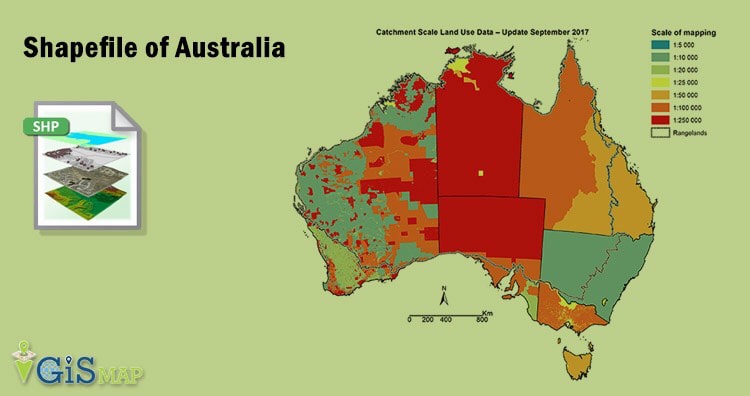
Hello GIS enthusiasts, IGISMAP has now published the latest GIS vector data of Australia administrative levels. Links for downloading the shapefiles of the important administrative divisions of Australia are provided in the following. You can also download these data in KML, GeoJSON or CSV formats. 

Note:

  • All data available are in GCS datum EPSG:4326 WGS84 CRS (Coordinate Reference System).
  • You need to login for downloading the shapefile.

Download Free Shapefile Data of Australia

Australia is the sixth largest country of the world by total area. It is a continent surrounded by Indian and Pacific oceans. Australia as a continent also exist as country, where Australia Continent does have Australia,  partially Indonesia and Papua New Guinea. Australia is one of the world’s most highly urbanized countries. Major cities of Australia are Sydney, Melbourne, Brisbane, Perth, Adelaide. Canberra is its capital city, which can be seen in the shapefile downloadable from below links.

Australia GIS Data - National Boundary
Australia National Boundary

Download Australia National Outline Boundary Shapefile

Download Australia States Shapefile Data

The states and territories are federated administrative divisions in Australia, ruled by regional governments that constitute the second level of governance between the federal government and local governments. The Federation of Australia constitutionally consists of six federated states and ten federal territories, out of which three are internal territories contiguous to the Australian mainland; and the other seven are external territories and other offshore dependent territories.

Australia GIS Data - States Boundaries
Australia State Boundaries

Download Australia State Boundaries Shapefile

Federal States

  • New South Wales
  • Queensland
  • South Australia
  • Tasmania
  • Victoria
  • Western Australia

Internal Territories

  • Australian Capital Territory
  • Jervis Bay Territory
  • Northern Territory

External Territories

  • Ashmore and Cartier Islands
  • Christmas Island
  • Cocos (Keeling) Islands
  • Coral Sea Islands
  • Heard Island and McDonald Islands
  • Norfolk Island
  • Australian Antarctic Territory

Download Australia Local Government Areas Shapefile Data

Local government is the third level of government in Australia, administered with limited autonomy under the states and territories, and in turn beneath the federal government. The Australian local government is generally run by a council, and its territory of public administration is referred to generically by the Australian Bureau of Statistics as the local government area or LGA, each of which encompasses multiple suburbs or localities often of different postcodes; however, stylized terms such as “city”, “borough” and “shire” also have a geographic or historical interpretation. As of August 2016, there were 547 local councils in Australia.

Australia GIS Data - LGA Boundaries
Australia LGA Boundaries

Download Australia LGA Boundaries Shapefile

This shapefile covers following shire or council listed below:

  • Inner West Council
  • Council of the City of Sydney
  • Burwood Council
  • Canterbury-Bankstown Council
  • City of Banyule
  • City of Darebin
  • City of Boroondara
  • City of Yarra
  • City of Melbourne
  • City of Port Phillip
  • City of Stonnington
  • City of Manningham
  • City of Whitehorse
  • City of Hobsons Bay
  • City of Wyndham
  • City of Greater Geelong
  • City of Monash
  • Northern Beaches Council
  • City of Adelaide
  • Borough of Queenscliffe
  • Surf Coast Shire
  • Golden Plains Shire
  • Shire of Colac Otway
  • Shire of Corangamite
  • Shire of Pyrenees
  • City of Ballarat
  • Shire of Moorabool
  • City of Melton
  • City of Brimbank
  • City of Hume
  • Shire of Macedon Ranges
  • City of Moreland
  • City of Whittlesea
  • Shire of Mitchell
  • Shire of Hepburn
  • City of Moonee Valley
  • City of Maribyrnong
  • Shire of Nillumbik
  • City of Glen Eira
  • Shire of Murrindindi
  • City of Bayside
  • City of Kingston
  • City of Greater Dandenong
  • City of Frankston
  • City of Casey
  • Shire of Mornington Peninsula
  • City of Knox
  • City of Maroondah
  • Shire of Yarra Ranges
  • Shire of Cardinia
  • Shire of Baw Baw
  • Shire of South Gippsland
  • Bass Coast Shire
  • Shire of Mount Alexander
  • City of Greater Bendigo
  • Shire of Loddon
  • Rural City of Mildura
  • Shire of West Wimmera
  • Shire of Hindmarsh
  • Shire of Yarriambiack
  • Shire of Buloke
  • Rural City of Swan Hill
  • Shire of Strathbogie
  • Shire of Campaspe
  • Rural City of Ararat
  • Shire of Moyne
  • City of Warrnambool
  • Shire of Northern Grampians
  • Shire of Southern Grampians
  • Shire of Mansfield
  • Shire of Central Goldfields
  • Shire of Wellington
  • Rural City of Wangaratta
  • Rural City of Benalla
  • Latrobe City
  • Shire of Glenelg
  • Rural City of Horsham
  • Shire of East Gippsland
  • Alpine Shire
  • Shire of Towong
  • Shire of Gannawarra
  • City of Greater Shepparton
  • Shire of Moira
  • Shire of Indigo
  • City of Wodonga
  • District Council of Grant
  • City of Mount Gambier
  • Albury City Council
  • Greater Hume Shire Council
  • Wattle Range Council
  • Victoria-Daly Region
  • City of Darwin
  • Bundaberg Region
  • Wentworth Shire Council
  • Central Darling Shire Council
  • Bourke Shire Council
  • Broken Hill City Council
  • Balranald Shire Council
  • Brewarrina Shire Council
  • Walgett Shire Council
  • Cobar Shire Council
  • Bogan Shire Council
  • Moree Plains Shire Council
  • Hay Shire Council
  • Carrathool Shire Council
  • Warren Shire Council
  • Lachlan Shire Council
  • Murray River Council
  • Queanbeyan-Palerang Regional Council
  • Edward River Council
  • Clarence Valley Council
  • Richmond Valley Council
  • Griffith City Council
  • Kyogle Council
  • Tenterfield Shire Council
  • Glen Innes Severn Council
  • Armidale Regional Council
  • Nambucca Shire Council
  • Bellingen Shire Council
  • Coffs Harbour City Council
  • Lismore City Council
  • Ballina Shire Council
  • Tweed Shire Council
  • Byron Shire Council
  • Kempsey Shire Council
  • Walcha Council
  • Port Macquarie-Hastings Council
  • Dungog Shire Council
  • Port Stephens Council
  • Upper Hunter Shire Council
  • Maitland City Council
  • Newcastle City Council
  • Cessnock City Council
  • Lake Macquarie City Council
  • Singleton Council
  • Inverell Shire Council
  • Central Coast Council
  • Randwick City Council
  • Waverley Council
  • Woollahra Municipal Council
  • Georges River Council
  • Sutherland Shire Council
  • Strathfield Municipal Council
  • Cumberland Council
  • Fairfield City Council
  • Liverpool City Council
  • City of Parramatta Council
  • City of Canada Bay Council
  • Blacktown City Council
  • Council of the City of Ryde
  • The Council of the Shire of Hornsby
  • The Hills Shire Council
  • Hawkesbury City Council
  • Ku-ring-gai Council
  • Willoughby City Council
  • Berrigan Shire Council
  • Murrumbidgee Council
  • Federation Council
  • Snowy Monaro Regional Council
  • Snowy Valleys Council
  • Eurobodalla Shire Council
  • Bega Valley Shire Council
  • Wagga Wagga City Council
  • Cootamundra-Gundagai Regional Council
  • Yass Valley Council
  • Mid-Coast Council
  • Junee Shire Council
  • Temora Shire Council
  • Hilltops Council
  • Bland Shire Council
  • Weddin Shire Council
  • Cowra Shire Council
  • Upper Lachlan Shire Council
  • Uralla Shire Council
  • Gwydir Shire Council
  • Gilgandra Shire Council
  • Dubbo Regional Council
  • Warrumbungle Shire Council
  • Mid-Western Regional Council
  • Cabonne Council
  • Parkes Shire Council
  • Narromine Shire Council
  • The Council of the Municipality of Hunters Hill
  • North Sydney Council
  • Lane Cove Municipal Council
  • Mosman Municipal Council
  • Penrith City Council
  • Wollondilly Shire Council
  • Camden Council
  • Campbelltown City Council
  • Lithgow City Council
  • Blue Mountains City Council
  • Wollongong City Council
  • Wingecarribee Shire Council
  • Shellharbour City Council
  • Oberon Council
  • Goulburn Mulwaree Council
  • The Council of the Municipality of Kiama
  • Shoalhaven City Council
  • Coolamon Shire Council
  • Narrandera Shire Council
  • Lockhart Shire Council
  • Bathurst Regional Council
  • Muswellbrook Shire Council
  • Liverpool Plains Shire Council
  • Tamworth Regional Council
  • Narrabri Shire Council
  • Gunnedah Shire Council
  • Leeton Shire Council
  • Forbes Shire Council
  • Blayney Shire Council
  • Orange City Council
  • Kangaroo Island Council
  • Yorke Peninsula Council
  • Renmark Paringa Council
  • District Council of Loxton Waikerie
  • Southern Mallee District Council
  • Tatiara District Council
  • Naracoorte Lucindale Council
  • District Council of Robe
  • Kingston District Council
  • Anangu Pitjantjatjara Yankunytjatjara Local Government Area
  • Maralinga Tjarutja
  • District Council of Coober Pedy
  • Municipal Council of Roxby Downs
  • Uia Riverland Local Government Area
  • Berri Barmera Council
  • Pastoral Unincorporated Area
  • Port Augusta City Council
  • Flinders Ranges Council
  • District Council of Orroroo Carrieton
  • District Council of Peterborough
  • Mid Murray Council
  • Unincorporated Area
  • Bayside Council
  • Coorong District Council
  • District Council of Karoonda East Murray
  • Rural City of Murray Bridge
  • District Council of Ceduna
  • District Council of Streaky Bay
  • Wudinna District Council
  • District Council of Elliston
  • Coonamble Shire Council
  • Alexandrina Council
  • City of Victor Harbor
  • District Council of Yankalilla
  • City of Onkaparinga
  • Mount Barker District Council
  • City of Swan
  • Bayswater
  • City of Belmont
  • Waverley Council

Download Australia Postal Areas Shapefile Data

There are over 2670 postal area boundaries in the following data

Australia GIS Data - Postal Area Boundaries
Australia Postal Area Boundaries

Download Australia Postal Area Boundaries Shapefile

Other Administrative Boundary Data:

Australia Demographic Data:

Download Free Shapefile for the following:

  1. World Countries Shapefile
  2. Australia
  3. Argentina
  4. Austria
  5. Belgium
  6. Brazil
  7. Canada
  8. Denmark
  9. Fiji
  10. Finland
  11. Germany
  12. Greece
  13. India
  14. Indonesia
  15. Ireland
  16. Italy
  17. Japan
  18. Kenya
  19. Lebanon
  20. Madagascar
  21. Malaysia
  22. Mexico
  23. Mongolia
  24. Netherlands
  25. New Zealand
  26. Nigeria
  27. Papua New Guinea
  28. Philippines
  29. Poland
  30. Russia
  31. Singapore
  32. South Africa
  33. South Korea
  34. Spain
  35. Switzerland
  36. Tunisia
  37. United Kingdom Shapefile
  38. United States of America
  39. Vietnam
  40. Croatia
  41. Chile
  42. Norway

Disclaimer : If you find any shapefile data of country provided is in correct do contact us or comment below, so that we will correct the same in our system as well we will try to correct the same in openstreetmap.

💬 Book a Meeting