Download Fruit Orchards GIS Data – Shapefile, KML, GeoJSON for All Countries

Looking to map agricultural landscapes more precisely? Download fruit orchards data effortlessly using GIS Data by MAPOG. This powerful and user-friendly platform offers seamless access to agricultural datasets in a wide range of GIS formats, including Shapefile, KML, MID, and over 15 others. Designed for agronomists, planners, researchers, and GIS professionals, the platform provides detailed, well-structured datasets that make analyzing orchard locations, coverage, and patterns easier than ever.

How to Download Fruit Orchards Data?

MAPOG simplifies the journey from data search to final download. With over 900+ layers and comprehensive global coverage, the platform supports popular formats like SHP, KML, MID, CSV, GeoJSON, DXF, GML, TOPOJSON, and MIF, among others—making it an ideal tool for both beginners and experts.

Download Fruit Orchards Data of any countries

Note:
  • All data is provided in GCS datum EPSG:4326 WGS84 CRS (Coordinate Reference System).
  • Users need to log in to access and download their preferred data formats.

Step-by-Step Guide to Download Fruit Orchards Data

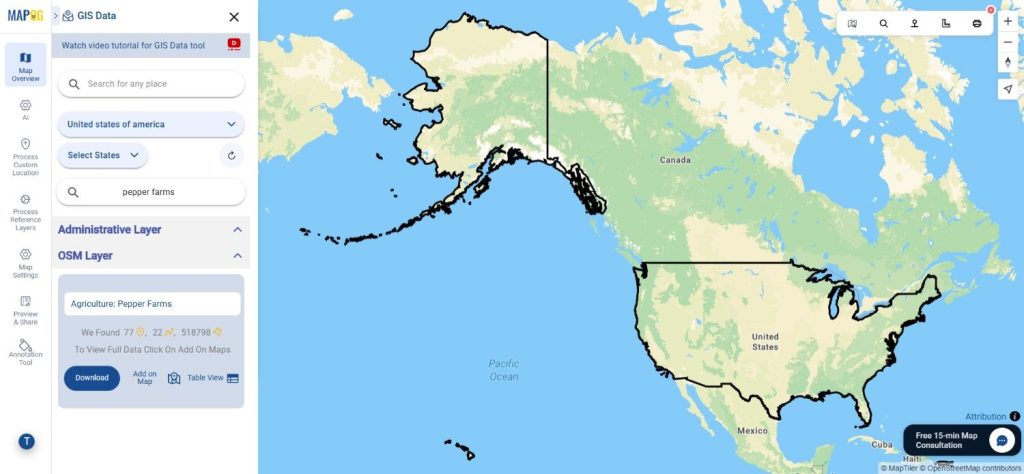
Step 1: Search for Fruit Orchards Data

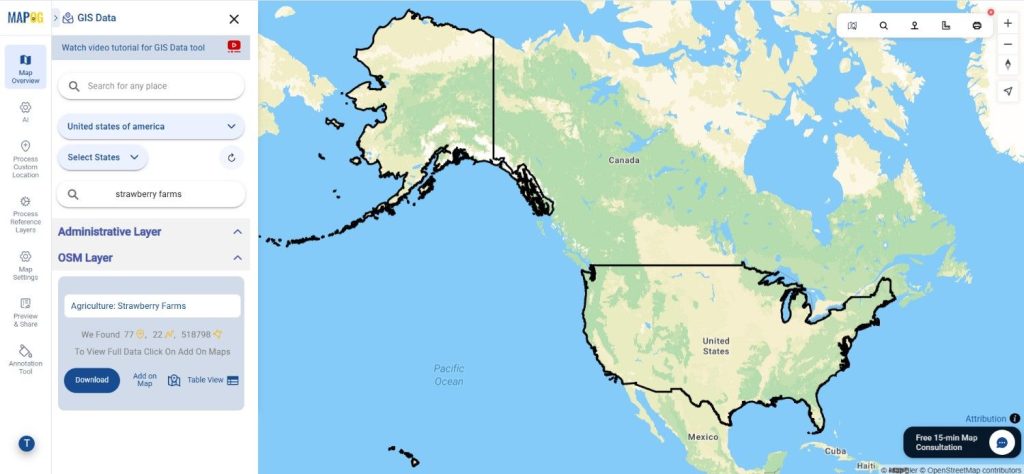
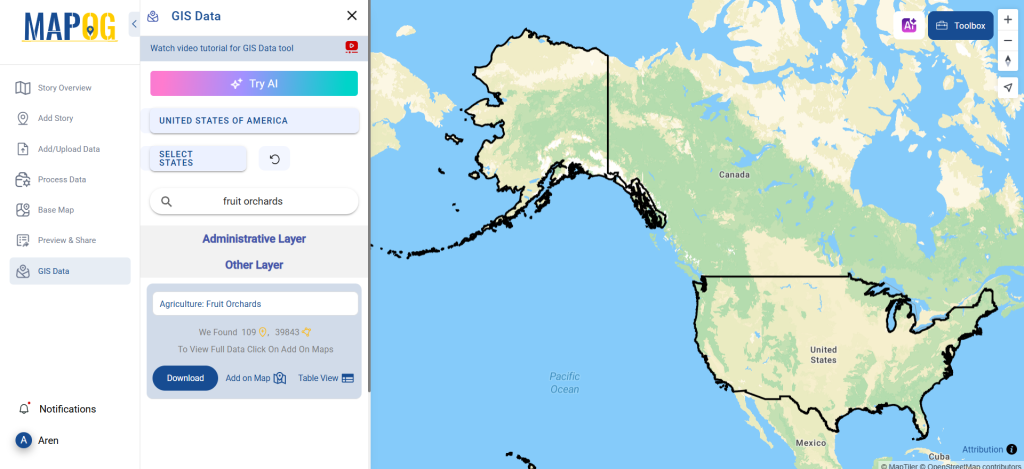
Begin by navigating to the GIS Data by MAPOG map interface. Use the search bar or explore layers to find “Fruit Orchards Data.” Preview the metadata to identify whether the data is represented as points or polygons and to understand attribute details.

Download Fruit Orchards Data
Step 2: Use the AI-Powered Search Tool

Tap into MAPOG’s “Try AI” feature to simplify your search. By entering a phrase like “fruit orchards near my location” or “orchard areas by district,” you’ll get instant suggestions and relevant layers. This tool is especially helpful when you’re unsure about naming conventions or regional layer titles.

Download Fruit Orchards Data
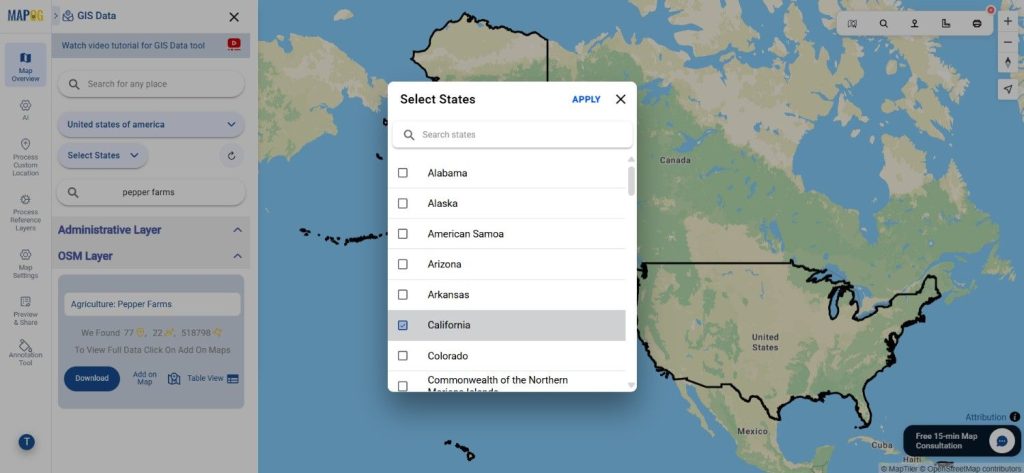
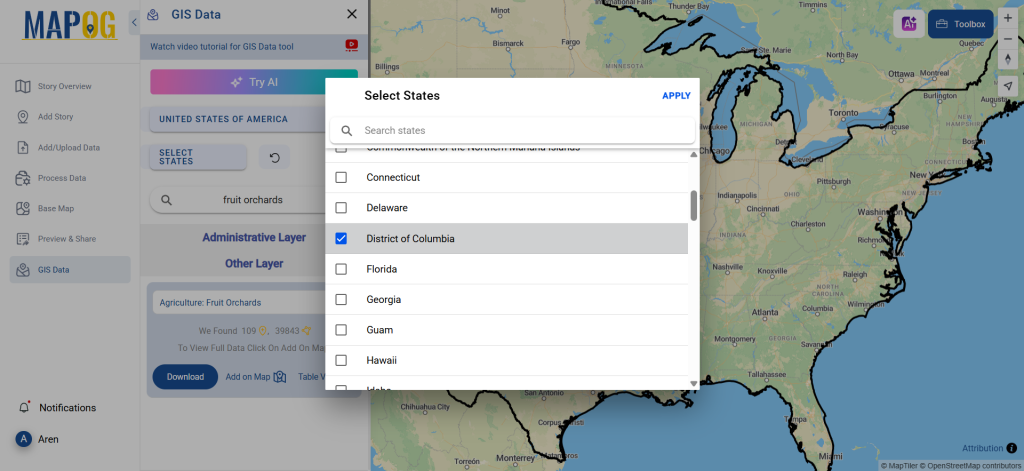
Step 3: Apply Smart Data Filters

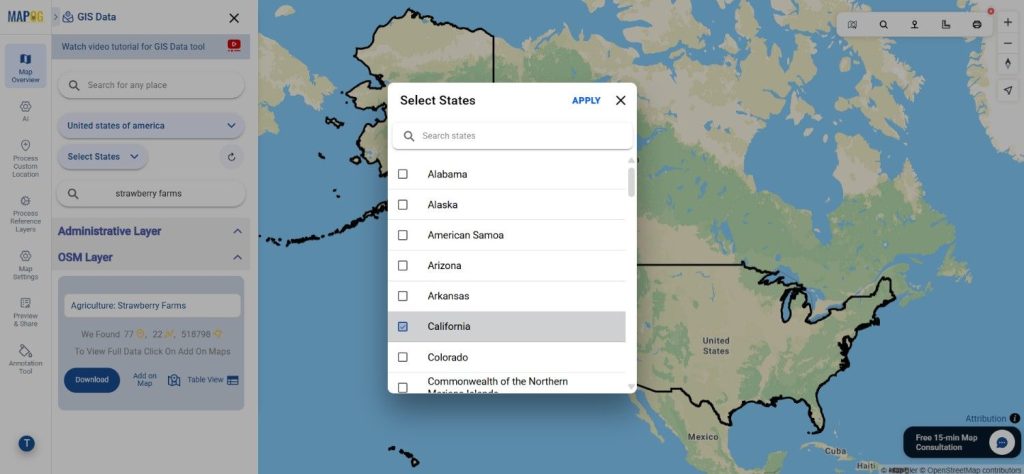
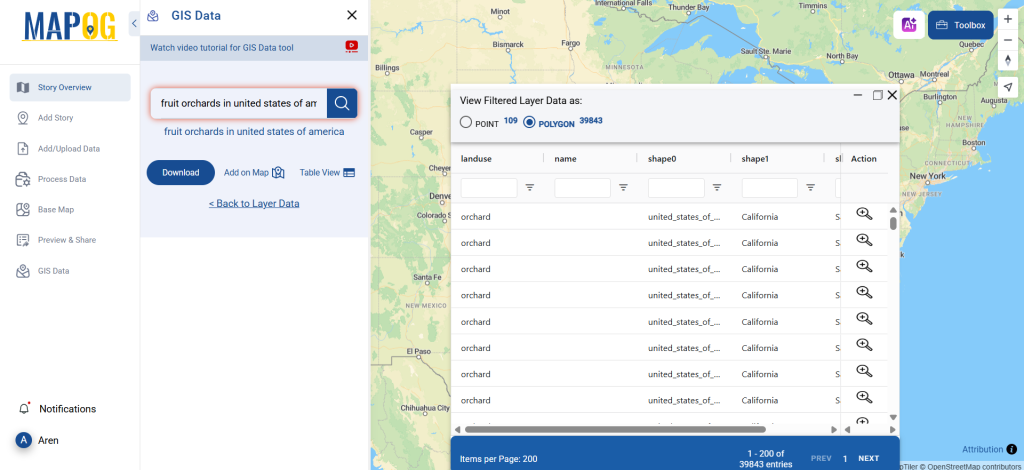
Narrow down your results with the Filter Data option. Here, you can select specific states or districts to tailor your dataset for regional mapping. When working with larger country-wide data, this helps focus on precise agricultural zones without overloading your GIS environment.

Download Fruit Orchards Data
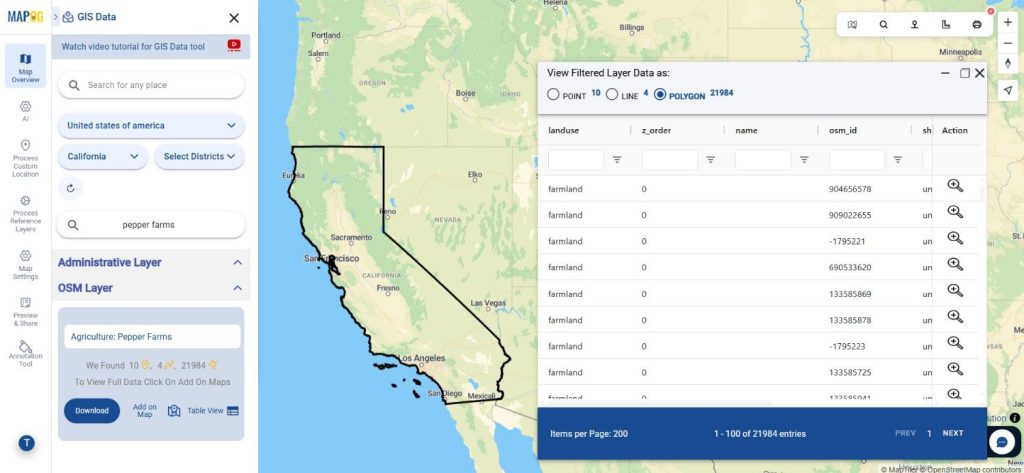
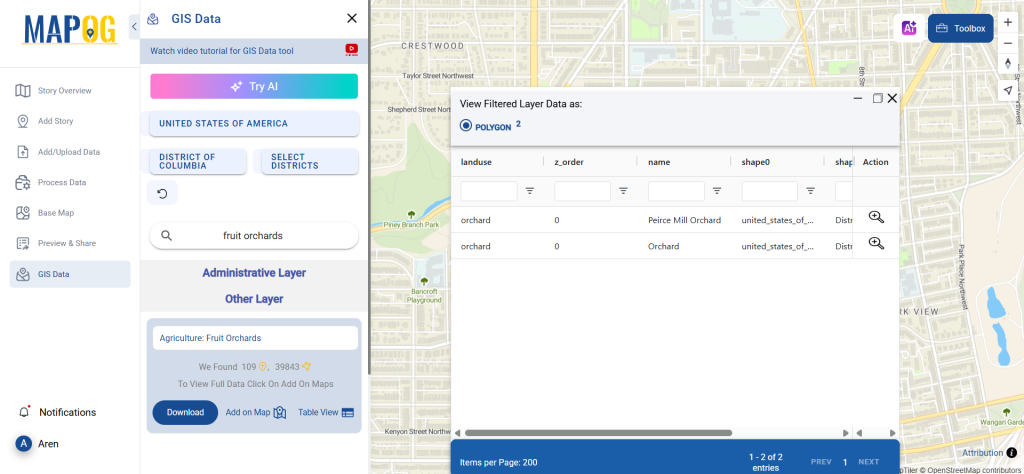
Step 4: Visualize with ‘Add on Map’

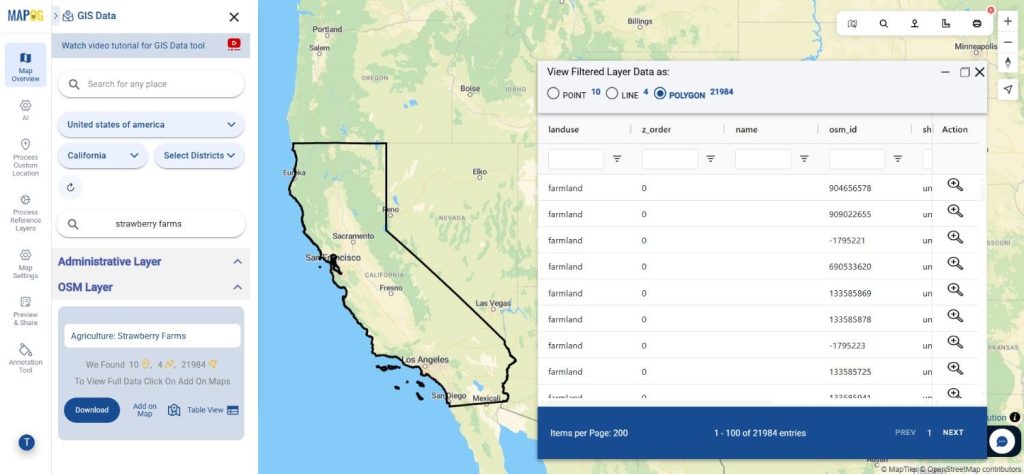
Activate the Add on Map feature to overlay orchard layers directly onto MAPOG’s interactive GIS interface. This visualization helps in spotting distribution trends, comparing land use areas, and planning agricultural or environmental strategies.

Download Fruit Orchards Data
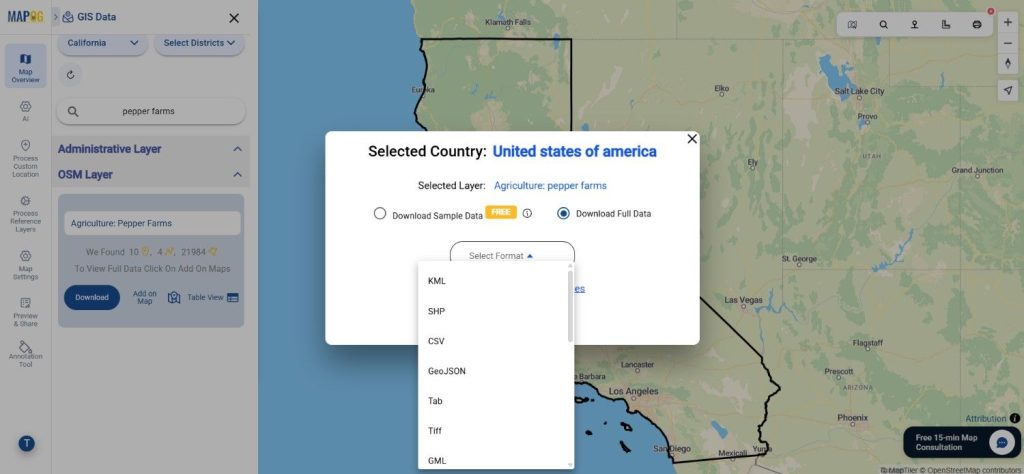
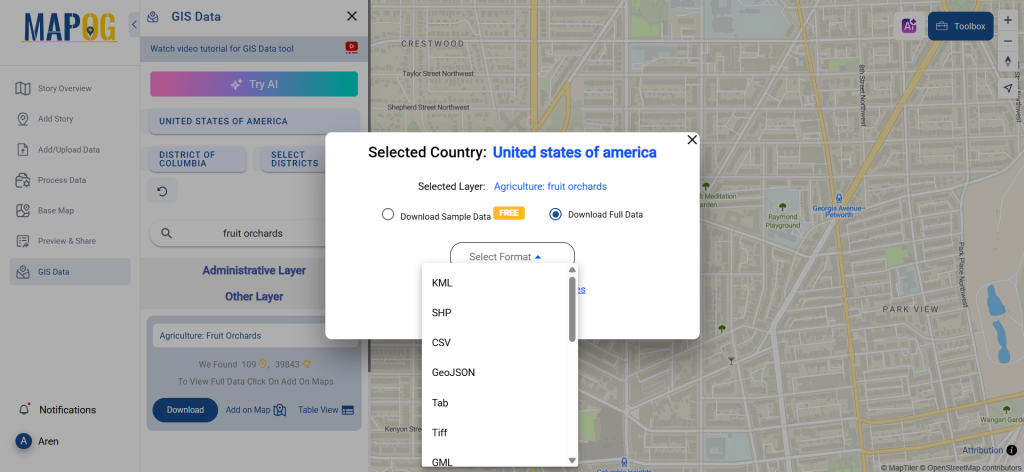
Step 5: Download Fruit Orchards Data

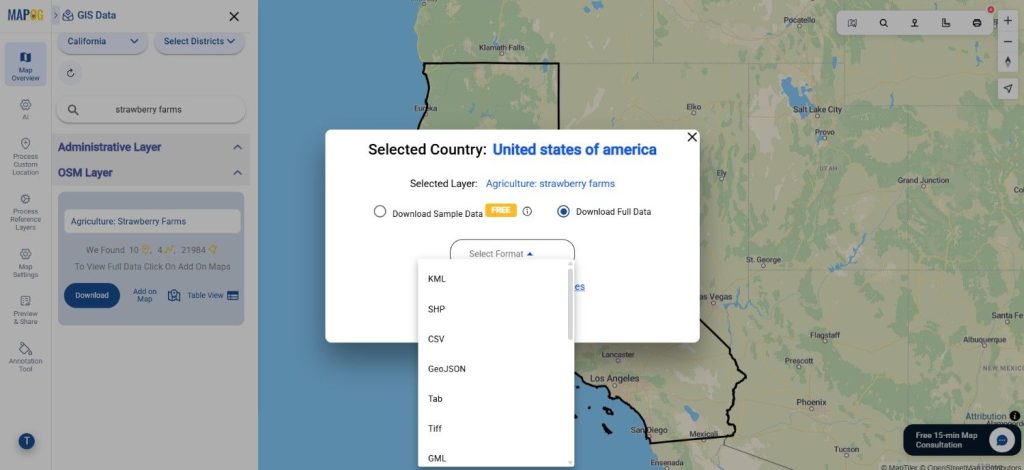
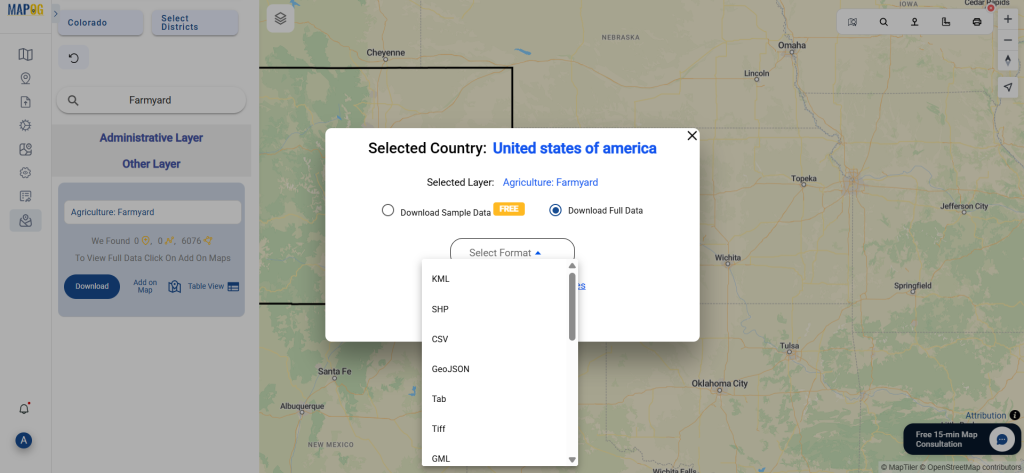
After finalizing your selection, click “Download Data.” You’ll have the option to download a sample or the complete dataset. Choose your desired format—whether it’s Shapefile, KML, GeoJSON, MID, or others—agree to the terms, and initiate the download.

Download Fruit Orchards Data

Final Thoughts

Thanks to MAPOG’s intuitive design and wide format support, the ability to download fruit orchards data is no longer a complex task. Whether you’re conducting agricultural research, land use planning, or environmental monitoring, this platform equips you with reliable and customizable data. Take full advantage of its tools to filter, visualize, and download fruit orchards data in formats best suited for your GIS project goals.

With MAPOG’s versatile toolkit, you can effortlessly upload vector and upload Excel or CSV data, incorporate existing layers, perform polyline splitting, use the converter for various formats, calculate isochrones, and utilize the Export Tool.

For any questions or further assistance, feel free to reach out to us at support@mapog.com. We’re here to help you make the most of your GIS data.

Download Shapefile for the following:

  1. World Countries Shapefile
  2. Australia
  3. Argentina
  4. Austria
  5. Belgium
  6. Brazil
  7. Canada
  8. Denmark
  9. Fiji
  10. Finland
  11. Germany
  12. Greece
  13. India
  14. Indonesia
  15. Ireland
  16. Italy
  17. Japan
  18. Kenya
  19. Lebanon
  20. Madagascar
  21. Malaysia
  22. Mexico
  23. Mongolia
  24. Netherlands
  25. New Zealand
  26. Nigeria
  27. Papua New Guinea
  28. Philippines
  29. Poland
  30. Russia
  31. Singapore
  32. South Africa
  33. South Korea
  34. Spain
  35. Switzerland
  36. Tunisia
  37. United Kingdom Shapefile
  38. United States of America
  39. Vietnam
  40. Croatia
  41. Chile
  42. Norway
  43. Maldives
  44. Bhutan
  45. Colombia
  46. Libya
  47. Comoros
  48. Hungary
  49. Laos
  50. Estonia
  51. Iraq
  52. Portugal
  53. Azerbaijan
  54. Macedonia
  55. Romania
  56. Peru
  57. Marshall Islands
  58. Slovenia
  59. Nauru
  60. Guatemala
  61. El Salvador
  62. Afghanistan
  63. Cyprus
  64. Syria
  65. Slovakia
  66. Luxembourg
  67. Jordan
  68. Armenia
  69. Haiti And Dominican Republic
  70. Malta
  71. Djibouti
  72. East Timor
  73. Micronesia
  74. Morocco
  75. Liberia
  76. Kosovo
  77. Isle Of Man
  78. Paraguay
  79. Tokelau
  80. Palau
  81. Ile De Clipperton
  82. Mauritius
  83. Equatorial Guinea
  84. Tonga
  85. Myanmar
  86. Thailand
  87. New Caledonia
  88. Niger
  89. Nicaragua
  90. Pakistan
  91. Nepal
  92. Seychelles
  93. Democratic Republic of the Congo
  94. China
  95. Kenya
  96. Kyrgyzstan
  97. Bosnia Herzegovina
  98. Burkina Faso
  99. Canary Island
  100. Togo
  101. Israel And Palestine
  102. Algeria
  103. Suriname
  104. Angola
  105. Cape Verde
  106. Liechtenstein
  107. Taiwan
  108. Turkmenistan
  109. Tuvalu
  110. Ivory Coast
  111. Moldova
  112. Somalia
  113. Belize
  114. Swaziland
  115. Solomon Islands
  116. North Korea
  117. Sao Tome And Principe
  118. Guyana
  119. Serbia
  120. Senegal And Gambia
  121. Faroe Islands
  122. Guernsey Jersey
  123. Monaco
  124. Tajikistan
  125. Pitcairn

Disclaimer : The GIS data provided for download in this article was initially sourced from OpenStreetMap (OSM) and further modified to enhance its usability. Please note that the original data is licensed under the Open Database License (ODbL) by the OpenStreetMap contributors. While modifications have been made to improve the data, any use, redistribution, or modification of this data must comply with the ODbL license terms. For more information on the ODbL, please visit OpenStreetMap’s License Page.

Here are some blogs you might be interested in:

Download Farmyard Data in Shapefile, KML, MID of any country

Looking to map and analyze rural agricultural zones? Download Farmyard Data easily with GIS Data by MAPOG—an intuitive platform built for all levels of GIS users. Farmyards, which typically include clusters of barns, livestock shelters, machinery sheds, and storage areas, are vital components in rural planning, livestock management, and food production analysis. Whether you’re a researcher, policy planner, or agri-tech developer, MAPOG enables you to obtain structured farmyard data across multiple GIS formats like Shapefile, KML, GeoJSON, and MID for seamless use in professional mapping tools.

How to Download Farmyard Data

GIS Data by MAPOG simplifies the entire data retrieval process. From a wide collection of over 900+ categorized layers, users can easily locate and Download Farmyard Data from various regions. The platform supports 15+ GIS formats including CSV, SQL, DXF, MIF, TOPOJSON, GPX, and more, making it ideal for multi-purpose usage in agriculture, land-use planning, and environmental assessments.

Download Farmyard Data of any countries

Note:
  • All data is provided in GCS datum EPSG:4326 WGS84 CRS (Coordinate Reference System).
  • Users need to log in to access and download their preferred data formats.

Step-by-Step Guide to Download Farmyard Data

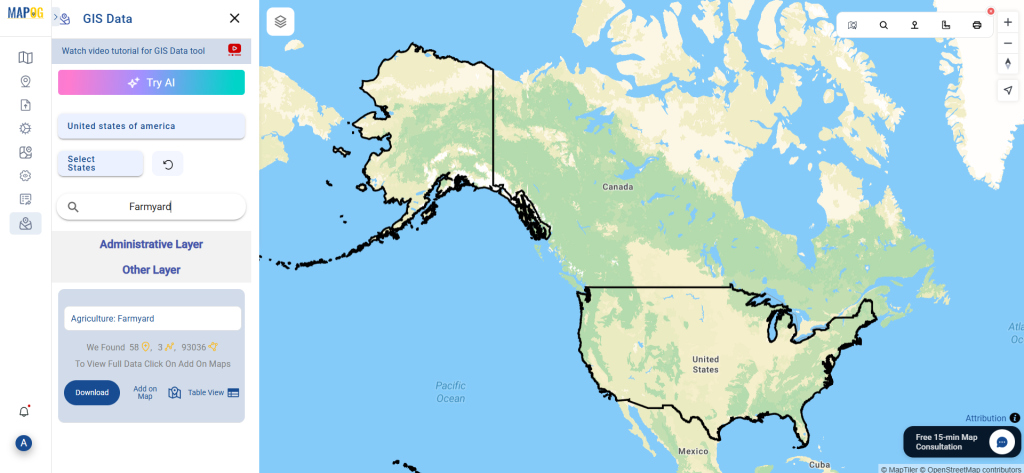
Step 1: Search for Farmyard Data

Begin by opening the GIS Data by MAPOG platform and using the search layer bar. Type “Farmyard Data” and browse through the layers provided. Review metadata to confirm if the features are represented as point, line, or polygon geometries.

Download Farmyard Data
Step 2: Try the AI Search Tool

Save time with MAPOG’s smart “Try AI” tool. Enter a phrase like “Farmyards near district” and let the AI deliver the most accurate datasets available for your region of interest.

Download Farmyard Data
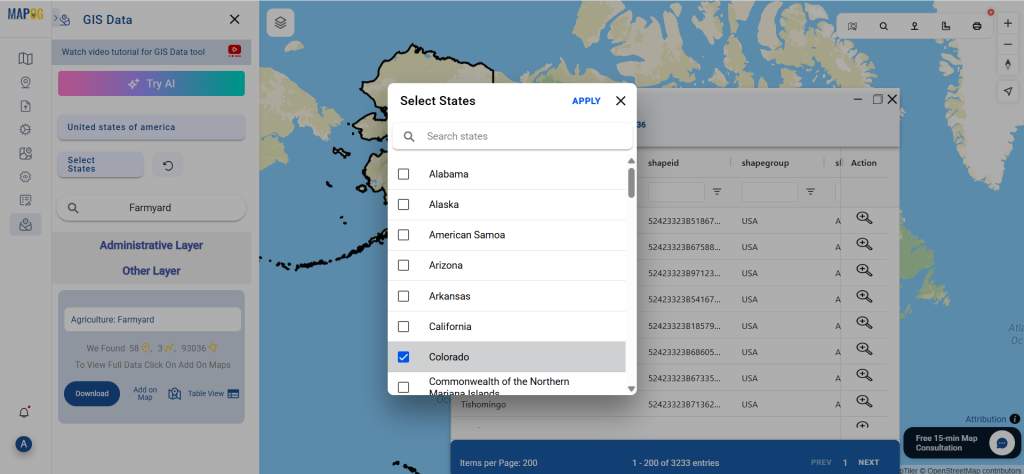
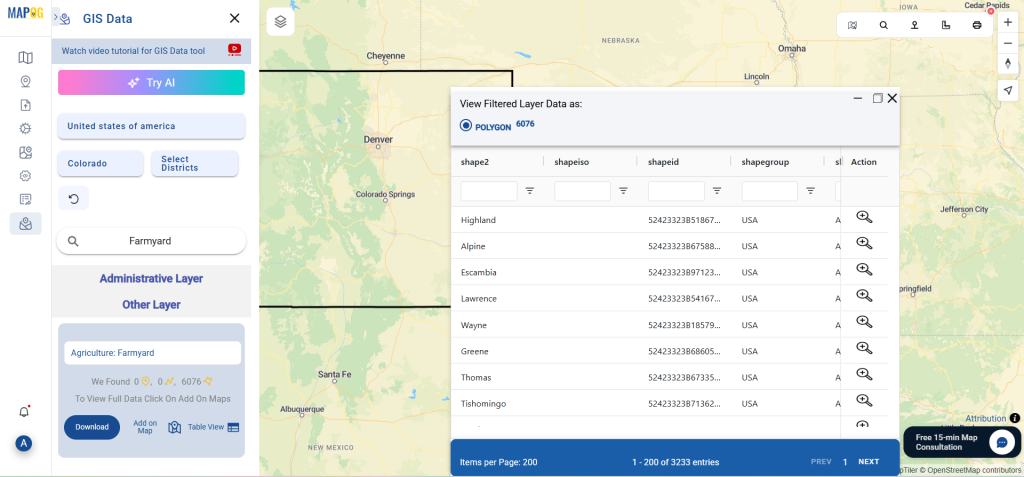
Step 3: Apply State and District Filters

Use the Filter Data option to focus your search. Narrow down datasets by specific states or districts to ensure you’re downloading the most relevant farmyard data for local-scale analysis. This is especially useful when dealing with country-level layers where local filtering becomes essential.

Download Farmyard Data
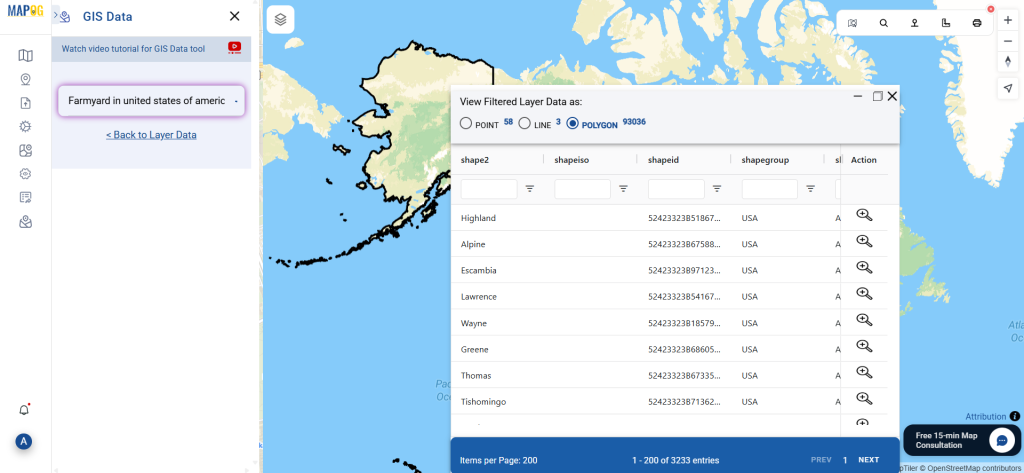
Step 4: Add on Map for Analysis

Click on the “Add on Map” button to visualize your selected farmyard dataset directly on MAPOG’s map interface. This interactive step is perfect for analyzing proximity, spatial distribution, and accessibility of farmyards in relation to roads, water sources, or settlements.

Download Farmyard Data
Step 5: Download Farmyard Data

Once you’re confident in your selection, proceed to download. Choose between a free sample or the complete dataset. Then, pick your preferred format—Shapefile, KML, MID, or any of the supported formats—accept the terms, and hit download.

Download Farmyard Data

Conclusion

With its simplified workflow and robust format support, GIS Data by MAPOG makes it incredibly efficient to Download Farmyard Data for diverse GIS applications. Whether you’re building an agri-map, conducting a land-use study, or integrating rural data into a GIS dashboard, MAPOG equips you with the tools and datasets needed for in-depth spatial analysis and smarter decision-making.

With MAPOG’s versatile toolkit, you can effortlessly upload vector and upload Excel or CSV data, incorporate existing layers, perform polyline splitting, use the converter for various formats, calculate isochrones, and utilize the Export Tool.

For any questions or further assistance, feel free to reach out to us at support@mapog.com. We’re here to help you make the most of your GIS data.

Download Shapefile for the following:

  1. World Countries Shapefile
  2. Australia
  3. Argentina
  4. Austria
  5. Belgium
  6. Brazil
  7. Canada
  8. Denmark
  9. Fiji
  10. Finland
  11. Germany
  12. Greece
  13. India
  14. Indonesia
  15. Ireland
  16. Italy
  17. Japan
  18. Kenya
  19. Lebanon
  20. Madagascar
  21. Malaysia
  22. Mexico
  23. Mongolia
  24. Netherlands
  25. New Zealand
  26. Nigeria
  27. Papua New Guinea
  28. Philippines
  29. Poland
  30. Russia
  31. Singapore
  32. South Africa
  33. South Korea
  34. Spain
  35. Switzerland
  36. Tunisia
  37. United Kingdom Shapefile
  38. United States of America
  39. Vietnam
  40. Croatia
  41. Chile
  42. Norway
  43. Maldives
  44. Bhutan
  45. Colombia
  46. Libya
  47. Comoros
  48. Hungary
  49. Laos
  50. Estonia
  51. Iraq
  52. Portugal
  53. Azerbaijan
  54. Macedonia
  55. Romania
  56. Peru
  57. Marshall Islands
  58. Slovenia
  59. Nauru
  60. Guatemala
  61. El Salvador
  62. Afghanistan
  63. Cyprus
  64. Syria
  65. Slovakia
  66. Luxembourg
  67. Jordan
  68. Armenia
  69. Haiti And Dominican Republic
  70. Malta
  71. Djibouti
  72. East Timor
  73. Micronesia
  74. Morocco
  75. Liberia
  76. Kosovo
  77. Isle Of Man
  78. Paraguay
  79. Tokelau
  80. Palau
  81. Ile De Clipperton
  82. Mauritius
  83. Equatorial Guinea
  84. Tonga
  85. Myanmar
  86. Thailand
  87. New Caledonia
  88. Niger
  89. Nicaragua
  90. Pakistan
  91. Nepal
  92. Seychelles
  93. Democratic Republic of the Congo
  94. China
  95. Kenya
  96. Kyrgyzstan
  97. Bosnia Herzegovina
  98. Burkina Faso
  99. Canary Island
  100. Togo
  101. Israel And Palestine
  102. Algeria
  103. Suriname
  104. Angola
  105. Cape Verde
  106. Liechtenstein
  107. Taiwan
  108. Turkmenistan
  109. Tuvalu
  110. Ivory Coast
  111. Moldova
  112. Somalia
  113. Belize
  114. Swaziland
  115. Solomon Islands
  116. North Korea
  117. Sao Tome And Principe
  118. Guyana
  119. Serbia
  120. Senegal And Gambia
  121. Faroe Islands
  122. Guernsey Jersey
  123. Monaco
  124. Tajikistan
  125. Pitcairn

Disclaimer : The GIS data provided for download in this article was initially sourced from OpenStreetMap (OSM) and further modified to enhance its usability. Please note that the original data is licensed under the Open Database License (ODbL) by the OpenStreetMap contributors. While modifications have been made to improve the data, any use, redistribution, or modification of this data must comply with the ODbL license terms. For more information on the ODbL, please visit OpenStreetMap’s License Page.

Here are some blogs you might be interested in:

Download United States Alaska – Shapefiles, Administrative boundaries, Boroughs, airport, highway line

Planners and surveyors in Alaska leverage GIS Data and Maps to visually analyze complex data patterns that are challenging to discern in tabular form. You can conveniently access and download GIS data for the state’s boundary, county divisions, rail, and highway maps with just a few clicks. This data is available for analysis within IGISMAP or for download in various GIS formats, such as KML, GeoJSON, CSV, or Shapefile.

With MAPOG’s versatile toolkit, you can effortlessly upload vector, add WMS (Web Map Service) layers, upload Excel or CSV data, incorporate existing files, perform polygon splitting and merging, generate new polygon and polyline data, use the converter for various formats, conduct buffer analysiscreate gridstransform points into polygons, calculate isochrones, and utilize the geocoder for precise location information.

We offer an extensive array of data formats, including KML, SHP, CSV, GeoJSON, Tab, SQL, Tiff, GML, KMZ, GPKZ, SQLITE, Dxf, MIF, TOPOJSON, XLSX, GPX, ODS, MID, and GPS, ensuring compatibility and accessibility for various applications and analyses.

Note:

  • All data available are in GCS datum EPSG:4326 WGS84 CRS (Coordinate Reference System).
  • You need to login for downloading the shapefile.

Download Shapefile of Alaska County

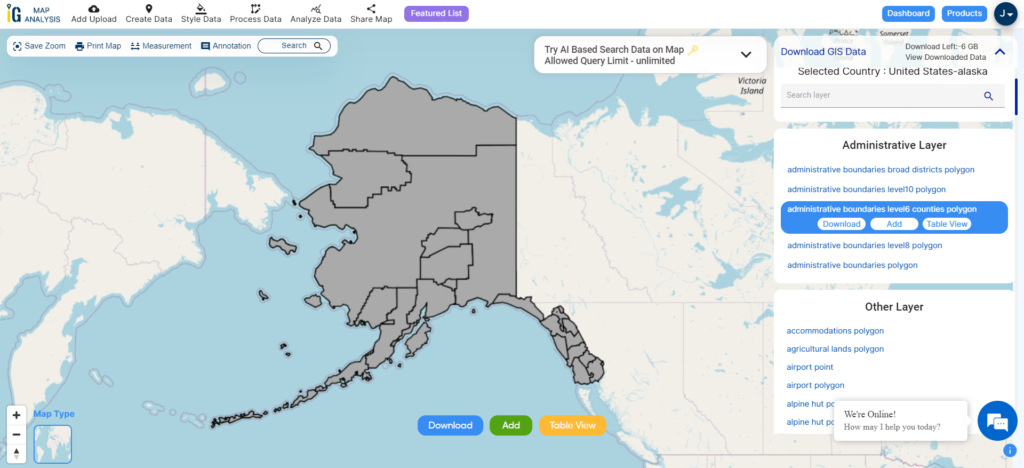
Alaska is a northwest state of the United States of America. It is divided into 19 organized boroughs and one unorganized boroughs and is the largest US states according to area. Juneau is the capital of Alaska state. It is a northwest state of the United States of America. It is divided into 19 organized boroughs and one unorganized boroughs.

Alaska State Boundary

Download Alaska County Boundaries Shapefile

In the above screen, the GIS data of Alaska administrative boundary is visible. You can download it into shapefile, kml, geojson, Mapinfo, PostgreSQL, and CSV. And for any other formats try our GIS Converter Tool.

This GIS data covers both organized and unorganized boroughs of states.

  • Aleutians East Borough
  • Anchorage
  • Bristol Bay Borough
  • Denali Borough
  • Fairbanks North Star Borough
  • Haines Borough
  • Juneau
  • Kenai Peninsula Borough
  • Ketchikan Gateway Borough
  • Kodiak Island Borough
  • Lake and Peninsula Borough
  • Matanuska-Susitna Borough
  • North Slope Borough
  • Northwest Arctic Borough
  • Petersburg Borough
  • Sitka
  • Skagway
  • Unorganized Borough
  • Wrangell
  • Yakutat

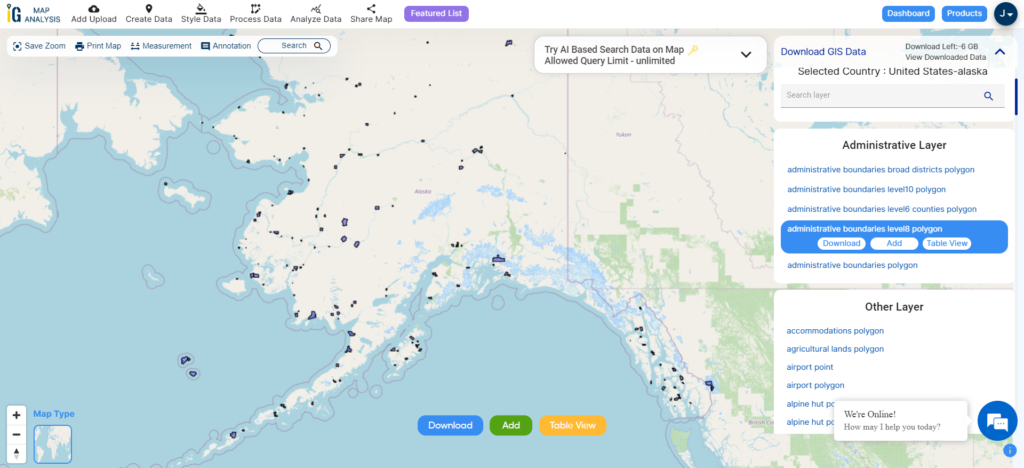
Download Cities, Towns and Villages Shapefile of Alaska

Alaska Cities, Towns and Villages Boundaries

Download Alaska Cities, Towns and Villages Boundary Shapefile

Airport point GIS data of Alaska State

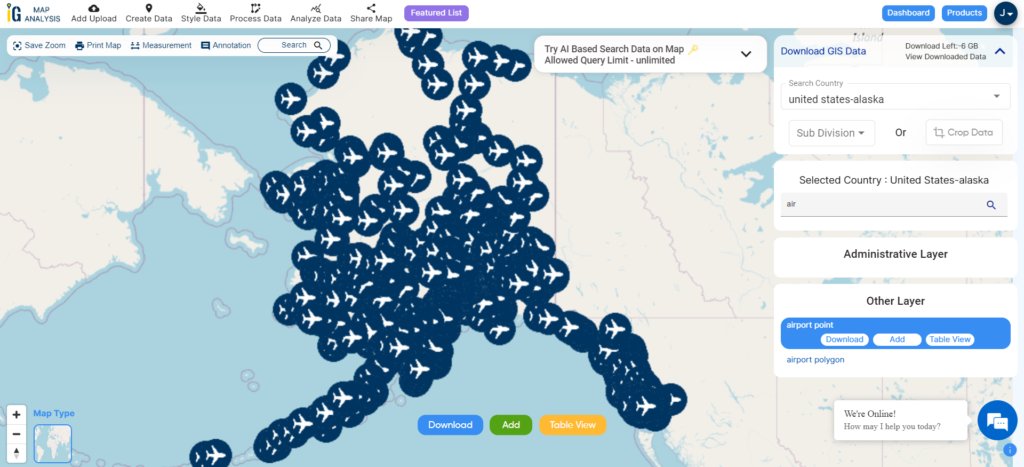
Click on the link for downloading airport point location data of Alaska state. Location data of Cold Bay Airport, Birchwood Airport, Boswell Bay Airport, Black Rapids Airport, Big Mountain Airport, Bettles Airport, Candle 2 Airport, Brown Low Point, Cantwell Airport, Buckland Airport, Atmautluak Airport, Juneau Harbor Seaplane, etc.

Alaska Airport Points

Download Alaska Airport Points Shapefile

Zoom in or Zoom out for a clear view. Change the color of icons using the MAPOG TOOL

Highway Line GIS data of Alaska

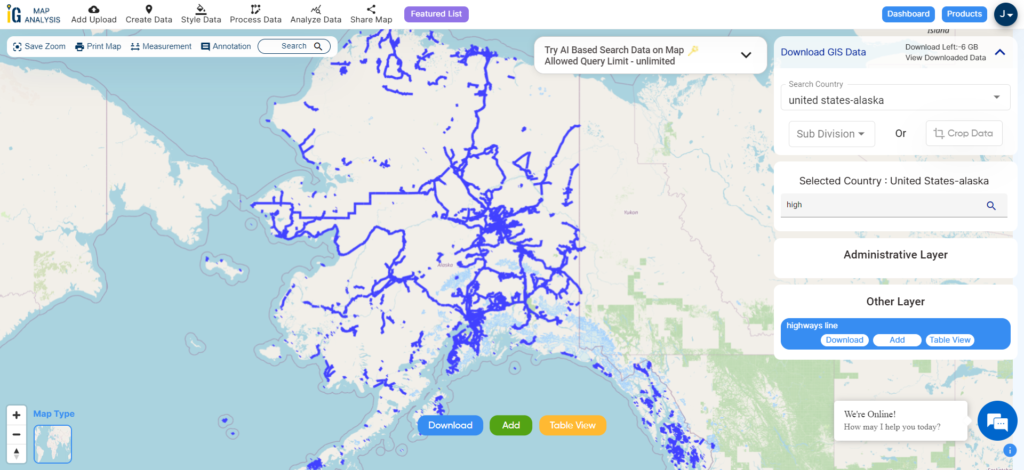
Alaska Highway Line
Alaska Highway Line

Download Alaska Highway Line Shapefile

Zoom in view of highway line map is shown shown above. Similarly, you can easily download point based GIS data of airport point, ATM point, parking area, hospital location, etc.

Download GIS Data of other states of USA:

  1. Alabama
  2. Alaska
  3. Arizona
  4. Arkansas
  5. California
  6. Colorado
  7. Connecticut
  8. Florida
  9. Georgia
  10. Hawaii
  11. Idaho
  12. Illinois
  13. Indiana
  14. Iowa
  15. Kansas
  16. Massachusetts
  17. Maryland
  18. Michigan
  19. Minnesota
  20. Mississipi
  21. Missouri
  22. Montana
  23. Nevada
  24. Nebraska
  25. Ohio
  26. Oklahoma
  27. Pennsylvania
  28. Utah
  29. Vermont
  30. Washington
  31. Wisconsin
  32. Wyoming
  33. Tennessee
  34. Texas
  35. Kentucky
  36. Louisiana
  37. Maine
  38. North Carolina
  39. Oregon
  40. Virginia
  41. West Virginia

Download Shapefile for the following:

  1. World Countries Shapefile
  2. Australia
  3. Argentina
  4. Austria
  5. Belgium
  6. Brazil
  7. Canada
  8. Denmark
  9. Fiji
  10. Finland
  11. Germany
  12. Greece
  13. India
  14. Indonesia
  15. Ireland
  16. Italy
  17. Japan
  18. Kenya
  19. Lebanon
  20. Madagascar
  21. Malaysia
  22. Mexico
  23. Mongolia
  24. Netherlands
  25. New Zealand
  26. Nigeria
  27. Papua New Guinea
  28. Philippines
  29. Poland
  30. Russia
  31. Singapore
  32. South Africa
  33. South Korea
  34. Spain
  35. Switzerland
  36. Tunisia
  37. United Kingdom Shapefile
  38. United States of America
  39. Vietnam
  40. Croatia
  41. Chile
  42. Norway
  43. Maldives
  44. Bhutan
  45. Colombia
  46. Libya
  47. Comoros
  48. Hungary
  49. Laos
  50. Estonia
  51. Iraq
  52. Portugal
  53. Azerbaijan
  54. Macedonia
  55. Romania
  56. Peru
  57. Marshall Islands
  58. Slovenia
  59. Nauru
  60. Guatemala
  61. El Salvador
  62. Afghanistan
  63. Cyprus
  64. Syria
  65. Slovakia
  66. Luxembourg
  67. Jordan
  68. Armenia
  69. Haiti And Dominican Republic

Disclaimer : If you find any shapefile data of country provided is incorrect do contact us or comment below, so that we will correct the same in our system as well we will try to correct the same in openstreetmap.

💬 Book a Meeting