How to Download USA Cities Data in GIS Formats (Step-by-Step Guide)

Looking to work with accurate urban datasets? You can Download USA Cities Data effortlessly using GIS Data by MAPOG, a platform built to simplify access to structured geographic information. It supports multiple GIS formats such as Shapefile, KML, GeoJSON, and MID, ensuring smooth compatibility across various GIS tools. Cities data typically includes boundaries, population clusters, administrative extents, and urban attributes, making it highly valuable for urban planning, infrastructure analysis, and location-based decision-making.

Understanding the Process

Cities data represents spatial information related to urban areas, often available as point or polygon layers depending on how the boundaries are defined. With GIS Data by MAPOG, this data can be searched, filtered, visualized, and exported in different formats, allowing users to integrate it seamlessly into their mapping workflows. The platform is designed to make data discovery and extraction quick, even when dealing with large and layered datasets.

How to Download USA Cities Data

MAPOG streamlines the process by offering access to extensive GIS layers and multiple export formats such as SHP, KML, CSV, GeoJSON, SQL, DXF, MIF, MID, TOPOJSON, and GPX. Just search for the country & layer, review them , add them on map for quick analysis or just download then for further use. This makes it suitable for analysts, planners, and GIS professionals who require flexible data handling.

Download USA Cities Data

Note:

• All datasets are provided in GCS datum EPSG:4326 WGS84 CRS (Coordinate Reference System).
• Login is required to access and download datasets in preferred formats.

Step-by-Step Guide to Download USA Cities Data

Step 1: Search for USA Cities Data

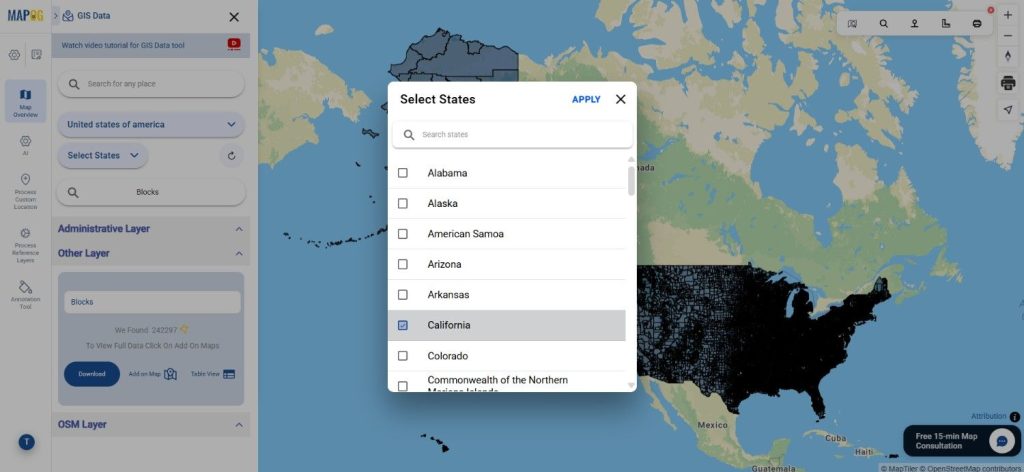
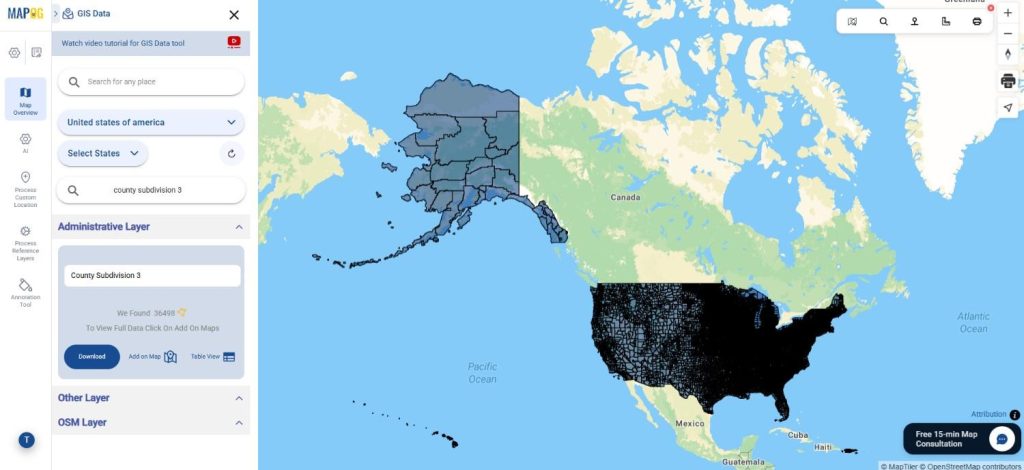
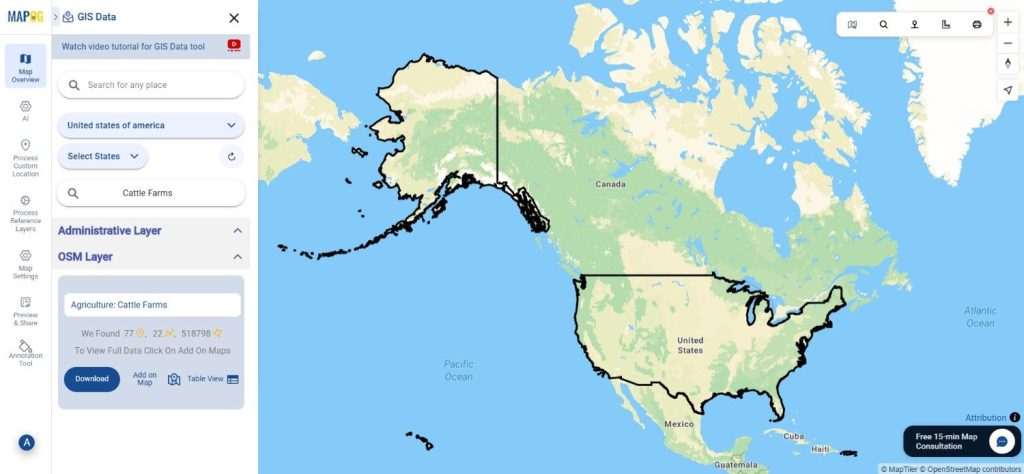
Begin by selecting GIS Data tool. Choose “United States of America” in select country panel. Then, you can get the cities layer in other layer or Use the search layer option to find “Cities Data.” Review the attributes to understand whether the dataset is represented as points (city locations) or polygons (city boundaries).
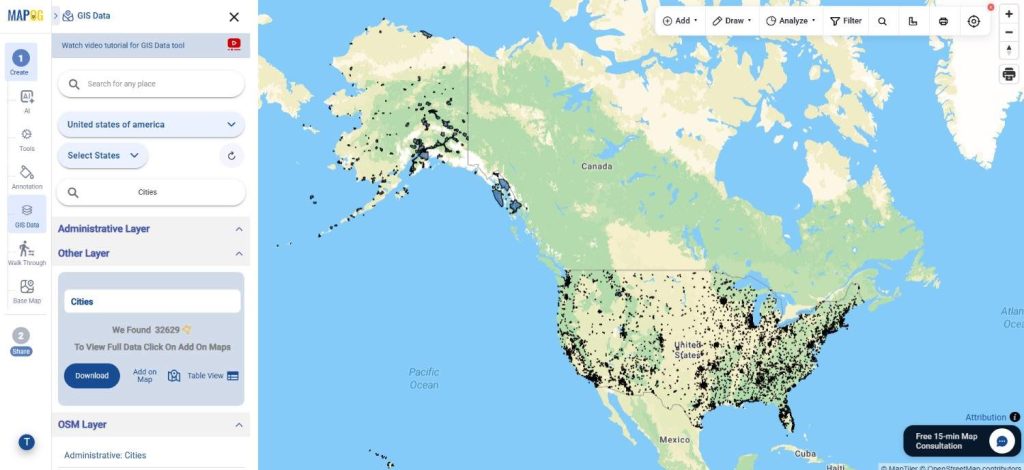
Download USA Cities Data
Step 3: Apply Data Filters

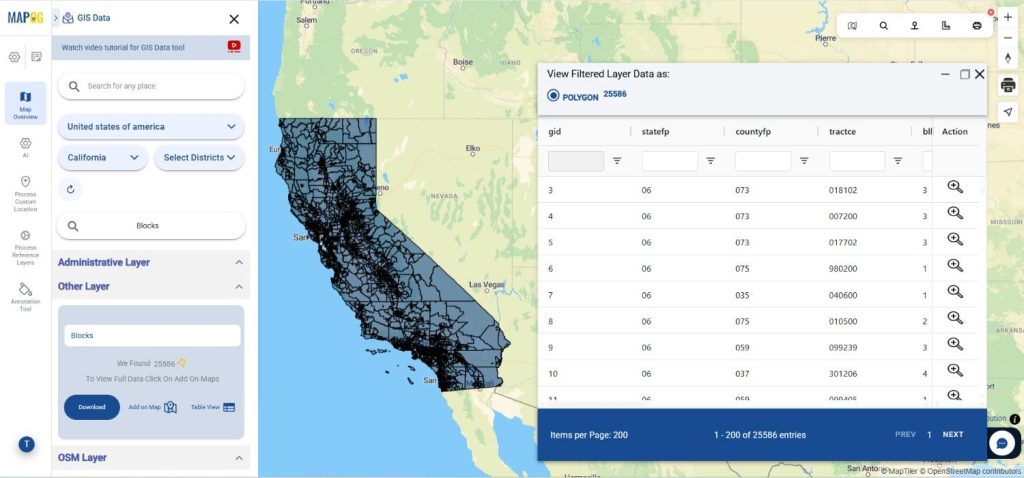
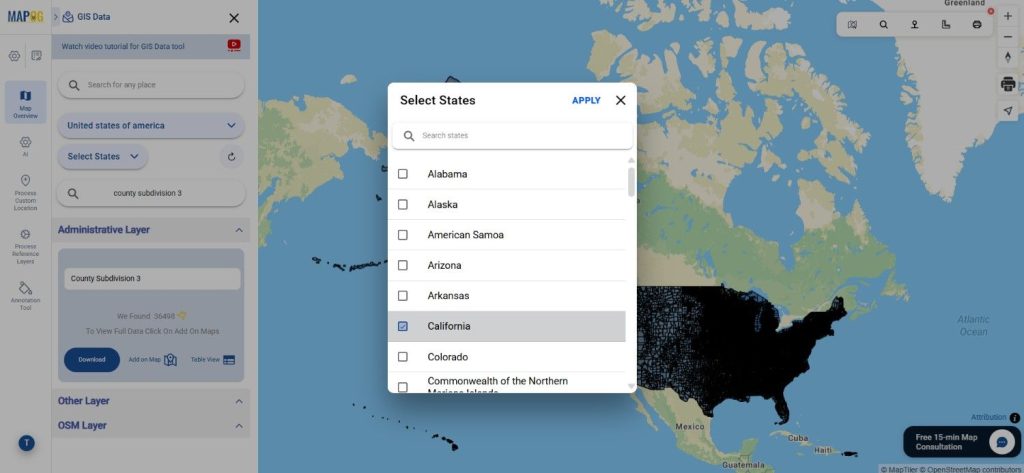
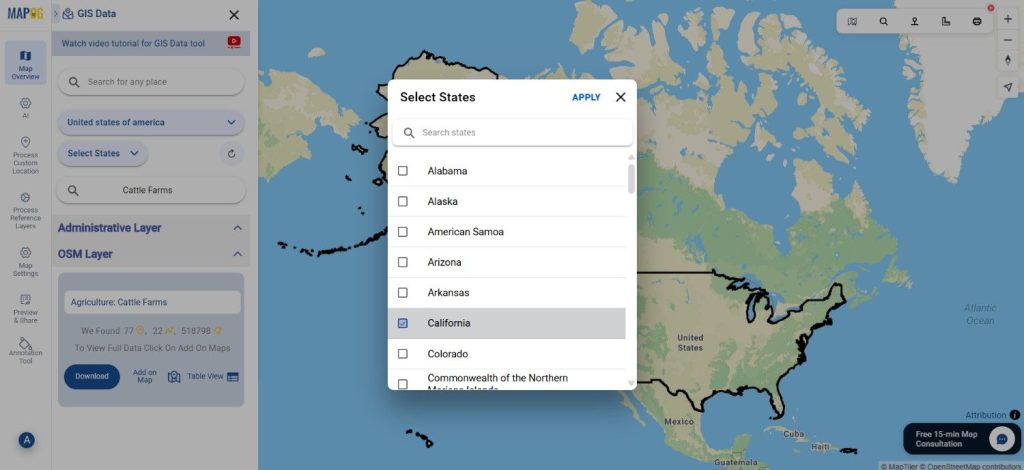
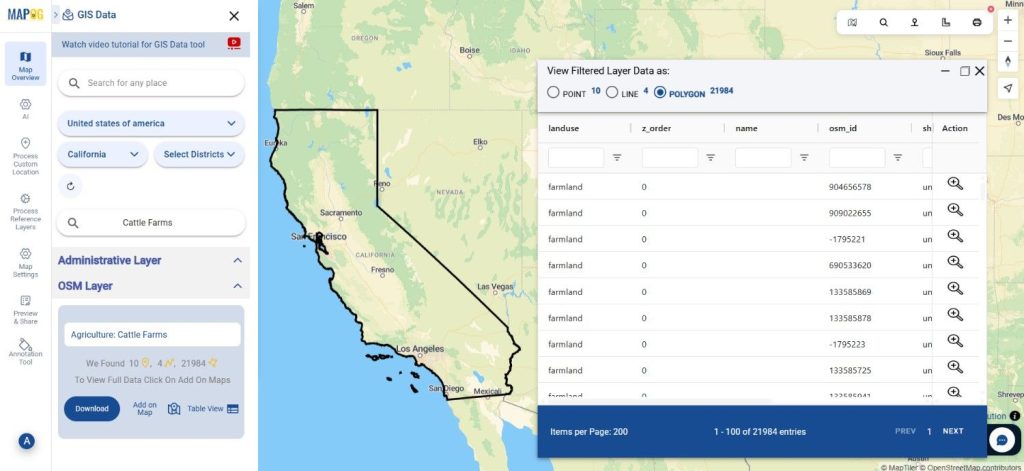
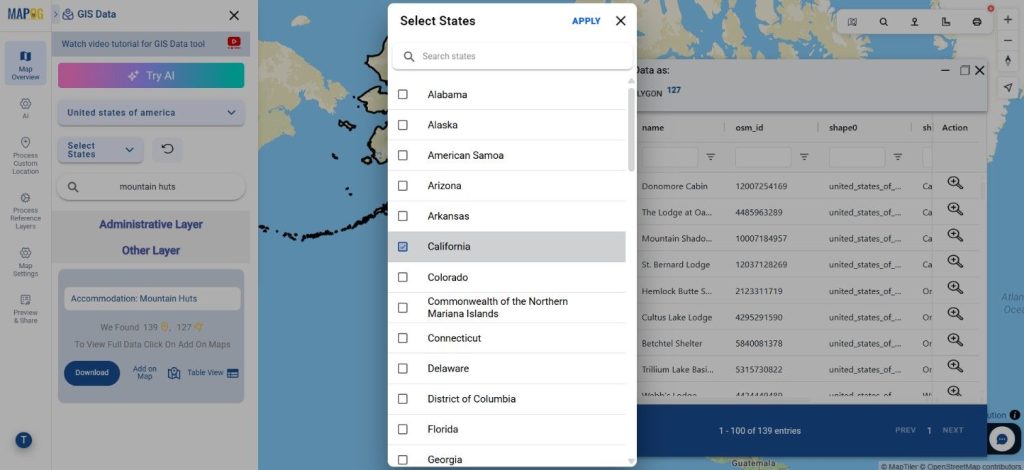
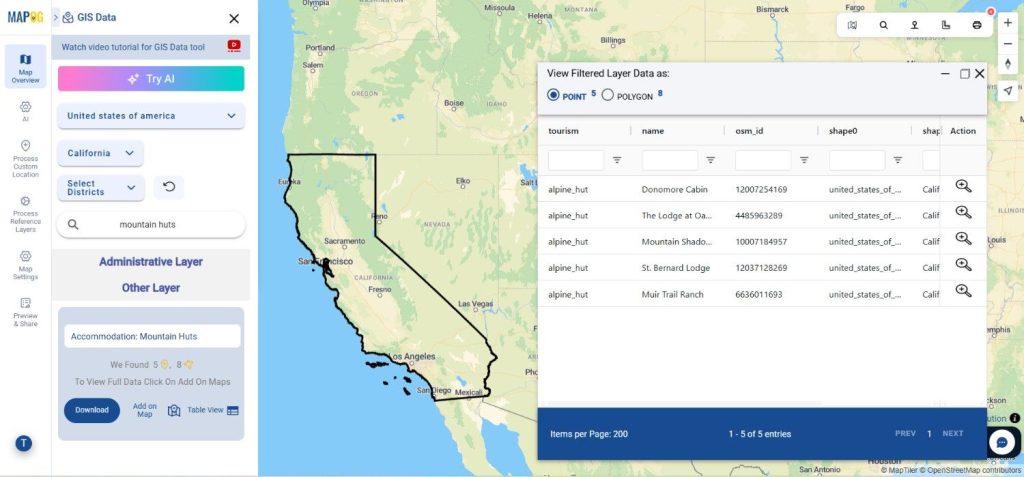
You can refine the dataset further using the Filter Data option. By narrowing results based on state and district levels, more precise and relevant city-level data can be extracted, which is especially useful for detailed spatial analysis.
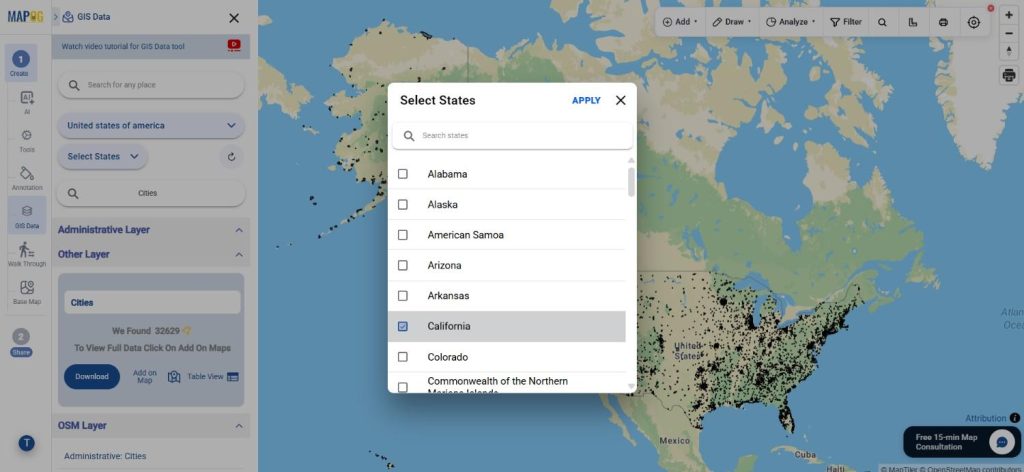
Download USA Cities Data
Step 4: Visualize with “Add on Map”

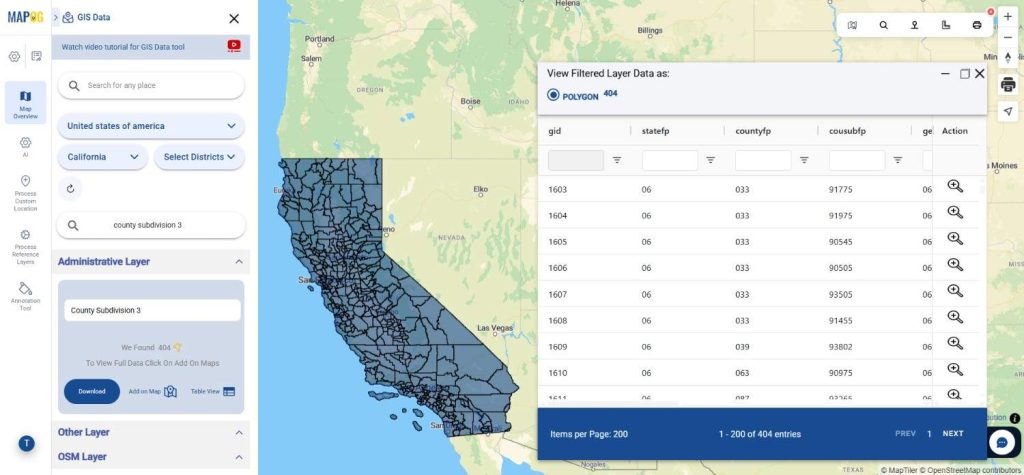
Next, use the “Add on Map” feature to bring the selected layer into the map analysis interface. This helps in visualizing city distribution, spatial patterns, and relationships with nearby features before proceeding to download.
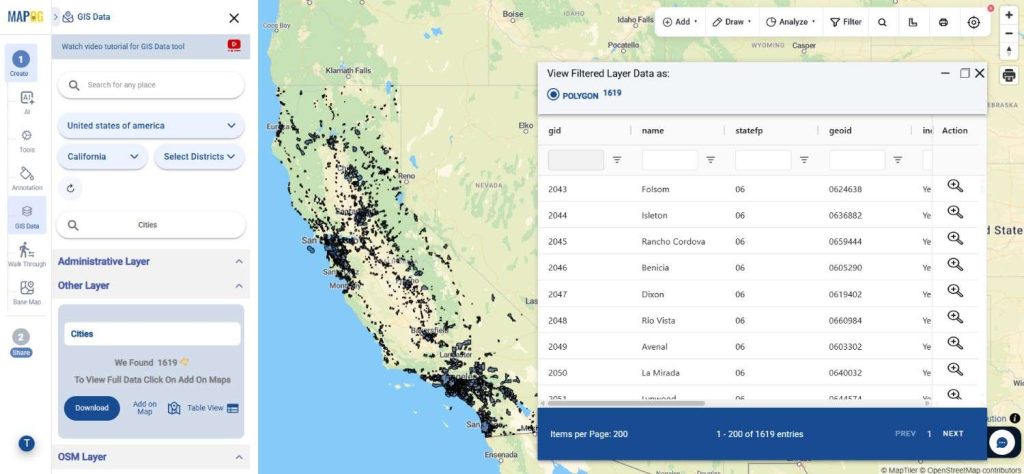
Download USA Cities Data
Step 5: Download Cities Data

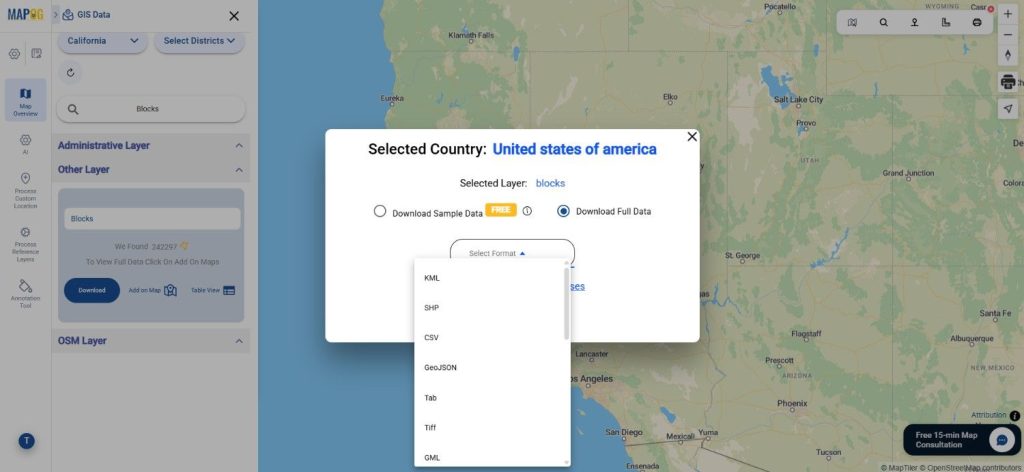
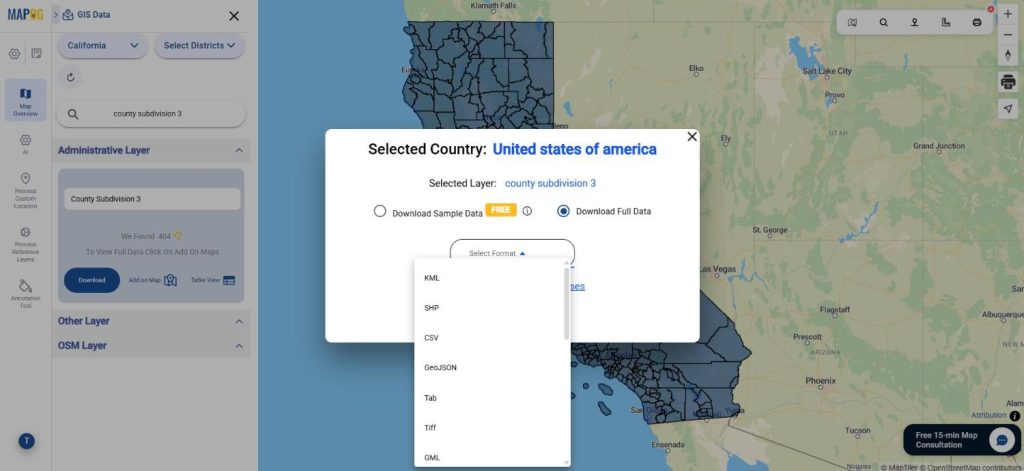
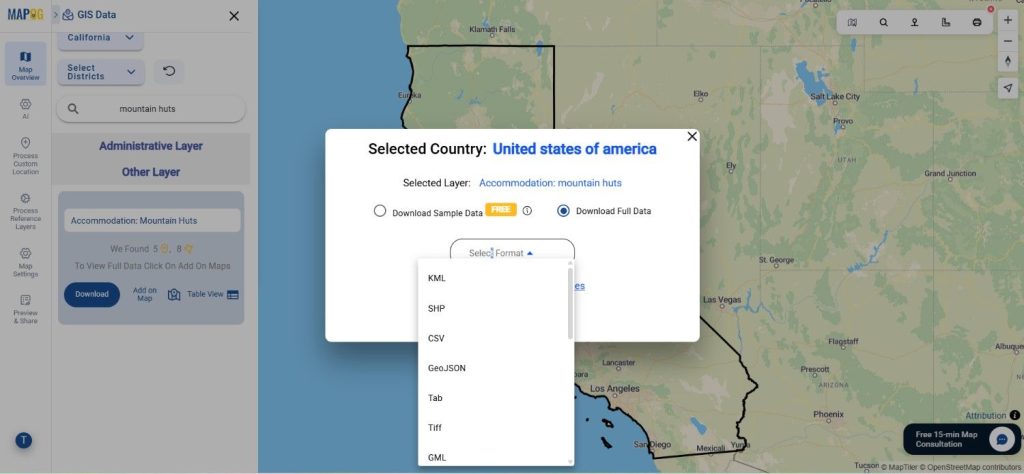
Once everything looks good, click on “Download Data.” You can choose between sample or complete datasets and select your required format such as Shapefile, KML, MID, or others. After confirming the terms, your data will be ready for use.
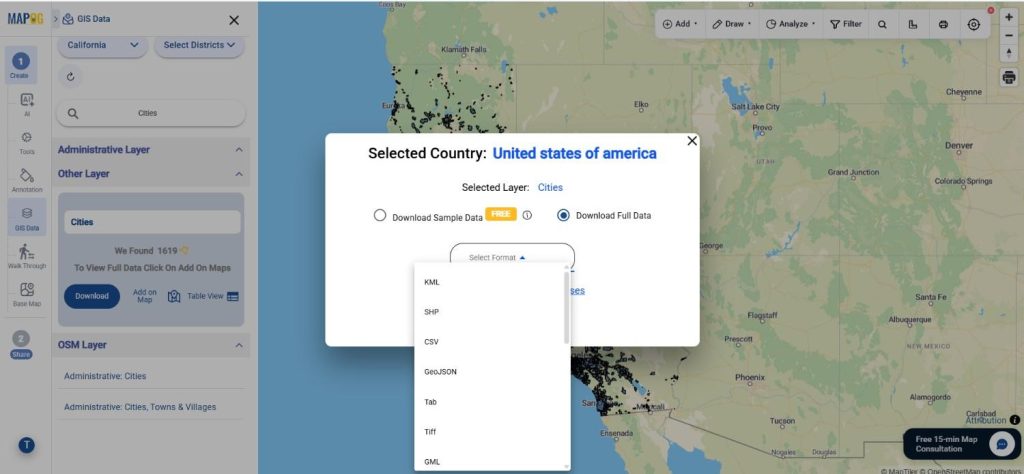
Download USA Cities Data

Final Thoughts

With GIS Data by MAPOG, the ability to Download USA Cities Data becomes both efficient and flexible. The platform not only simplifies access to detailed urban datasets but also enhances how users interact with spatial data. Whether it’s for planning, research, or analysis, having the option to Download Cities Data in multiple formats ensures you’re always equipped for your GIS projects.

With MAPOG’s versatile toolkit, you can effortlessly upload vectors and upload Excel or CSV data, incorporate existing layers, perform polygon splitting, use the converter for various formats, calculate isochrones, and utilize the Export Tool.

For any questions or further assistance, feel free to reach out to us at support@mapog.com. We’re here to help you make the most of your GIS data.

Download More Useful Data from USA:

Download Shapefile for the following:

  1. World Countries Shapefile
  2. Australia
  3. Argentina
  4. Austria
  5. Belgium
  6. Brazil
  7. Canada
  8. Denmark
  9. Fiji
  10. Finland
  11. Germany
  12. Greece
  13. India
  14. Indonesia
  15. Ireland
  16. Italy
  17. Japan
  18. Kenya
  19. Lebanon
  20. Madagascar
  21. Malaysia
  22. Mexico
  23. Mongolia
  24. Netherlands
  25. New Zealand
  26. Nigeria
  27. Papua New Guinea
  28. Philippines
  29. Poland
  30. Russia
  31. Singapore
  32. South Africa
  33. South Korea
  34. Spain
  35. Switzerland
  36. Tunisia
  37. United Kingdom Shapefile
  38. United States of America
  39. Vietnam
  40. Croatia
  41. Chile
  42. Norway
  43. Maldives
  44. Bhutan
  45. Colombia
  46. Libya
  47. Comoros
  48. Hungary
  49. Laos
  50. Estonia
  51. Iraq
  52. Portugal
  53. Azerbaijan
  54. Macedonia
  55. Romania
  56. Peru
  57. Marshall Islands
  58. Slovenia
  59. Nauru
  60. Guatemala
  61. El Salvador
  62. Afghanistan
  63. Cyprus
  64. Syria
  65. Slovakia
  66. Luxembourg
  67. Jordan
  68. Armenia
  69. Haiti And Dominican Republic
  70. Malta
  71. Djibouti
  72. East Timor
  73. Micronesia
  74. Morocco
  75. Liberia
  76. Kosovo
  77. Isle Of Man
  78. Paraguay
  79. Tokelau
  80. Palau
  81. Ile De Clipperton
  82. Mauritius
  83. Equatorial Guinea
  84. Tonga
  85. Myanmar
  86. Thailand
  87. New Caledonia
  88. Niger
  89. Nicaragua
  90. Pakistan
  91. Nepal
  92. Seychelles
  93. Democratic Republic of the Congo
  94. China
  95. Kenya
  96. Kyrgyzstan
  97. Bosnia Herzegovina
  98. Burkina Faso
  99. Canary Island
  100. Togo
  101. Israel And Palestine
  102. Algeria
  103. Suriname
  104. Angola
  105. Cape Verde
  106. Liechtenstein
  107. Taiwan
  108. Turkmenistan
  109. Tuvalu
  110. Ivory Coast
  111. Moldova
  112. Somalia
  113. Belize
  114. Swaziland
  115. Solomon Islands
  116. North Korea
  117. Sao Tome And Principe
  118. Guyana
  119. Serbia
  120. Senegal And Gambia
  121. Faroe Islands
  122. Guernsey Jersey
  123. Monaco
  124. Tajikistan
  125. Pitcairn

Disclaimer : The GIS data provided for download in this article was initially sourced from OpenStreetMap (OSM) and further modified to enhance its usability. Please note that the original data is licensed under the Open Database License (ODbL) by the OpenStreetMap contributors. While modifications have been made to improve the data, any use, redistribution, or modification of this data must comply with the ODbL license terms. For more information on the ODbL, please visit OpenStreetMap’s License Page.

Here are some blogs you might be interested in:

Download USA School Districts Data in Shapefile, KML, MID +15 GIS Formats Using GIS Data by MAPOG

Looking to Download USA School Districts Data for mapping, planning, or research purposes? GIS Data by MAPOG makes the entire process smooth and accessible with support for multiple GIS formats like Shapefile, KML, GeoJSON, MID, and more. School districts represent administrative boundaries that define how educational institutions are organized within specific regions, making this data highly valuable for urban planning, demographic studies, and education management.

Understanding the Process

When you Download USA School Districts Data, you are essentially accessing geographic boundary data that can be used across different GIS platforms. MAPOG simplifies this by offering structured datasets in various formats, ensuring compatibility and ease of use. The platform integrates search, filtering, and visualization tools so users can quickly identify and work with relevant spatial layers.

How to Download USA School Districts Data

GIS Data by MAPOG provides access to hundreds of layers and supports 15+ GIS formats including SHP, KML, CSV, GeoJSON, SQL, DXF, MIF, TOPOJSON, and GPX. Just search for the country & layer, review them , add them on map for quick analysis or just download then for further use. This makes it suitable for professionals, researchers, and planners who need flexible data options.

Download USA School Districts Data

Note:
  • All datasets are provided in GCS datum EPSG:4326 WGS84 CRS.
  • Login is required to access and download the data.

Step-by-Step Guide to Download USA School Districts Data

Step 1: Search for School Districts Data

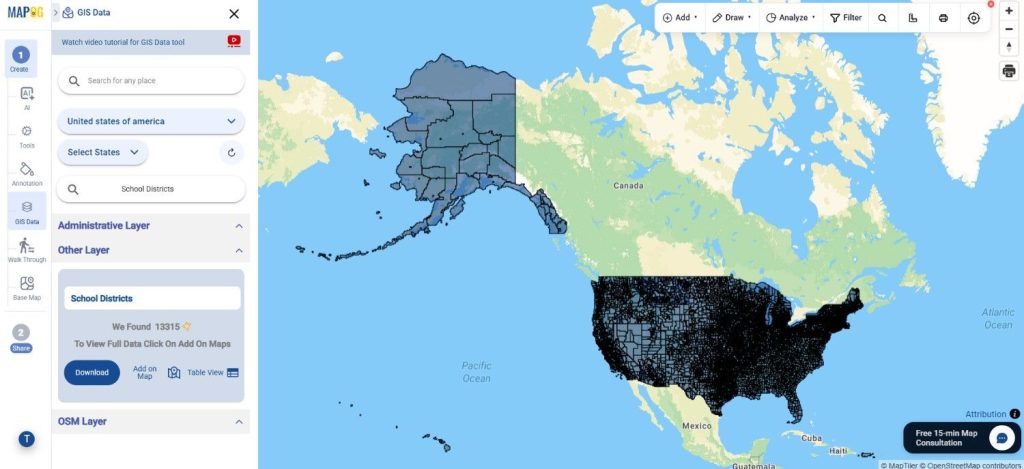
Begin by selecting GIS Data tool. Choose “United States of America” in select country panel. Then, you can get the school district layer in other layer or use the search layer tool to find “School Districts.” Review the attributes to understand whether the data is available as polygons (boundaries) or points.

Download USA School Districts Data
Step 2: Apply Data Filters

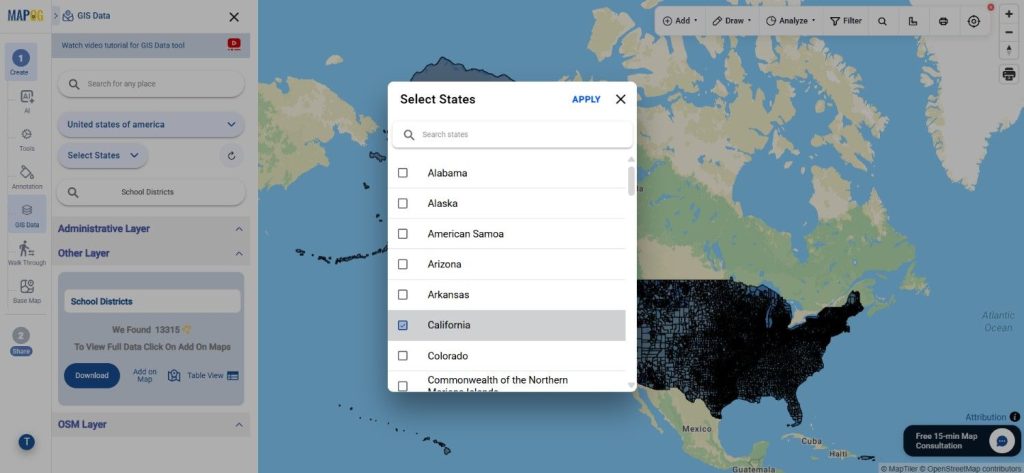
You can refine your dataset using the filter option by narrowing it down to state or district levels. This helps in extracting more precise and relevant information for targeted analysis.

Download USA School Districts Data
Step 3: Visualize with “Add on Map”

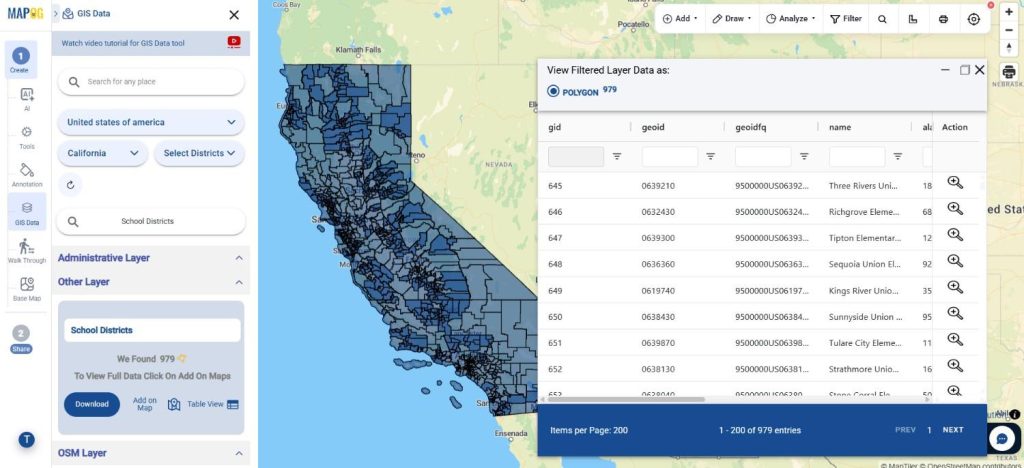
Next, use the “Add on Map” feature to load the selected layer into the map interface. This allows users to visually analyze boundaries, compare regions, and understand spatial distribution more effectively.

Download USA School Districts Data
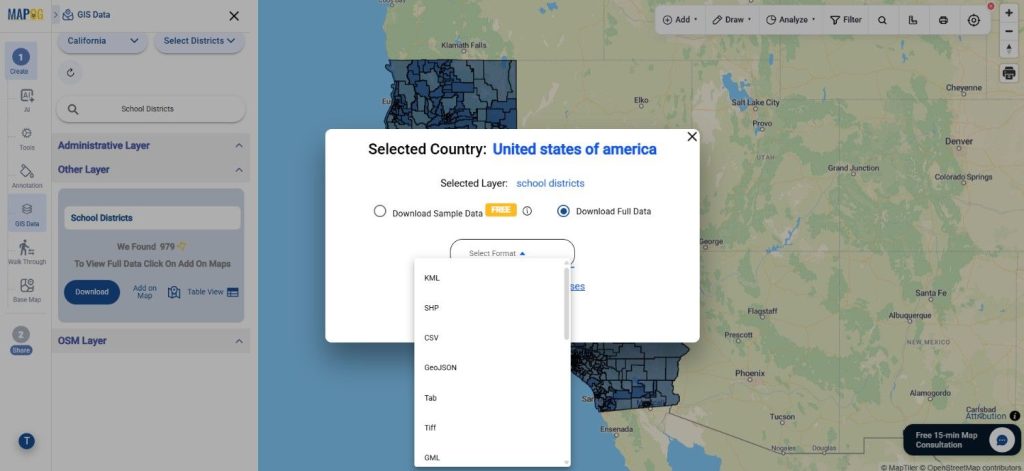
Step 4: Download School Districts Data

Finally, click on “Download Data.” Choose between sample or full datasets, select your preferred format (Shapefile, KML, MID, etc.), accept the terms, and proceed with the download.

Download USA School Districts Data

Conclusion

With GIS Data by MAPOG, the ability to Download USA School Districts Data becomes efficient and flexible. From searching and filtering to visualization and export, every step is designed to simplify GIS workflows. Whether it’s for educational planning, spatial analysis, or research, this platform provides reliable and ready-to-use datasets for informed decision-making.

With MAPOG’s versatile toolkit, you can effortlessly upload vectors and upload Excel or CSV data, incorporate existing layers, perform polygon splitting, use the converter for various formats, calculate isochrones, and utilize the Export Tool.

For any questions or further assistance, feel free to reach out to us at support@mapog.com. We’re here to help you make the most of your GIS data.

Download More Useful Data from USA:

Download Shapefile for the following:

  1. World Countries Shapefile
  2. Australia
  3. Argentina
  4. Austria
  5. Belgium
  6. Brazil
  7. Canada
  8. Denmark
  9. Fiji
  10. Finland
  11. Germany
  12. Greece
  13. India
  14. Indonesia
  15. Ireland
  16. Italy
  17. Japan
  18. Kenya
  19. Lebanon
  20. Madagascar
  21. Malaysia
  22. Mexico
  23. Mongolia
  24. Netherlands
  25. New Zealand
  26. Nigeria
  27. Papua New Guinea
  28. Philippines
  29. Poland
  30. Russia
  31. Singapore
  32. South Africa
  33. South Korea
  34. Spain
  35. Switzerland
  36. Tunisia
  37. United Kingdom Shapefile
  38. United States of America
  39. Vietnam
  40. Croatia
  41. Chile
  42. Norway
  43. Maldives
  44. Bhutan
  45. Colombia
  46. Libya
  47. Comoros
  48. Hungary
  49. Laos
  50. Estonia
  51. Iraq
  52. Portugal
  53. Azerbaijan
  54. Macedonia
  55. Romania
  56. Peru
  57. Marshall Islands
  58. Slovenia
  59. Nauru
  60. Guatemala
  61. El Salvador
  62. Afghanistan
  63. Cyprus
  64. Syria
  65. Slovakia
  66. Luxembourg
  67. Jordan
  68. Armenia
  69. Haiti And Dominican Republic
  70. Malta
  71. Djibouti
  72. East Timor
  73. Micronesia
  74. Morocco
  75. Liberia
  76. Kosovo
  77. Isle Of Man
  78. Paraguay
  79. Tokelau
  80. Palau
  81. Ile De Clipperton
  82. Mauritius
  83. Equatorial Guinea
  84. Tonga
  85. Myanmar
  86. Thailand
  87. New Caledonia
  88. Niger
  89. Nicaragua
  90. Pakistan
  91. Nepal
  92. Seychelles
  93. Democratic Republic of the Congo
  94. China
  95. Kenya
  96. Kyrgyzstan
  97. Bosnia Herzegovina
  98. Burkina Faso
  99. Canary Island
  100. Togo
  101. Israel And Palestine
  102. Algeria
  103. Suriname
  104. Angola
  105. Cape Verde
  106. Liechtenstein
  107. Taiwan
  108. Turkmenistan
  109. Tuvalu
  110. Ivory Coast
  111. Moldova
  112. Somalia
  113. Belize
  114. Swaziland
  115. Solomon Islands
  116. North Korea
  117. Sao Tome And Principe
  118. Guyana
  119. Serbia
  120. Senegal And Gambia
  121. Faroe Islands
  122. Guernsey Jersey
  123. Monaco
  124. Tajikistan
  125. Pitcairn

Disclaimer : The GIS data provided for download in this article was initially sourced from OpenStreetMap (OSM) and further modified to enhance its usability. Please note that the original data is licensed under the Open Database License (ODbL) by the OpenStreetMap contributors. While modifications have been made to improve the data, any use, redistribution, or modification of this data must comply with the ODbL license terms. For more information on the ODbL, please visit OpenStreetMap’s License Page.

Here are some blogs you might be interested in:

Download France Postal Code Data in Shapefile, KML, MID +15 GIS Formats

Looking to Download France Postal Code Data for mapping or analysis? GIS Data by MAPOG offers a simple and efficient way to access structured postal boundary datasets in multiple GIS formats like Shapefile, KML, GeoJSON, and MID. Postal codes represent specific geographic areas used for mail delivery, but they are also widely used in location intelligence, service planning, and demographic analysis. With MAPOG, accurate and well-organized data is made available for seamless integration into your GIS projects.

Understanding the Process

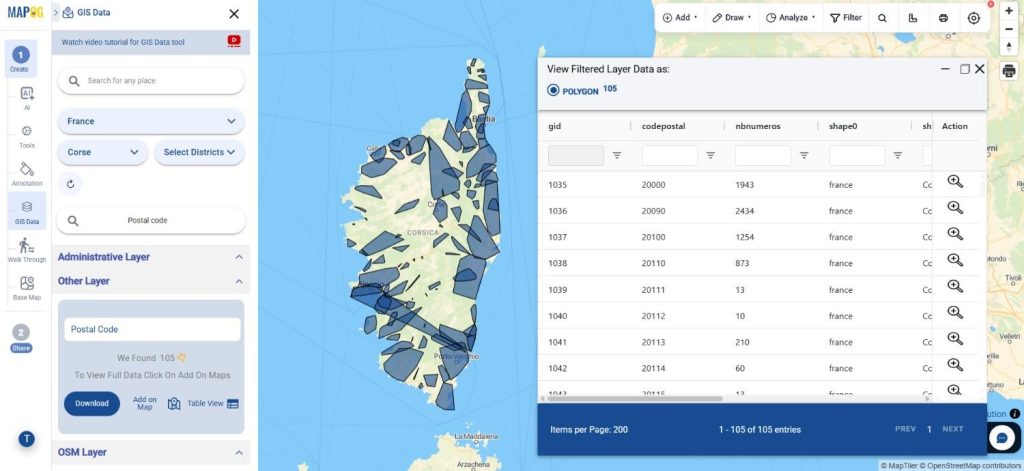
Postal Code data typically consists of boundaries or point locations that define delivery zones, making it essential for logistics, planning, and spatial analysis. Using GIS Data by MAPOG, users can quickly search, visualize, and extract this data in their preferred format. The platform works by organizing datasets into layers, allowing users to filter, preview, and download them based on their requirements.

How to Download Postal Code Data

MAPOG simplifies the workflow by providing access to hundreds of layers and multiple export formats such as SHP, KML, CSV, GeoJSON, SQL, DXF, MIF, TOPOJSON, and GPX. Just search for the country & layer, review them , add them on map for quick analysis or just download then for further use. This ensures compatibility with a wide range of GIS tools and applications.

Download France Postal Code Data

Note:

• All datasets are provided in GCS datum EPSG:4326 WGS84 Coordinate Reference System.
• Users are required to log in before downloading datasets.

Step-by-Step Guide to Download France Postal Code Data

Step 1: Search for Postal Code Data

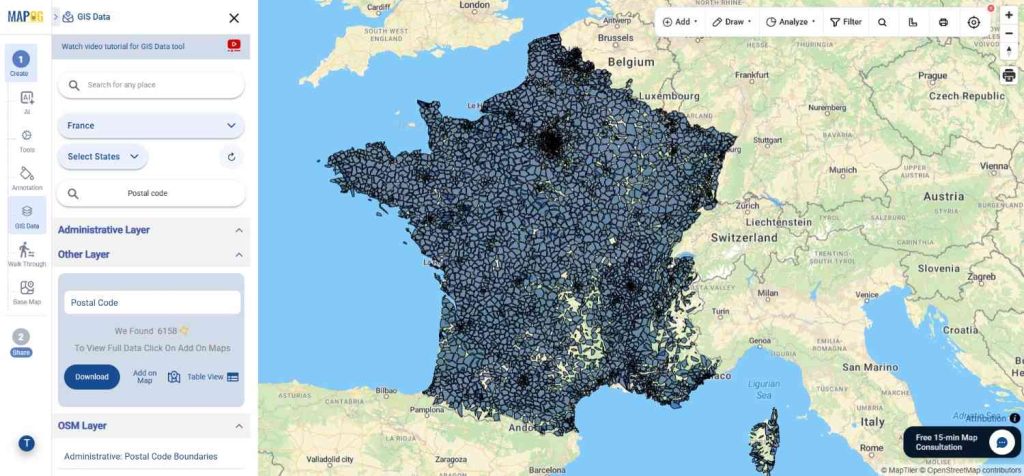
Begin by selecting GIS Data tool. Choose “France” in select country panel. Then, you can get the Postal Code layer in other layer or Use the search layer option to find “Postal Code Data.” You can also review the attributes to understand whether the dataset is available as points or polygons.

Download France Postal Code Data
Step 2: Apply Data Filters

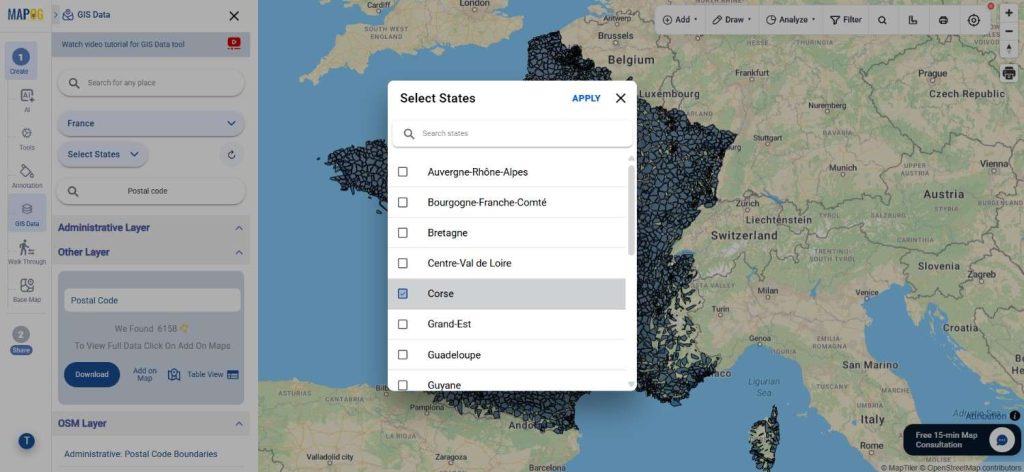
Next, refine your dataset using the Filter Data option. This allows you to narrow results by state and district, helping you focus on more specific and relevant geographic areas for better analysis.

Download France Postal Code Data
Step 3: Visualize with “Add on Map”

With the “Add on Map” feature, selected layers can be directly added to the map analysis interface. This enables users to visualize postal code boundaries, study spatial distribution, and perform further analysis interactively.

Download France Postal Code Data
Step 4: Download Postal Code Data

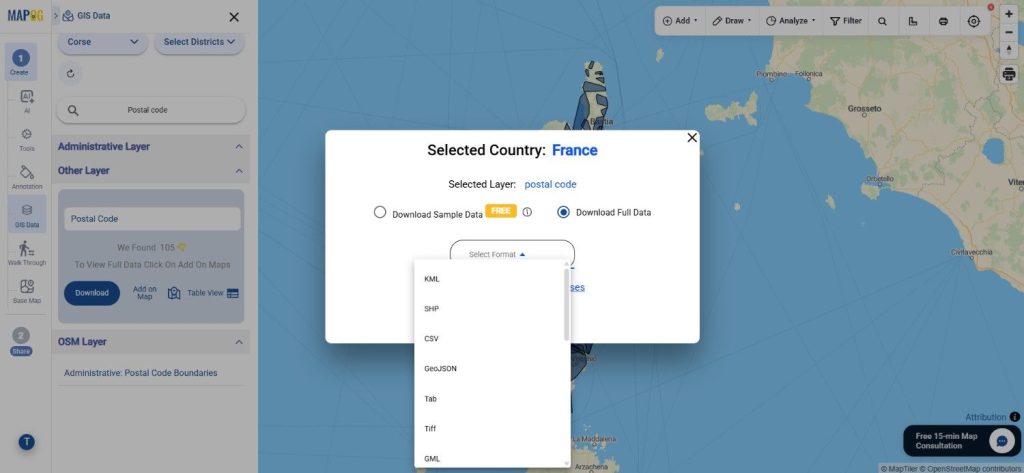
Once the dataset meets your needs, click on “Download Data.” You may choose between sample data or the complete dataset. Select your preferred format—Shapefile, KML, MID, or others—accept the terms, and proceed with the download.

Download France Postal Code Data

Final Thoughts

With GIS Data by MAPOG, the ability to Download France Postal Code Data becomes smooth and highly flexible. From logistics planning to market analysis, postal datasets play a crucial role in understanding geographic patterns. The platform not only simplifies access but also enhances usability by offering multiple formats and interactive tools, making it a reliable choice for GIS professionals and enthusiasts alike.

With MAPOG’s versatile toolkit, you can effortlessly upload vectors and upload Excel or CSV data, incorporate existing layers, perform polygon splitting, use the converter for various formats, calculate isochrones, and utilize the Export Tool.

For any questions or further assistance, feel free to reach out to us at support@mapog.com. We’re here to help you make the most of your GIS data.

Download Shapefile for the following:

  1. World Countries Shapefile
  2. Australia
  3. Argentina
  4. Austria
  5. Belgium
  6. Brazil
  7. Canada
  8. Denmark
  9. Fiji
  10. Finland
  11. Germany
  12. Greece
  13. India
  14. Indonesia
  15. Ireland
  16. Italy
  17. Japan
  18. Kenya
  19. Lebanon
  20. Madagascar
  21. Malaysia
  22. Mexico
  23. Mongolia
  24. Netherlands
  25. New Zealand
  26. Nigeria
  27. Papua New Guinea
  28. Philippines
  29. Poland
  30. Russia
  31. Singapore
  32. South Africa
  33. South Korea
  34. Spain
  35. Switzerland
  36. Tunisia
  37. United Kingdom Shapefile
  38. United States of America
  39. Vietnam
  40. Croatia
  41. Chile
  42. Norway
  43. Maldives
  44. Bhutan
  45. Colombia
  46. Libya
  47. Comoros
  48. Hungary
  49. Laos
  50. Estonia
  51. Iraq
  52. Portugal
  53. Azerbaijan
  54. Macedonia
  55. Romania
  56. Peru
  57. Marshall Islands
  58. Slovenia
  59. Nauru
  60. Guatemala
  61. El Salvador
  62. Afghanistan
  63. Cyprus
  64. Syria
  65. Slovakia
  66. Luxembourg
  67. Jordan
  68. Armenia
  69. Haiti And Dominican Republic
  70. Malta
  71. Djibouti
  72. East Timor
  73. Micronesia
  74. Morocco
  75. Liberia
  76. Kosovo
  77. Isle Of Man
  78. Paraguay
  79. Tokelau
  80. Palau
  81. Ile De Clipperton
  82. Mauritius
  83. Equatorial Guinea
  84. Tonga
  85. Myanmar
  86. Thailand
  87. New Caledonia
  88. Niger
  89. Nicaragua
  90. Pakistan
  91. Nepal
  92. Seychelles
  93. Democratic Republic of the Congo
  94. China
  95. Kenya
  96. Kyrgyzstan
  97. Bosnia Herzegovina
  98. Burkina Faso
  99. Canary Island
  100. Togo
  101. Israel And Palestine
  102. Algeria
  103. Suriname
  104. Angola
  105. Cape Verde
  106. Liechtenstein
  107. Taiwan
  108. Turkmenistan
  109. Tuvalu
  110. Ivory Coast
  111. Moldova
  112. Somalia
  113. Belize
  114. Swaziland
  115. Solomon Islands
  116. North Korea
  117. Sao Tome And Principe
  118. Guyana
  119. Serbia
  120. Senegal And Gambia
  121. Faroe Islands
  122. Guernsey Jersey
  123. Monaco
  124. Tajikistan
  125. Pitcairn

Disclaimer : The GIS data provided for download in this article was initially sourced from OpenStreetMap (OSM) and further modified to enhance its usability. Please note that the original data is licensed under the Open Database License (ODbL) by the OpenStreetMap contributors. While modifications have been made to improve the data, any use, redistribution, or modification of this data must comply with the ODbL license terms. For more information on the ODbL, please visit OpenStreetMap’s License Page.

Here are some blogs you might be interested in:

Download USA Blocks Data in GIS Formats (Step-by-Step Guide)

GIS Data by MAPOG is a powerful platform designed to help users access and download structured geographic datasets in multiple GIS formats. It supports a wide range of layers and formats, making spatial data easily accessible for mapping, planning, and analysis. If you need administrative boundary information, you can Download USA Blocks Data quickly and efficiently from the platform in formats compatible with most GIS tools.

Understanding the Process

USA Blocks represent administrative subdivisions used for regional planning, governance, and statistical analysis. These boundaries help researchers, planners, and analysts understand local-level geography and demographic distribution. With GIS Data by MAPOG, users can easily Download USA Blocks Data in formats suitable for various GIS applications while ensuring compatibility and accuracy.

How to Download USA Blocks Data

MAPOG simplifies the entire workflow by providing a structured interface to explore hundreds of datasets and layers. Simply look up the nation and layer, examine them, add them to a map for easy study, or simply download them for later use. The platform supports formats such as SHP, KML, MID, CSV, GeoJSON, SQL, DXF, MIF, TOPOJSON, GPX, and more, allowing seamless integration into different GIS environments.

Download USA Blocks Data of Any Region

Note:
  • All datasets are provided in GCS datum EPSG:4326 WGS84 CRS (Coordinate Reference System).
  • Users must log in to access and download their required data formats.

Step-by-Step Guide to Download USA Blocks Data

Step 1: Search for USA Blocks Data

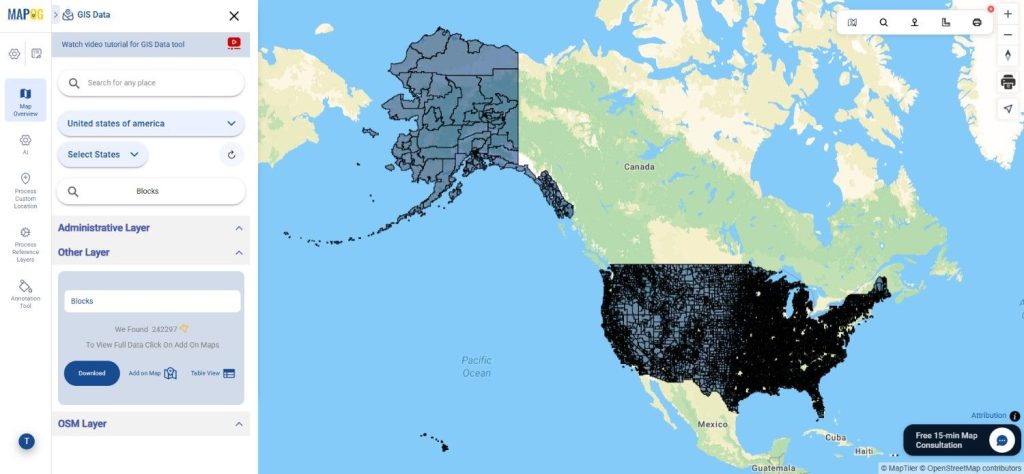
Begin by selecting GIS Data tool. Choose “United States of America” in select country panel. Then, you can get the Blocks layer in other layer or enter “Blocks Data” in the search bar to locate the dataset. Once the results appear, review the attributes and geometry type to understand whether the dataset is available as polygon boundaries or other spatial formats.

Download USA Blocks Data
Step 2: Apply Data Filters

Next, refine the results using the Filter Data option. Users can narrow down datasets by selecting specific states or districts, allowing them to focus on smaller administrative areas within a larger dataset. As a result, the search becomes more precise and relevant for detailed mapping projects.

Download USA Blocks Data
Step 3: Visualize with “Add on Map”

Before downloading, you can preview the dataset using the Add on Map feature. This option overlays the selected blocks layer onto the interactive map analysis interface. It helps users examine spatial distribution, boundaries, and relationships with other layers before proceeding further.

Download USA Blocks Data
Step 4: Download the Dataset

Finally, once the dataset meets your requirements, click Download Data. You can choose between a sample dataset or the full version. Select the preferred format such as Shapefile, KML, MID, or other supported GIS formats, accept the terms, and proceed with the download to Download USA Blocks Data for your GIS workflow.

Download USA Blocks Data

Conclusion

GIS Data by MAPOG makes accessing administrative boundary datasets simple and efficient. With multiple format options, advanced search tools, and interactive visualization features, users can easily explore and obtain accurate spatial data. Whether it is for research, planning, or mapping projects, the platform provides a reliable way to download and analyze geographic datasets with flexibility and ease.

With MAPOG’s versatile toolkit, you can effortlessly upload vectors and upload Excel or CSV data, incorporate existing layers, perform polygon splitting, use the converter for various formats, calculate isochrones, and utilize the Export Tool.

For any questions or further assistance, feel free to reach out to us at support@mapog.com. We’re here to help you make the most of your GIS data.

Download More Useful Data from USA:

Download Shapefile for the following:

  1. World Countries Shapefile
  2. Australia
  3. Argentina
  4. Austria
  5. Belgium
  6. Brazil
  7. Canada
  8. Denmark
  9. Fiji
  10. Finland
  11. Germany
  12. Greece
  13. India
  14. Indonesia
  15. Ireland
  16. Italy
  17. Japan
  18. Kenya
  19. Lebanon
  20. Madagascar
  21. Malaysia
  22. Mexico
  23. Mongolia
  24. Netherlands
  25. New Zealand
  26. Nigeria
  27. Papua New Guinea
  28. Philippines
  29. Poland
  30. Russia
  31. Singapore
  32. South Africa
  33. South Korea
  34. Spain
  35. Switzerland
  36. Tunisia
  37. United Kingdom Shapefile
  38. United States of America
  39. Vietnam
  40. Croatia
  41. Chile
  42. Norway
  43. Maldives
  44. Bhutan
  45. Colombia
  46. Libya
  47. Comoros
  48. Hungary
  49. Laos
  50. Estonia
  51. Iraq
  52. Portugal
  53. Azerbaijan
  54. Macedonia
  55. Romania
  56. Peru
  57. Marshall Islands
  58. Slovenia
  59. Nauru
  60. Guatemala
  61. El Salvador
  62. Afghanistan
  63. Cyprus
  64. Syria
  65. Slovakia
  66. Luxembourg
  67. Jordan
  68. Armenia
  69. Haiti And Dominican Republic
  70. Malta
  71. Djibouti
  72. East Timor
  73. Micronesia
  74. Morocco
  75. Liberia
  76. Kosovo
  77. Isle Of Man
  78. Paraguay
  79. Tokelau
  80. Palau
  81. Ile De Clipperton
  82. Mauritius
  83. Equatorial Guinea
  84. Tonga
  85. Myanmar
  86. Thailand
  87. New Caledonia
  88. Niger
  89. Nicaragua
  90. Pakistan
  91. Nepal
  92. Seychelles
  93. Democratic Republic of the Congo
  94. China
  95. Kenya
  96. Kyrgyzstan
  97. Bosnia Herzegovina
  98. Burkina Faso
  99. Canary Island
  100. Togo
  101. Israel And Palestine
  102. Algeria
  103. Suriname
  104. Angola
  105. Cape Verde
  106. Liechtenstein
  107. Taiwan
  108. Turkmenistan
  109. Tuvalu
  110. Ivory Coast
  111. Moldova
  112. Somalia
  113. Belize
  114. Swaziland
  115. Solomon Islands
  116. North Korea
  117. Sao Tome And Principe
  118. Guyana
  119. Serbia
  120. Senegal And Gambia
  121. Faroe Islands
  122. Guernsey Jersey
  123. Monaco
  124. Tajikistan
  125. Pitcairn

Disclaimer : The GIS data provided for download in this article was initially sourced from OpenStreetMap (OSM) and further modified to enhance its usability. Please note that the original data is licensed under the Open Database License (ODbL) by the OpenStreetMap contributors. While modifications have been made to improve the data, any use, redistribution, or modification of this data must comply with the ODbL license terms. For more information on the ODbL, please visit OpenStreetMap’s License Page.

Here are some blogs you might be interested in:

Download USA County Subdivision Data in Shapefile, KML, MID +15 GIS Formats using GIS Data by MAPOG

GIS Data by MAPOG is a powerful platform that provides structured geographic datasets in multiple GIS-ready formats. It allows users to easily explore, visualize, and download spatial layers required for mapping, planning, and spatial analysis. If you want to Download USA County Subdivision Data, MAPOG offers a streamlined solution with access to well-organized administrative boundary datasets in more than 15 GIS-compatible formats.

Understanding USA County Subdivision Data

USA County subdivisions represent smaller administrative units within counties that help organize governance, planning, and statistical reporting. These boundaries are widely used in demographic analysis, regional planning, infrastructure development, and geographic research. With GIS Data by MAPOG, users can Download USA County Subdivision Data and integrate it directly into their GIS workflows for deeper spatial analysis.

Simply look up the nation and layer, examine them, add them to a map for easy study, or download them for later use. The platform provides access to datasets from hundreds of countries and supports multiple formats such as SHP, KML, GeoJSON, MID, CSV, SQL, DXF, MIF, TOPOJSON, and GPX, making the data compatible with a wide range of GIS tools.

Download USA County Subdivision Data

Notes:
  • All datasets are provided in GCS Datum EPSG:4326 – WGS84 CRS (Coordinate Reference System).
  • Users must log in to the platform before downloading the required data formats.

Steps to Download USA County Subdivision Data

Step 1: Search for USA County Subdivision Data

Begin by selecting GIS Data tool. Choose “United States of America” in select country panel. Then, you can get the County Subdivision in other layer or Use the Search Layer option and type “County Subdivision Data.” Once the dataset appears, review the attributes to understand whether the layer is available in polygon or boundary format.

Download USA County Subdivision Data
Step 2: Apply Data Filters

The Filter Data option allows users to refine the dataset by administrative levels such as state or district. This makes it easier to narrow down the results and focus on a specific geographic region. By applying these filters, users can efficiently locate detailed administrative boundaries and Download USA County Subdivision Data that is more relevant to their analysis.
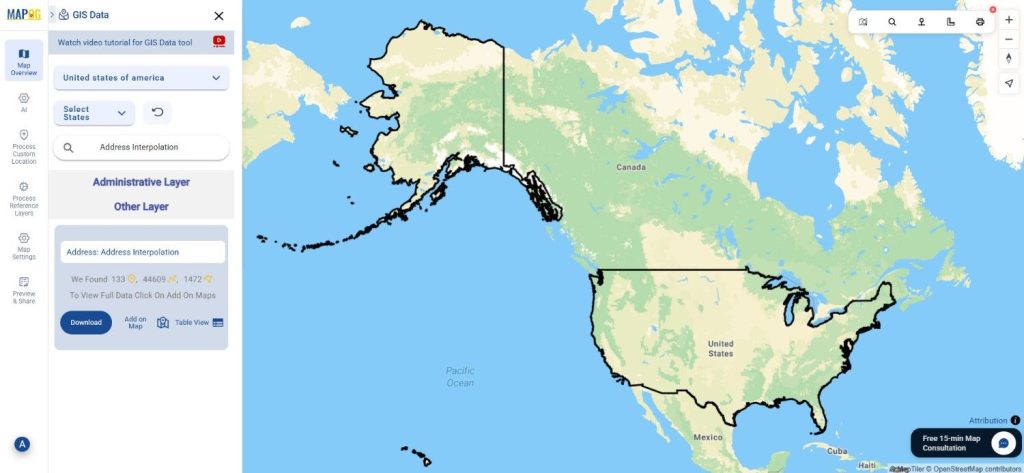
Download USA County Subdivision Data
Step 3: Visualize Using “Add on Map”

Before downloading, users can preview the dataset through the Add on Map feature. This option overlays the selected layer on the platform’s interactive map interface, allowing users to visually analyze boundary distribution and spatial relationships. It helps confirm whether the dataset matches the required area or study region.

Download USA County Subdivision Data
Step 4: Download the Dataset

Once the correct dataset is identified, click on the Download Data option. Users can choose between a sample file or the complete dataset and select their preferred format such as Shapefile, KML, MID, GeoJSON, or other GIS formats. After accepting the terms, the data can be downloaded and used directly in GIS software.

Download USA County Subdivision Data

Conclusion

Accessing administrative boundary datasets has become much easier with GIS Data by MAPOG. The platform provides a structured and efficient way to explore and download geographic layers for mapping and spatial analysis. By offering multiple GIS formats and powerful search tools, it enables researchers, planners, and GIS professionals to work with accurate datasets and perform detailed regional analysis with ease.

With MAPOG’s versatile toolkit, you can effortlessly upload vectors and upload Excel or CSV data, incorporate existing layers, perform polygon splitting, use the converter for various formats, calculate isochrones, and utilize the Export Tool.

For any questions or further assistance, feel free to reach out to us at support@mapog.com. We’re here to help you make the most of your GIS data.

Download More Useful Data from USA:

Download Shapefile for the following:

  1. World Countries Shapefile
  2. Australia
  3. Argentina
  4. Austria
  5. Belgium
  6. Brazil
  7. Canada
  8. Denmark
  9. Fiji
  10. Finland
  11. Germany
  12. Greece
  13. India
  14. Indonesia
  15. Ireland
  16. Italy
  17. Japan
  18. Kenya
  19. Lebanon
  20. Madagascar
  21. Malaysia
  22. Mexico
  23. Mongolia
  24. Netherlands
  25. New Zealand
  26. Nigeria
  27. Papua New Guinea
  28. Philippines
  29. Poland
  30. Russia
  31. Singapore
  32. South Africa
  33. South Korea
  34. Spain
  35. Switzerland
  36. Tunisia
  37. United Kingdom Shapefile
  38. United States of America
  39. Vietnam
  40. Croatia
  41. Chile
  42. Norway
  43. Maldives
  44. Bhutan
  45. Colombia
  46. Libya
  47. Comoros
  48. Hungary
  49. Laos
  50. Estonia
  51. Iraq
  52. Portugal
  53. Azerbaijan
  54. Macedonia
  55. Romania
  56. Peru
  57. Marshall Islands
  58. Slovenia
  59. Nauru
  60. Guatemala
  61. El Salvador
  62. Afghanistan
  63. Cyprus
  64. Syria
  65. Slovakia
  66. Luxembourg
  67. Jordan
  68. Armenia
  69. Haiti And Dominican Republic
  70. Malta
  71. Djibouti
  72. East Timor
  73. Micronesia
  74. Morocco
  75. Liberia
  76. Kosovo
  77. Isle Of Man
  78. Paraguay
  79. Tokelau
  80. Palau
  81. Ile De Clipperton
  82. Mauritius
  83. Equatorial Guinea
  84. Tonga
  85. Myanmar
  86. Thailand
  87. New Caledonia
  88. Niger
  89. Nicaragua
  90. Pakistan
  91. Nepal
  92. Seychelles
  93. Democratic Republic of the Congo
  94. China
  95. Kenya
  96. Kyrgyzstan
  97. Bosnia Herzegovina
  98. Burkina Faso
  99. Canary Island
  100. Togo
  101. Israel And Palestine
  102. Algeria
  103. Suriname
  104. Angola
  105. Cape Verde
  106. Liechtenstein
  107. Taiwan
  108. Turkmenistan
  109. Tuvalu
  110. Ivory Coast
  111. Moldova
  112. Somalia
  113. Belize
  114. Swaziland
  115. Solomon Islands
  116. North Korea
  117. Sao Tome And Principe
  118. Guyana
  119. Serbia
  120. Senegal And Gambia
  121. Faroe Islands
  122. Guernsey Jersey
  123. Monaco
  124. Tajikistan
  125. Pitcairn

Disclaimer : The GIS data provided for download in this article was initially sourced from OpenStreetMap (OSM) and further modified to enhance its usability. Please note that the original data is licensed under the Open Database License (ODbL) by the OpenStreetMap contributors. While modifications have been made to improve the data, any use, redistribution, or modification of this data must comply with the ODbL license terms. For more information on the ODbL, please visit OpenStreetMap’s License Page.

Here are some blogs you might be interested in:

Download Cattle Farms Data in Shapefile, KML, MID +15 GIS Formats Using GIS Data by MAPOG

Accessing structured livestock location information is essential for agriculture planning, supply chain analysis, and rural development studies. With GIS Data by MAPOG, you can Download Cattle Farms Data in multiple GIS formats such as Shapefile, KML, MID, and many others, ensuring smooth compatibility with different GIS tools. Cattle farms data generally includes farm locations, spatial distribution, and related attributes, helping users analyze patterns, density, and regional coverage more effectively.

How to Download Cattle Farms Data

MAPOG streamlines the entire process of data access, allowing users to explore extensive GIS layers related to agriculture and livestock. Various formats such as SHP, KML, MID, CSV, GeoJSON, SQL, DXF, MIF, GPX, and TOPOJSON are supported, making it suitable for advanced GIS analysis as well as basic mapping needs.

Download Cattle Farms Data of any countries

Note:
  • All datasets are delivered in GCS datum EPSG:4326 (WGS84 Coordinate Reference System).
  • User login is required to view and download datasets in preferred formats.

Step-by-Step Guide to Download Cattle Farms Data

Step 1: Search for Cattle Farms Data

Begin by selecting the required area within the GIS Data by MAPOG interface. Use the layer search option and type “Cattle Farms Data.” The available attributes can be reviewed to understand whether the data is represented as points or polygons.

Download Cattle Farms Data
Step 2: Apply Data Filters

To improve accuracy, the Filter Data option can be used to narrow results by state and district. When broader datasets are available, this filtering approach allows deeper data exploration at more granular administrative levels.

Download Cattle Farms Data
Step 3: Visualize Using “Add on Map”

Before downloading, selected layers can be added directly to the map analysis interface using the “Add on Map” option. This makes it easier to visually assess cattle farm distribution, clustering, and spatial relationships for further analysis.

Download Cattle Farms Data
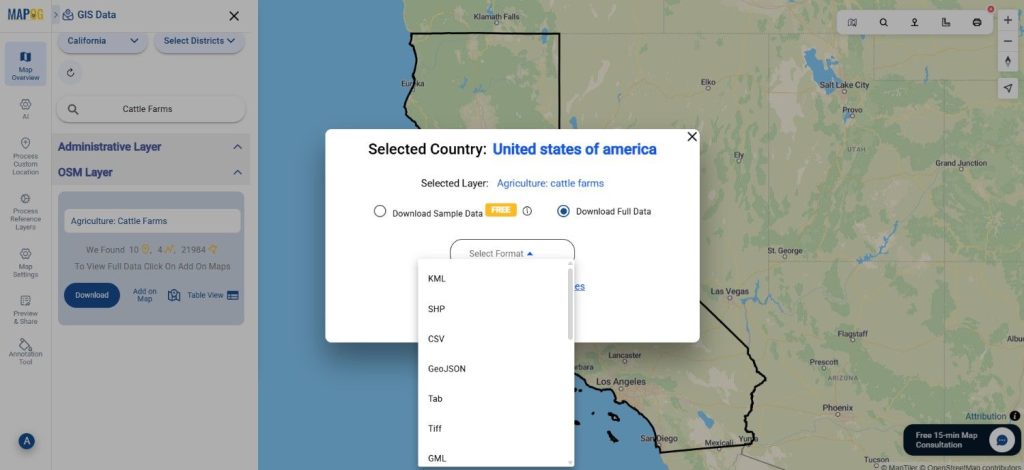
Step 4: Download the Data

Once the dataset meets your requirements, click on the download option. You may choose between sample data or full datasets, select the desired format, accept the terms, and proceed. With this step, users can successfully Download Cattle Farms Data for offline use in any compatible GIS software.

Download Cattle Farms Data

Final Thoughts

GIS Data by MAPOG makes agricultural and livestock-related spatial analysis more accessible and efficient. The ability to Download Cattle Farms Data in multiple GIS formats, combined with smart search, filtering, and visualization tools, ensures flexibility across various use cases. Whether used for research, planning, or analysis, the platform delivers reliable and ready-to-use GIS datasets for informed decision-making.

With MAPOG’s versatile toolkit, you can effortlessly upload vector and upload Excel or CSV data, incorporate existing layers, perform Split polygon by line, use the converter for various formats, calculate isochrones, and utilize the Export Tool.

For any questions or further assistance, feel free to reach out to us at support@mapog.com. We’re here to help you make the most of your GIS data.

Download Shapefile for the following:

  1. World Countries Shapefile
  2. Australia
  3. Argentina
  4. Austria
  5. Belgium
  6. Brazil
  7. Canada
  8. Denmark
  9. Fiji
  10. Finland
  11. Germany
  12. Greece
  13. India
  14. Indonesia
  15. Ireland
  16. Italy
  17. Japan
  18. Kenya
  19. Lebanon
  20. Madagascar
  21. Malaysia
  22. Mexico
  23. Mongolia
  24. Netherlands
  25. New Zealand
  26. Nigeria
  27. Papua New Guinea
  28. Philippines
  29. Poland
  30. Russia
  31. Singapore
  32. South Africa
  33. South Korea
  34. Spain
  35. Switzerland
  36. Tunisia
  37. United Kingdom Shapefile
  38. United States of America
  39. Vietnam
  40. Croatia
  41. Chile
  42. Norway
  43. Maldives
  44. Bhutan
  45. Colombia
  46. Libya
  47. Comoros
  48. Hungary
  49. Laos
  50. Estonia
  51. Iraq
  52. Portugal
  53. Azerbaijan
  54. Macedonia
  55. Romania
  56. Peru
  57. Marshall Islands
  58. Slovenia
  59. Nauru
  60. Guatemala
  61. El Salvador
  62. Afghanistan
  63. Cyprus
  64. Syria
  65. Slovakia
  66. Luxembourg
  67. Jordan
  68. Armenia
  69. Haiti And Dominican Republic
  70. Malta
  71. Djibouti
  72. East Timor
  73. Micronesia
  74. Morocco
  75. Liberia
  76. Kosovo
  77. Isle Of Man
  78. Paraguay
  79. Tokelau
  80. Palau
  81. Ile De Clipperton
  82. Mauritius
  83. Equatorial Guinea
  84. Tonga
  85. Myanmar
  86. Thailand
  87. New Caledonia
  88. Niger
  89. Nicaragua
  90. Pakistan
  91. Nepal
  92. Seychelles
  93. Democratic Republic of the Congo
  94. China
  95. Kenya
  96. Kyrgyzstan
  97. Bosnia Herzegovina
  98. Burkina Faso
  99. Canary Island
  100. Togo
  101. Israel And Palestine
  102. Algeria
  103. Suriname
  104. Angola
  105. Cape Verde
  106. Liechtenstein
  107. Taiwan
  108. Turkmenistan
  109. Tuvalu
  110. Ivory Coast
  111. Moldova
  112. Somalia
  113. Belize
  114. Swaziland
  115. Solomon Islands
  116. North Korea
  117. Sao Tome And Principe
  118. Guyana
  119. Serbia
  120. Senegal And Gambia
  121. Faroe Islands
  122. Guernsey Jersey
  123. Monaco
  124. Tajikistan
  125. Pitcairn

Disclaimer : The GIS data provided for download in this article was initially sourced from OpenStreetMap (OSM) and further modified to enhance its usability. Please note that the original data is licensed under the Open Database License (ODbL) by the OpenStreetMap contributors. While modifications have been made to improve the data, any use, redistribution, or modification of this data must comply with the ODbL license terms. For more information on the ODbL, please visit OpenStreetMap’s License Page.

Here are some blogs you might be interested in:

Download Address Interpolation Data (SHP, KML, GeoJSON) – Accurate Geocoding & Mapping

Looking to Download Address Interpolation Data for mapping, navigation, or spatial analytics? GIS Data by MAPOG makes this process smooth and efficient by offering multiple export formats such as Shapefile, KML, GeoJSON, MID, and more. Address Interpolation data helps estimate house numbers or address points along road segments, enabling accurate geocoding, routing, and urban planning workflows. With MAPOG, users can access structured, ready-to-use datasets that support various professional GIS applications.

Key Features & Supported Formats

MAPOG provides access to a vast collection of GIS layers, offering formats like SHP, KML, GeoJSON, MID/MIF, CSV, SQL, DXF, GPX, and TOPOJSON. The interface is designed so that professionals and beginners alike can easily browse, preview, filter, and Download Address Interpolation Data for their mapping needs.
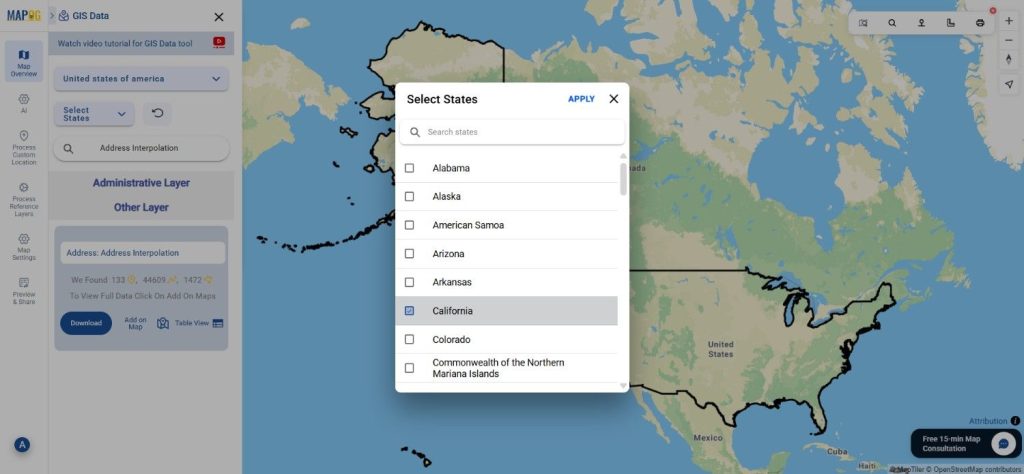
Download Address Interpolation Data of any countries

Note:
  • All datasets are provided in GCS datum EPSG:4326 – WGS84 CRS.
  • Login is required before downloading any dataset.

Step-by-Step Guide to Download Address Interpolation Data

Step 1: Search for Address Interpolation Layer

Begin by navigating to the GIS Data by MAPOG platform. Use the search layer function and type Address Interpolation Data.” Review the dataset details to understand its structure, attributes, and geometry type—usually line-based data representing address ranges along streets.

Download Address Interpolation Data

Step 2: Apply Data Filters for Precise Results

MAPOG’s Filter Data option allows you to refine the dataset by selecting specific states or districts. This helps in isolating the exact areas you need. For deeper datasets, you can progressively narrow the results from broader to more localized regions, making the final output highly relevant.

Download Address Interpolation Data

Step 3: Visualize Using “Add on Map”

With the Add on Map feature, users can instantly view the Address Interpolation layer on the interactive map interface. This visualization helps you analyze road segments, address ranges, density clusters, and positional accuracy before downloading.

Download Address Interpolation Data

Step 4: Download Address Interpolation Data

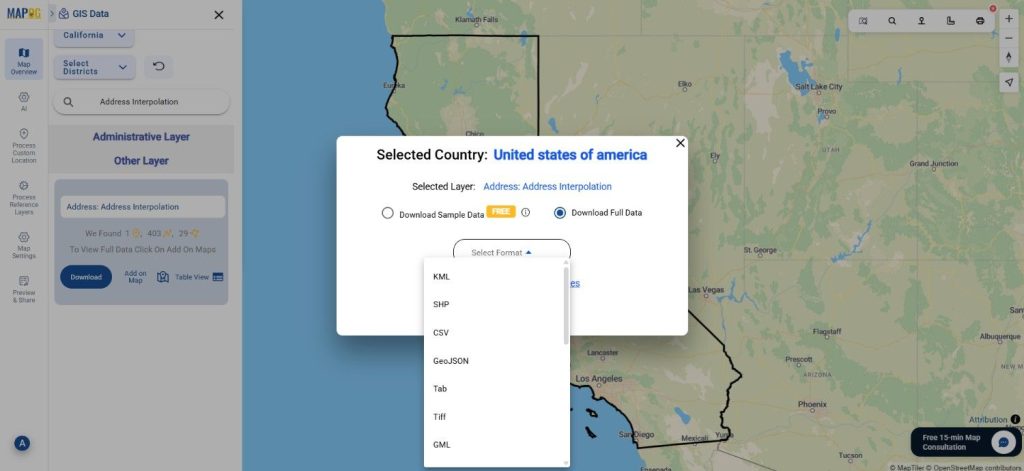
Once everything looks correct, click Download Data. Choose between a sample or complete dataset. Select your preferred format—Shapefile, KML, GeoJSON, MID, or others—agree to the terms, and proceed to download. The exported data can be seamlessly used in software like QGIS, ArcGIS, or any GIS workflow.

Download Address Interpolation Data

Final Thoughts

With MAPOG’s rich GIS Data library, the process to Download Address Interpolation Data becomes significantly easier and more efficient. The platform provides a blend of flexibility, accuracy, and user-friendly features suited for geocoding, planning, analytics, and research. Whether you’re handling urban development projects or location-based services, MAPOG empowers you with reliable datasets ready for immediate integration into your GIS environment.

With MAPOG’s versatile toolkit, you can effortlessly upload vector and upload Excel or CSV data, incorporate existing layers, perform Split polygon by line, use the converter for various formats, calculate isochrones, and utilize the Export Tool.

For any questions or further assistance, feel free to reach out to us at support@mapog.com. We’re here to help you make the most of your GIS data.

Download Shapefile for the following:

  1. World Countries Shapefile
  2. Australia
  3. Argentina
  4. Austria
  5. Belgium
  6. Brazil
  7. Canada
  8. Denmark
  9. Fiji
  10. Finland
  11. Germany
  12. Greece
  13. India
  14. Indonesia
  15. Ireland
  16. Italy
  17. Japan
  18. Kenya
  19. Lebanon
  20. Madagascar
  21. Malaysia
  22. Mexico
  23. Mongolia
  24. Netherlands
  25. New Zealand
  26. Nigeria
  27. Papua New Guinea
  28. Philippines
  29. Poland
  30. Russia
  31. Singapore
  32. South Africa
  33. South Korea
  34. Spain
  35. Switzerland
  36. Tunisia
  37. United Kingdom Shapefile
  38. United States of America
  39. Vietnam
  40. Croatia
  41. Chile
  42. Norway
  43. Maldives
  44. Bhutan
  45. Colombia
  46. Libya
  47. Comoros
  48. Hungary
  49. Laos
  50. Estonia
  51. Iraq
  52. Portugal
  53. Azerbaijan
  54. Macedonia
  55. Romania
  56. Peru
  57. Marshall Islands
  58. Slovenia
  59. Nauru
  60. Guatemala
  61. El Salvador
  62. Afghanistan
  63. Cyprus
  64. Syria
  65. Slovakia
  66. Luxembourg
  67. Jordan
  68. Armenia
  69. Haiti And Dominican Republic
  70. Malta
  71. Djibouti
  72. East Timor
  73. Micronesia
  74. Morocco
  75. Liberia
  76. Kosovo
  77. Isle Of Man
  78. Paraguay
  79. Tokelau
  80. Palau
  81. Ile De Clipperton
  82. Mauritius
  83. Equatorial Guinea
  84. Tonga
  85. Myanmar
  86. Thailand
  87. New Caledonia
  88. Niger
  89. Nicaragua
  90. Pakistan
  91. Nepal
  92. Seychelles
  93. Democratic Republic of the Congo
  94. China
  95. Kenya
  96. Kyrgyzstan
  97. Bosnia Herzegovina
  98. Burkina Faso
  99. Canary Island
  100. Togo
  101. Israel And Palestine
  102. Algeria
  103. Suriname
  104. Angola
  105. Cape Verde
  106. Liechtenstein
  107. Taiwan
  108. Turkmenistan
  109. Tuvalu
  110. Ivory Coast
  111. Moldova
  112. Somalia
  113. Belize
  114. Swaziland
  115. Solomon Islands
  116. North Korea
  117. Sao Tome And Principe
  118. Guyana
  119. Serbia
  120. Senegal And Gambia
  121. Faroe Islands
  122. Guernsey Jersey
  123. Monaco
  124. Tajikistan
  125. Pitcairn

Disclaimer : The GIS data provided for download in this article was initially sourced from OpenStreetMap (OSM) and further modified to enhance its usability. Please note that the original data is licensed under the Open Database License (ODbL) by the OpenStreetMap contributors. While modifications have been made to improve the data, any use, redistribution, or modification of this data must comply with the ODbL license terms. For more information on the ODbL, please visit OpenStreetMap’s License Page.

Here are some blogs you might be interested in:

How to Convert SHP to KMZ Easily: Complete Step-by-Step Guide for GIS Users

A crucial part of the GIS process involves file conversion, which ensures that information flows smoothly across different platforms. To make this process effortless, the MAPOG Converter Tool comes into play—it allows users to quickly and efficiently convert data between multiple formats.

What is SHP File?

In GIS, one of the most commonly used geographic vector data formats is the SHP file (Shapefile). It stores both the attribute data, which describes the features, and the geometry, which includes points, lines, and polygons. Additionally, SHP files work seamlessly with applications like ArcGIS and QGIS, making them ideal for mapping locations, boundaries, and other spatial data. Moreover, these files often come with additional supporting files that store related information.

Online GIS Data Conversion

Key Concept for Conversion SHP to KMZ:

To make the conversion process even smoother, MAPOG’s Converter Tool provides a simple and intuitive platform. With its user-friendly interface, users can move through each step without any hassle. Whether you want to convert SHP to KMZ or any other format, MAPOG ensures that the process is both fast and accurate.

Step-by-Step Guide to Converting SHP to KMZ

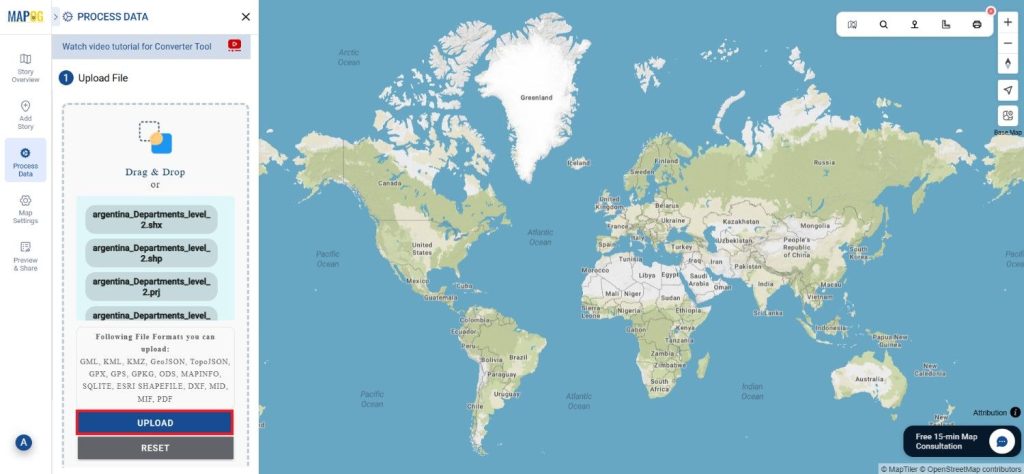
Step 1: Upload the Data

Start by selecting the “Process Data” section in MAPOG Map Analysis. From there, choose the “Converter Tool” option.

SHP to KMZ

Before uploading your SHP file, make sure it is ready for conversion.

SHP to KMZ
Step 2: Select the Format for Conversion

Next, select KMZ as the output format. KMZ is widely used for displaying geographic data in Google Earth and other web-based mapping platforms, making it a versatile format for visualization and sharing.

SHP to KMZ
Step 3: Execute the Conversion

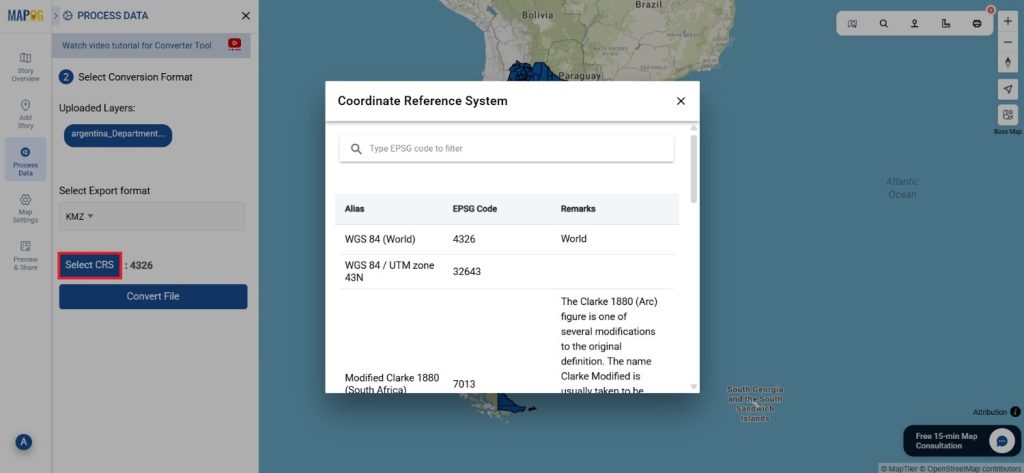
Once you’ve chosen the KMZ format and set the CRS, proceed with the conversion process.

SHP to KMZ

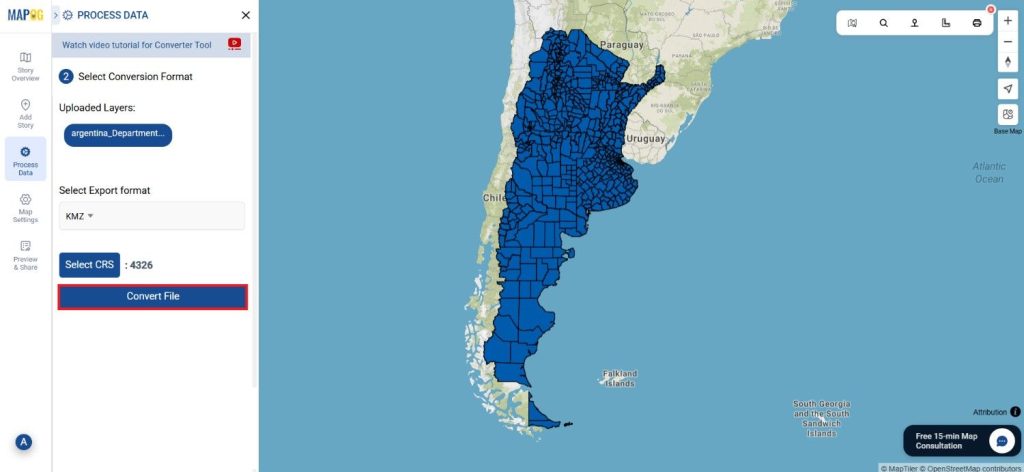
The MAPOG tool will efficiently convert your SHP file into KMZ format, allowing for easy integration into Google Earth and similar tools.

SHP to KMZ
Step 4: Review and Download
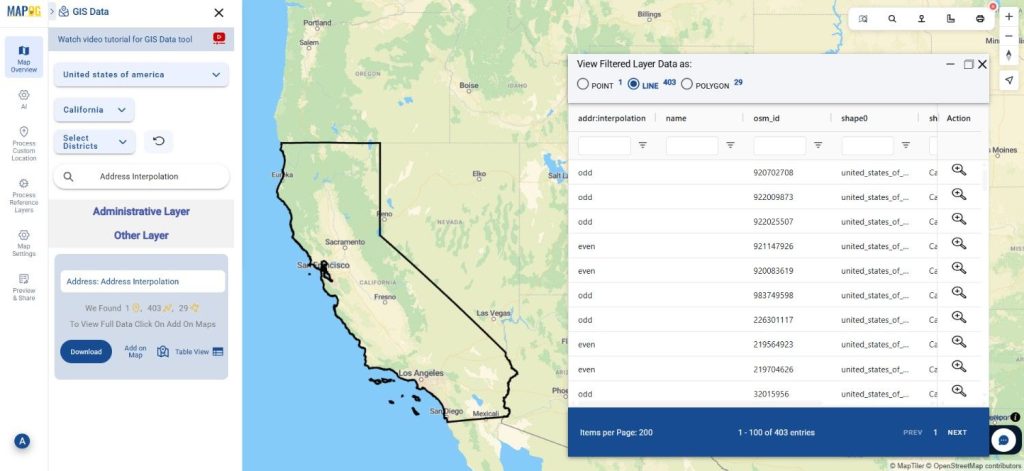
After the conversion is complete, review the output to ensure the data was accurately converted. Finally, download the KMZ file.

SHP to KMZ

Conclusion:

The MAPOG Converter Tool simplifies the process of converting data between different formats, making it an essential resource for GIS professionals. By following these simple steps, you can easily convert SHP files to KMZ format, ensuring your data is ready for use in web mapping applications and interactive visualizations.

Additional Tools for Further Analysis:

With MAPOG’s versatile toolkit, you can effortlessly upload vectors and upload Excel or CSV data, incorporate existing layers, perform polygon splitting, use the converter for various formats, calculate isochrones, and utilize the Export Tool.

Learn About MAPOG:

MAPOG is perfect for people who want to use visually striking and interactive maps to make their data come to life. It lets you build engaging narratives by connecting maps with visuals like text and images. Producing shareable content is made easy with MAPOG, whether you’re marketing a project, giving a tour or presenting research.

Here are some other blogs you might be interested in:

How to Download Wine Cellars Data in SHP, KML, and GeoJSON Formats
If you’re looking to Download Wine Cellars Data, MAPOG’s GIS Data platform provides an easy and efficient way to access accurate wine cellar locations in multiple GIS formats. Wine cellars, often used for storage, production, or aging of wine, play a crucial role in viticulture and tourism analysis. With MAPOG’s structured datasets and simple workflow, users can download Wine Cellars Data in Shapefile, KML, GeoJSON, MID, and 15+ other formats for seamless mapping and spatial analysis.
How to Download Wine Cellars Data
MAPOG provides a streamlined system to help users explore and export wine cellar datasets across hundreds of available layers. With support for formats like SHP, KML, MID, MIF, CSV, DXF, GeoJSON, SQL, TOPOJSON, and GPX, the platform is suitable for both beginners and GIS professionals seeking flexibility and reliability.

Download Wine Cellars Data of any countries
Note:
  • All datasets are provided using EPSG:4326 WGS84 CRS (Coordinate Reference System).
  • Users must be logged in to access and download their desired data formats.

Step-by-Step Guide to Download Wine Cellars Data
Step 1: Search for Wine Cellars Data

Begin by selecting the location of interest inside the MAPOG interface. Use the search layer feature to look for Wine Cellars Data.” Review the data attributes to check whether the layer contains point features or polygon boundaries.

Download Wine Cellars Data
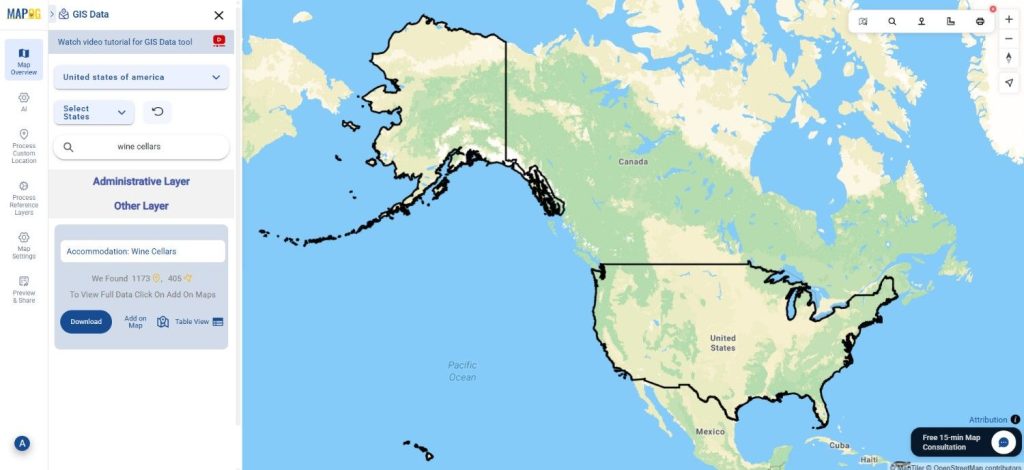
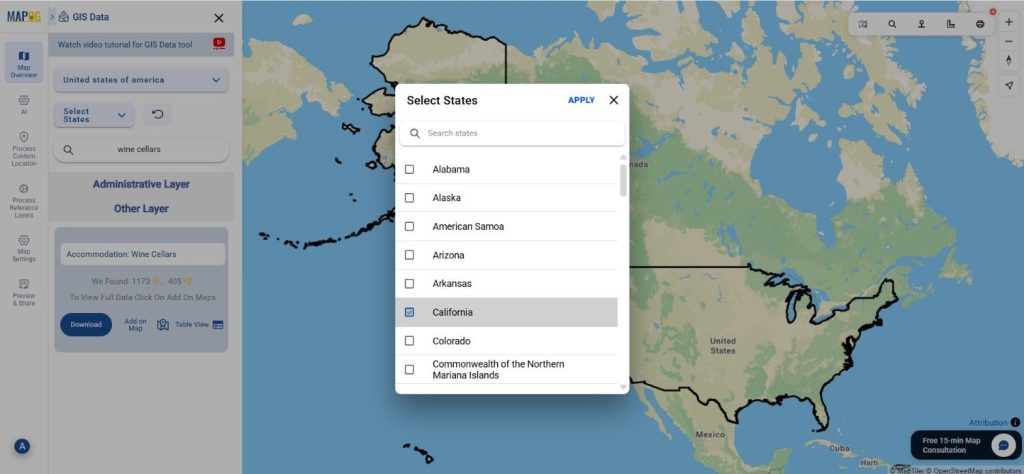
Step 3: Apply Data Filters

You can refine the results using the Filter Data option. Filter the dataset by state or district to narrow down the search, especially when working with large or detailed datasets. This ensures precise, relevant outputs for your project.

Download Wine Cellars Data
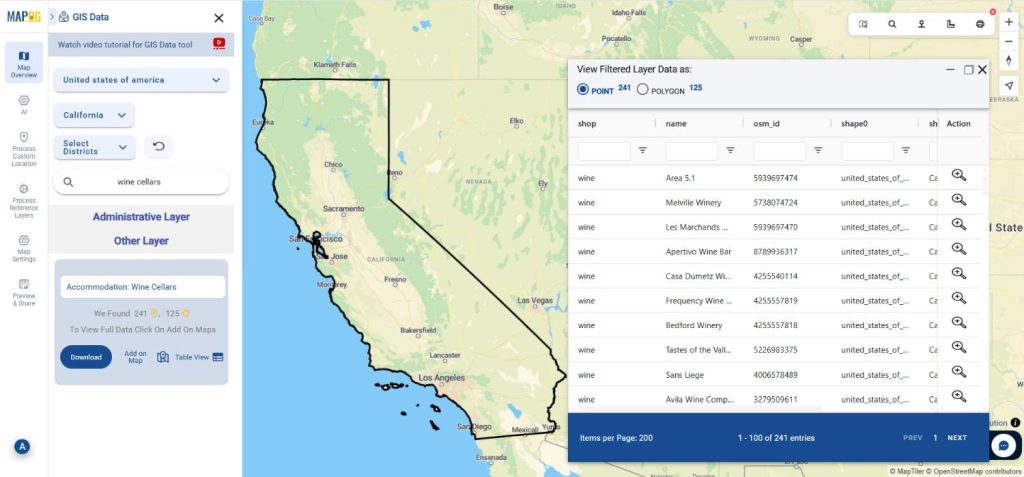
Step 4: Visualize with “Add on Map”

With the “Add on Map” feature, users can quickly load wine cellar layers onto the interactive map interface. This visualization step helps in analyzing distribution patterns, accessibility, clustering, and regional wine production insights.

Download Wine Cellars Data
Step 5: Download Wine Cellars Data

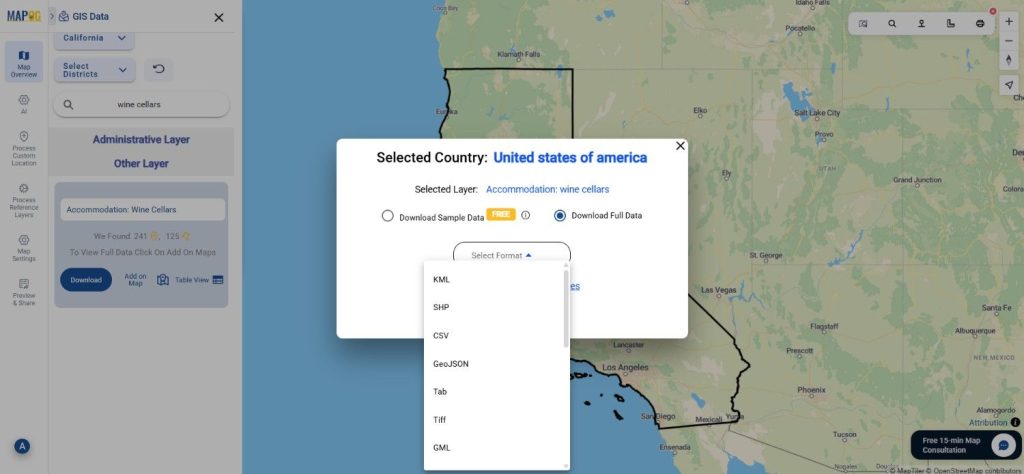
After reviewing the dataset on the map, click “Download Data.” Choose either a sample dataset or the complete file. Select your preferred format—Shapefile, KML, GeoJSON, MID, or any of the other available options—accept the terms, and complete the download.

Download Wine Cellars Data

Final Thoughts

With MAPOG, the process to Download Wine Cellars Data becomes smooth, flexible, and highly accessible. The platform empowers users from various domains—research, tourism planning, agriculture, logistics, or GIS analysis—to obtain the exact datasets they need in over 15+ GIS formats. Whether you’re creating maps, conducting spatial studies, or planning field activities, MAPOG offers a reliable way to unlock valuable insights through high-quality Wine Cellars datasets.

With MAPOG’s versatile toolkit, you can effortlessly upload vector and upload Excel or CSV data, incorporate existing layers, perform Split polygon by line, use the converter for various formats, calculate isochrones, and utilize the Export Tool.

For any questions or further assistance, feel free to reach out to us at support@mapog.com. We’re here to help you make the most of your GIS data.

Download Shapefile for the following:

  1. World Countries Shapefile
  2. Australia
  3. Argentina
  4. Austria
  5. Belgium
  6. Brazil
  7. Canada
  8. Denmark
  9. Fiji
  10. Finland
  11. Germany
  12. Greece
  13. India
  14. Indonesia
  15. Ireland
  16. Italy
  17. Japan
  18. Kenya
  19. Lebanon
  20. Madagascar
  21. Malaysia
  22. Mexico
  23. Mongolia
  24. Netherlands
  25. New Zealand
  26. Nigeria
  27. Papua New Guinea
  28. Philippines
  29. Poland
  30. Russia
  31. Singapore
  32. South Africa
  33. South Korea
  34. Spain
  35. Switzerland
  36. Tunisia
  37. United Kingdom Shapefile
  38. United States of America
  39. Vietnam
  40. Croatia
  41. Chile
  42. Norway
  43. Maldives
  44. Bhutan
  45. Colombia
  46. Libya
  47. Comoros
  48. Hungary
  49. Laos
  50. Estonia
  51. Iraq
  52. Portugal
  53. Azerbaijan
  54. Macedonia
  55. Romania
  56. Peru
  57. Marshall Islands
  58. Slovenia
  59. Nauru
  60. Guatemala
  61. El Salvador
  62. Afghanistan
  63. Cyprus
  64. Syria
  65. Slovakia
  66. Luxembourg
  67. Jordan
  68. Armenia
  69. Haiti And Dominican Republic
  70. Malta
  71. Djibouti
  72. East Timor
  73. Micronesia
  74. Morocco
  75. Liberia
  76. Kosovo
  77. Isle Of Man
  78. Paraguay
  79. Tokelau
  80. Palau
  81. Ile De Clipperton
  82. Mauritius
  83. Equatorial Guinea
  84. Tonga
  85. Myanmar
  86. Thailand
  87. New Caledonia
  88. Niger
  89. Nicaragua
  90. Pakistan
  91. Nepal
  92. Seychelles
  93. Democratic Republic of the Congo
  94. China
  95. Kenya
  96. Kyrgyzstan
  97. Bosnia Herzegovina
  98. Burkina Faso
  99. Canary Island
  100. Togo
  101. Israel And Palestine
  102. Algeria
  103. Suriname
  104. Angola
  105. Cape Verde
  106. Liechtenstein
  107. Taiwan
  108. Turkmenistan
  109. Tuvalu
  110. Ivory Coast
  111. Moldova
  112. Somalia
  113. Belize
  114. Swaziland
  115. Solomon Islands
  116. North Korea
  117. Sao Tome And Principe
  118. Guyana
  119. Serbia
  120. Senegal And Gambia
  121. Faroe Islands
  122. Guernsey Jersey
  123. Monaco
  124. Tajikistan
  125. Pitcairn

Disclaimer : The GIS data provided for download in this article was initially sourced from OpenStreetMap (OSM) and further modified to enhance its usability. Please note that the original data is licensed under the Open Database License (ODbL) by the OpenStreetMap contributors. While modifications have been made to improve the data, any use, redistribution, or modification of this data must comply with the ODbL license terms. For more information on the ODbL, please visit OpenStreetMap’s License Page.

Here are some blogs you might be interested in:

How to Easily Download Mountain Huts GIS Data for Tourism & Trail Mapping

Looking for detailed data on mountain shelters and hiking accommodations? You can now download Mountain Huts data effortlessly using GIS Data by MAPOG. This intuitive platform allows users to access accurate and well-structured mountain huts information across multiple GIS formats such as Shapefile, KML, GeoJSON, and MID. Whether you’re working on tourism planning, outdoor recreation mapping, or environmental studies, MAPOG provides reliable, ready-to-use datasets for smooth integration and analysis in various GIS tools.

How to Download Mountain Huts Data

MAPOG simplifies the entire process, offering a structured guide to obtaining mountain huts datasets from its vast global database. Supporting over 15+ GIS formats like SHP, KML, MID, MIF, CSV, GeoJSON, SQL, DXF, and GPX, the platform ensures compatibility with leading GIS software such as QGIS, ArcGIS, and AutoCAD.

Download Mountain Huts Data of any countries

Note:
  • All data is provided in GCS datum EPSG:4326 WGS84 CRS (Coordinate Reference System).
  • A valid user login is required to access and download the desired dataset.

Step-by-Step Guide to Download Mountain Huts Data

Step 1: Search for Mountain Huts Data

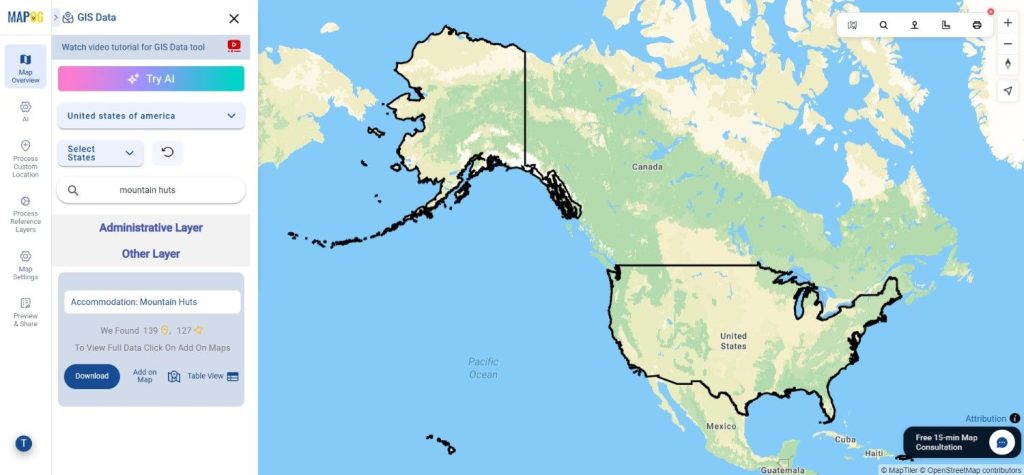
Begin by selecting the target area within the GIS Data by MAPOG interface. Use the search layer function to look for “Mountain Huts Data.” Review the dataset attributes to confirm whether it’s represented as point or polygon features.

Download Mountain Huts Data
Step 2: Use the AI Search Tool

MAPOG’s smart “Try AI” feature makes searching easier and faster. Simply type in phrases like “Mountain huts near trail routes” or “Mountain huts in region,” and the AI will instantly retrieve the most relevant datasets. This feature saves valuable time while improving accuracy.

Download Mountain Huts Data
Step 3: Apply Data Filters

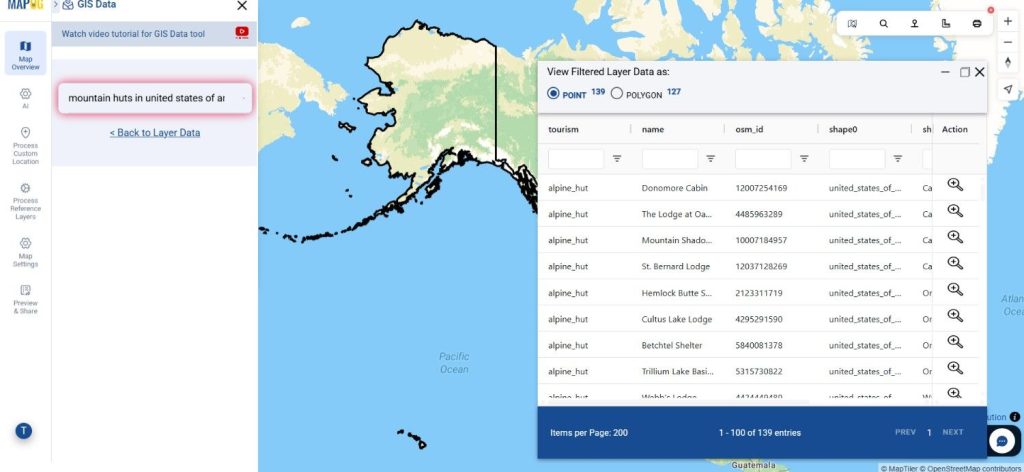
Refine your search with the Filter Data option. You can narrow results by selecting specific states or districts, allowing you to explore detailed datasets that match your exact geographic needs. This deeper filtering helps identify regional hut distributions and enhances mapping precision.

Download Mountain Huts Data
Step 4: Visualize with “Add on Map”

Use the Add on Map option to overlay the selected mountain huts layer on the interactive map interface. This step helps visualize hut locations, assess spatial coverage, and plan routes or emergency logistics effectively. It’s ideal for both analysis and presentation purposes.

Download Mountain Huts Data
Step 5: Download Mountain Huts Data

After confirming your selections, click “Download Data.” Choose between downloading a sample or full dataset. Select your preferred file format—Shapefile, KML, GeoJSON, MID, or any of the 15+ supported formats—accept the terms, and your download will begin instantly.

Download Mountain Huts Data

Final Thoughts

With GIS Data by MAPOG, the process to Download Mountain Huts Data is simple, efficient, and highly adaptable. The platform empowers users to explore, analyze, and integrate geographic datasets with ease. Whether you’re a GIS analyst, researcher, or outdoor project planner, MAPOG ensures that accurate mountain hut data is just a few clicks away—ready to enhance your mapping, analysis, and decision-making.

With MAPOG’s versatile toolkit, you can effortlessly upload vector and upload Excel or CSV data, incorporate existing layers, perform Split polygon by line, use the converter for various formats, calculate isochrones, and utilize the Export Tool.

For any questions or further assistance, feel free to reach out to us at support@mapog.com. We’re here to help you make the most of your GIS data.

Download Shapefile for the following:

  1. World Countries Shapefile
  2. Australia
  3. Argentina
  4. Austria
  5. Belgium
  6. Brazil
  7. Canada
  8. Denmark
  9. Fiji
  10. Finland
  11. Germany
  12. Greece
  13. India
  14. Indonesia
  15. Ireland
  16. Italy
  17. Japan
  18. Kenya
  19. Lebanon
  20. Madagascar
  21. Malaysia
  22. Mexico
  23. Mongolia
  24. Netherlands
  25. New Zealand
  26. Nigeria
  27. Papua New Guinea
  28. Philippines
  29. Poland
  30. Russia
  31. Singapore
  32. South Africa
  33. South Korea
  34. Spain
  35. Switzerland
  36. Tunisia
  37. United Kingdom Shapefile
  38. United States of America
  39. Vietnam
  40. Croatia
  41. Chile
  42. Norway
  43. Maldives
  44. Bhutan
  45. Colombia
  46. Libya
  47. Comoros
  48. Hungary
  49. Laos
  50. Estonia
  51. Iraq
  52. Portugal
  53. Azerbaijan
  54. Macedonia
  55. Romania
  56. Peru
  57. Marshall Islands
  58. Slovenia
  59. Nauru
  60. Guatemala
  61. El Salvador
  62. Afghanistan
  63. Cyprus
  64. Syria
  65. Slovakia
  66. Luxembourg
  67. Jordan
  68. Armenia
  69. Haiti And Dominican Republic
  70. Malta
  71. Djibouti
  72. East Timor
  73. Micronesia
  74. Morocco
  75. Liberia
  76. Kosovo
  77. Isle Of Man
  78. Paraguay
  79. Tokelau
  80. Palau
  81. Ile De Clipperton
  82. Mauritius
  83. Equatorial Guinea
  84. Tonga
  85. Myanmar
  86. Thailand
  87. New Caledonia
  88. Niger
  89. Nicaragua
  90. Pakistan
  91. Nepal
  92. Seychelles
  93. Democratic Republic of the Congo
  94. China
  95. Kenya
  96. Kyrgyzstan
  97. Bosnia Herzegovina
  98. Burkina Faso
  99. Canary Island
  100. Togo
  101. Israel And Palestine
  102. Algeria
  103. Suriname
  104. Angola
  105. Cape Verde
  106. Liechtenstein
  107. Taiwan
  108. Turkmenistan
  109. Tuvalu
  110. Ivory Coast
  111. Moldova
  112. Somalia
  113. Belize
  114. Swaziland
  115. Solomon Islands
  116. North Korea
  117. Sao Tome And Principe
  118. Guyana
  119. Serbia
  120. Senegal And Gambia
  121. Faroe Islands
  122. Guernsey Jersey
  123. Monaco
  124. Tajikistan
  125. Pitcairn

Disclaimer : The GIS data provided for download in this article was initially sourced from OpenStreetMap (OSM) and further modified to enhance its usability. Please note that the original data is licensed under the Open Database License (ODbL) by the OpenStreetMap contributors. While modifications have been made to improve the data, any use, redistribution, or modification of this data must comply with the ODbL license terms. For more information on the ODbL, please visit OpenStreetMap’s License Page.

Here are some blogs you might be interested in:
💬 Book a Meeting